
Shared Libraries in Jenkins: Reusing Pipeline Code
Move repeated pipeline code into a Jenkins shared library in Git, register it as a global pipeline library, load it with @Library, and call custom steps from vars/ in any pipeline.
One pipeline is easy to maintain. Now imagine a company with ten microservices, each in its own repository with its own Jenkinsfile. Almost every one of those pipelines has the same Maven build stage, the same Docker build and push, the same notification code. Copying that code into ten files causes real problems:
- a fix (say, a new Maven flag) has to be made in ten places,
- someone forgets one, and the pipelines quietly drift apart,
- every copy is another place for a typo.
Jenkins has a clean answer: a shared library, a collection of reusable Groovy scripts kept in its own Git repository, that any pipeline can call. You write the common code once and reuse it everywhere.
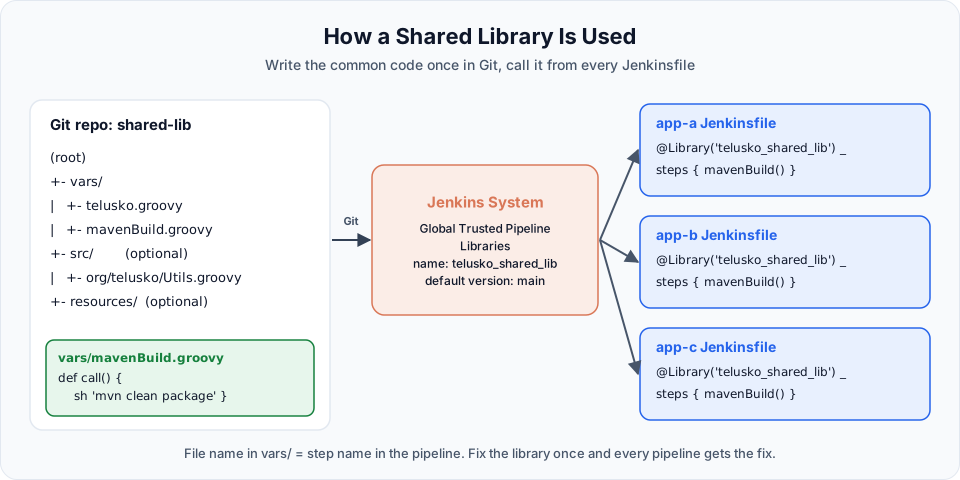
The library repository
A shared library is just a Git repository with a fixed folder layout:
(root)
+- vars/                       # global steps you can call from pipelines
|   +- telusko.groovy          # becomes the step telusko()
|   +- mavenBuild.groovy       # becomes the step mavenBuild()
+- src/                        # optional: Groovy classes (org/telusko/Utils.groovy)
+- resources/                  # optional: non-Groovy files, loaded with libraryResource
For most teams, vars/ is all they need. Each file in vars/ becomes a step with the same name as the file. The code that runs is the file's call method.
The demo repository is https://github.com/Haider7214/shared-lib (public), with two files:
def call()
{
    echo "Telusko DevOps learning --> learn.telusko.com"
}def call()
{
sh "mvn clean package"
}Use camelCase file names (mavenBuild.groovy, not maven-build.groovy), because the file name must be a valid Groovy identifier to be callable as a step.
Step 1: register the library in Jenkins
Go to Manage Jenkins > System and scroll to Global Trusted Pipeline Libraries. Click Add:
| Field | Value | Meaning |
|---|---|---|
| Name | telusko_shared_lib | The name pipelines use in @Library(...). Must match exactly |
| Default version | main | Branch, tag or commit to load when a pipeline does not ask for one |
| Load implicitly | Unticked | If ticked, every pipeline gets the library without @Library |
| Allow default version to be overridden | Ticked | Lets a pipeline ask for another version, such as @Library('telusko_shared_lib@v1.2') |
| Include @Library changes in job recent changes | Ticked | Commits to the library show up in the build's Changes |
| Retrieval method | Modern SCM, Source Code Management: Git | How Jenkins fetches the library |
| Project Repository | https://github.com/Haider7214/shared-lib.git | The library repository. Add credentials if it is private |
Click Save.
Trusted vs untrusted libraries
The page has two sections. Global Trusted Pipeline Libraries run outside the Groovy sandbox, with full access to Jenkins internals. That is powerful, so only admins should be able to change the library repository. Global Untrusted Pipeline Libraries run inside the sandbox like normal pipeline code. For a team library maintained by a small group of trusted people, trusted is the usual choice. Protect its main branch with pull request reviews, because any change runs on your Jenkins with full rights.
Step 2: call the library from a pipeline
Create a new Pipeline job named sample-shared-lib-demo with the description Demonstration of shared library. Start from the Hello World sample and replace it with:
@Library('telusko_shared_lib') _
pipeline {
    agent any

    stages {
        stage('Hello Telusko') {
            steps {
                telusko()
            }
        }
    }
}| Part | Meaning |
|---|---|
@Library('telusko_shared_lib') | Load the library registered under this name, at its default version |
_ | Groovy annotations must be attached to something. When you only use vars/ steps and have nothing to import, the underscore is that "something". Do not forget it |
telusko() | Calls vars/telusko.groovy, which runs its call() method |
The name must match exactly
The first build in the video failed with:
ERROR: Could not find any definition of libraries [teluso_shared_lib]
org.codehaus.groovy.control.MultipleCompilationErrorsException: startup failed:
WorkflowScript: Loading libraries failed
The name in @Library had a typo, and in the Jenkins configuration a hyphen had been used where the pipeline used an underscore. The library name is an exact, case-sensitive match. Copy it from Manage Jenkins > System rather than typing it.
After fixing the name, the build succeeds and the log shows:
Loading library telusko_shared_lib@main
...
[Pipeline] echo
Telusko DevOps learning --> learn.telusko.com
The pipeline itself contains no echo. The message came from the library.
Step 3: reuse real build logic
Now replace the hard-coded Maven command with the library step:
@Library('telusko_shared_lib') _
pipeline {
    agent any

    tools {
        maven "maven"
    }

    stages {
        stage('Hello Telusko') {
            steps {
                telusko()
            }
        }

        stage('git clone') {
            steps {
                git branch: 'main', url: 'https://github.com/Haider7214/springboot-mvnapp.git'
            }
        }

        stage('maven build') {
            steps {
                mavenBuild()
            }
        }
    }
}
In the video, the first run of this version failed in the maven build stage with mvn: not found, because the tools block was missing. The library only contains sh "mvn clean package". It still runs inside your pipeline, on your node, so Maven must be on the PATH there. With tools { maven "maven" } added, the build succeeds and produces the WAR as before.
Make library steps flexible with parameters
A step that always runs the same command is only the start. call can take arguments with defaults:
def call(String goals = 'clean package') {
    sh "mvn ${goals}"
}
Now mavenBuild() keeps working, and another pipeline can call mavenBuild('clean verify'). You can also pass a map for many options (mavenBuild(goals: 'clean package', skipTests: true)), or even define a whole standard pipeline inside a library step, so a service's Jenkinsfile becomes just a few lines.
Versioning the library
Because the library lives in Git, you can pin versions:
@Library('telusko_shared_lib@v1.0') _          // a tag
@Library('telusko_shared_lib@main') _          // a branch
@Library(['telusko_shared_lib', 'other-lib@abc1234']) _   // several libraries
Teams usually tag stable releases of the library and let production pipelines use a tag, while a test pipeline tries the newest main. That way, one bad commit to the library cannot break every pipeline at once.
Try It Yourself
- Register
https://github.com/Haider7214/shared-lib.gitastelusko_shared_lib, createsample-shared-lib-demo, and run it. - Change the name in
@Libraryby one letter and read the error. Fix it. - Fork the library, point Jenkins to your fork, and add
vars/sayHello.groovywithdef call(String name) { echo "Hello, ${name}" }. CallsayHello('Jenkins')from the pipeline. - Change
mavenBuild.groovyin your fork to accept agoalsparameter as shown above and call it with'clean verify'. - Create a tag
v1.0in your fork and load the library with@Library('telusko_shared_lib@v1.0') _.
Official references
Written By: Shramik Masti
How is this guide?
Last updated on
Jenkins Pipelines: Parallel Stages
Run independent pipeline stages at the same time with the parallel block, understand which stages can safely run together, use failFast, and visualise parallel branches in Jenkins.
Building Pipelines with Groovy: Scripted Pipeline
Write a scripted Jenkins pipeline with node and stage blocks, use Groovy variables and the tool step to locate Maven, and decide when scripted is worth it over declarative.