
Building Pipelines with Groovy: Scripted Pipeline
Write a scripted Jenkins pipeline with node and stage blocks, use Groovy variables and the tool step to locate Maven, and decide when scripted is worth it over declarative.
The declarative pipelines we have written so far are structured and easy to read, and most projects use them. But declarative syntax is deliberately limited. When you need real programming (variables that change during the run, loops over a list of services, complex conditions, try/catch with custom recovery), there is a second style: the scripted pipeline.
A scripted pipeline is a Jenkins pipeline written directly in Groovy, a programming language that runs on the JVM. It still has stages for each phase of build and deployment, but around them you can use variables, loops, conditions and functions freely.
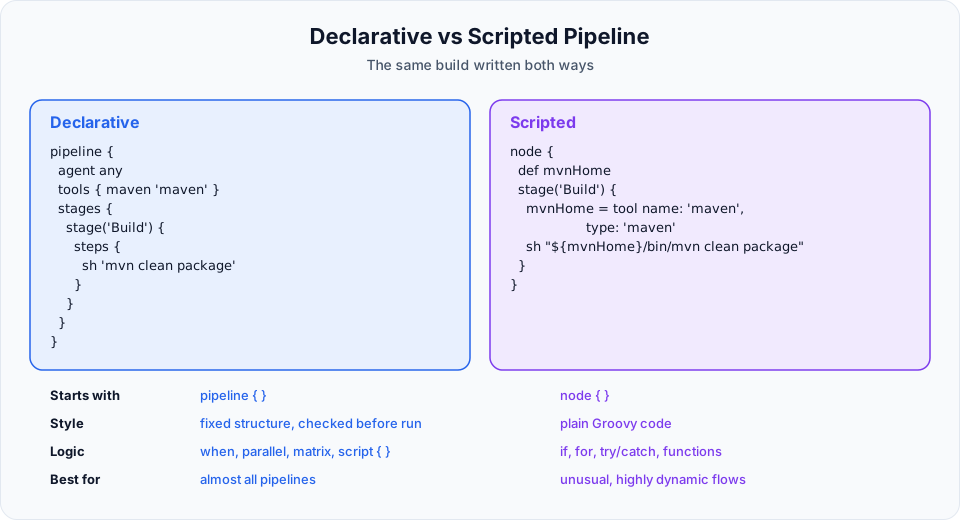
| Declarative | Scripted | |
|---|---|---|
| Syntax | Simple, fixed sections | Groovy code |
| Learning curve | Easy | Steeper, you need some Groovy |
| Structure | Enforced: pipeline > stages > stage > steps | Free-form: node { stage { ... } } |
| Validation | Jenkins checks the structure before running | Mistakes show up at runtime |
| Best for | Most projects | Complex, dynamic workflows |
Create the job
Click + New Item, name it cicd-scripted, choose Pipeline, and add the description Scripted pipeline demonstration. In the try sample Pipeline... drop-down you can pick Scripted Pipeline to see Jenkins' own example.
A first scripted pipeline
node {
    stage('Preparation') {
        echo 'preparing git clone'
    }
    stage('Build') {
        echo 'building project'
    }
}
Compare it with declarative:
| Declarative | Scripted | What it does |
|---|---|---|
pipeline { agent any ... } | node { ... } | Get an executor on some node and allocate a workspace there |
stages { stage('X') { steps { ... } } } | stage('X') { ... } | A named phase. No stages or steps wrappers |
node is the important one. It tells Jenkins "find me an executor, create a workspace, and run everything inside here". Code outside a node block runs on the controller without a workspace, so file and shell steps must be inside it. node('slave-node') { ... } would request our labelled agent, just like agent { label 'slave-node' } in declarative.
Save, Build Now, and the log prints both messages with the usual [Pipeline] stage markers.
A real build with Groovy variables
Now the version from the video, which clones the project and builds it with Maven, using variables to locate the Maven installation:
node {
    def mvnHome
    def mvnPath

    stage('Preparation - git clone') {
        git branch: 'main',
            url: 'https://github.com/Haider7214/springboot-mvnapp.git'
    }

    stage('Build') {
        mvnHome = tool name: 'maven', type: 'maven'
        mvnPath = "${mvnHome}/bin/mvn"
        sh "${mvnPath} clean package"
        echo 'building project'
    }
}
Line by line:
| Code | Meaning |
|---|---|
def mvnHome | Declares a Groovy variable. def means "a variable of any type" |
tool name: 'maven', type: 'maven' | Installs the Jenkins tool called maven on this node if needed and returns its installation folder, for example /var/lib/jenkins/tools/hudson.tasks.Maven_MavenInstallation/maven |
"${mvnHome}/bin/mvn" | Builds the full path to the mvn executable with string interpolation |
sh "${mvnPath} clean package" | Runs Maven by its full path |
The tool step is what scripted pipelines use instead of the declarative tools { } block. Unlike tools, it does not change the PATH. It only gives you the folder, which is why we build the full path.
You can generate the exact tool line in Pipeline Syntax > Snippet Generator by choosing the tool step. The type: 'maven' value is the short symbol for a Maven installation.
Double quotes for interpolation
Groovy only replaces ${...} inside double-quoted strings. sh '${mvnPath} clean package' (single quotes) passes the text literally to the shell, which then fails. The video's first draft also had a stray = and stray spaces that broke the line until they were removed: Groovy is less forgiving than the declarative editor, so read error messages carefully.
Declare the variables with def at the top of node, as above. In the video, mvnHome is assigned without def. That still works, but it creates a global "binding" variable shared across the whole script, which can cause surprising behaviour in bigger pipelines.
Run it. In the demo, it ran on the SSH agent from the previous section, and the console showed the workspace under /home/ubuntu/slavenode/workspace/cicd-scripted and the WAR file in its target folder.
Where scripted really helps
The demo shows the syntax. Here is the kind of logic that justifies using Groovy:
node {
    def services = ['orders', 'payments', 'users']
    def mvnHome = tool 'maven'

    stage('Checkout') {
        git branch: 'main', url: 'https://github.com/<your-org>/<monorepo>.git'
    }

    for (svc in services) {
        stage("Build ${svc}") {
            dir(svc) {
                sh "${mvnHome}/bin/mvn -B clean package"
            }
        }
    }

    stage('Deploy') {
        if (env.BRANCH_NAME == 'main') {
            echo 'Deploying to production'
        } else {
            echo "Branch ${env.BRANCH_NAME}: skipping deploy"
        }
    }
}
A loop creates one stage per service, and the deploy stage decides at runtime what to do. Declarative pipelines can do some of this too, either with the when directive or by putting Groovy inside a script { } block within steps. A common modern approach is: declarative for the overall structure, script { } for the few places that need logic, and shared libraries for anything reusable.
Things that behave differently in scripted pipelines
| Topic | Declarative | Scripted |
|---|---|---|
| Post actions | post { success { } failure { } } | try { ... } catch (e) { ...; throw e } finally { ... } |
| Tools | tools { maven 'maven' } | def mvnHome = tool 'maven' |
| Parameters | parameters { } directive | properties([parameters([...])]) step |
| Restart from stage | Supported | Not supported |
Try It Yourself
- Create
cicd-scriptedwith the two echo stages and run it. - Replace it with the Maven version and find the WAR in the workspace of the node it ran on.
- Add
echo "Maven is installed at ${mvnHome}"and check the printed path. - Change the double quotes in the
shline to single quotes, run it, and read the error. Change them back. - Write a scripted pipeline that loops over
['dev', 'test', 'prod']and creates one stage per environment that printsDeploying to <env>.
Official references
- Jenkins: Pipeline overview (declarative vs scripted)
- Jenkins Pipeline Syntax: Scripted Pipeline
- Jenkins: Pipeline Steps Reference
Written By: Shramik Masti
How is this guide?
Last updated on
Shared Libraries in Jenkins: Reusing Pipeline Code
Move repeated pipeline code into a Jenkins shared library in Git, register it as a global pipeline library, load it with @Library, and call custom steps from vars/ in any pipeline.
Configuring Email Notifications in Jenkins
Configure the Email Extension plugin with Gmail SMTP and an app password stored as a Jenkins credential, then send success and failure emails from a pipeline post block.