
Jenkins Pipelines: Parallel Stages
Run independent pipeline stages at the same time with the parallel block, understand which stages can safely run together, use failFast, and visualise parallel branches in Jenkins.
By default, every stage in a pipeline runs one after another. That is correct for most of them, because they depend on each other:
- you cannot build the project before you have cloned it,
- you should not build a Docker image if the Maven build failed,
- you cannot deploy an image that was never built.
But some stages do not depend on each other at all. Once the Maven build has produced the WAR file, two things can happen with it: a code review (static analysis, for example with SonarQube) and an upload to Nexus (storing the artifact). Neither needs the other's result. Running them one after the other just wastes time.
That is what parallel stages are for: independent stages that run at the same time.
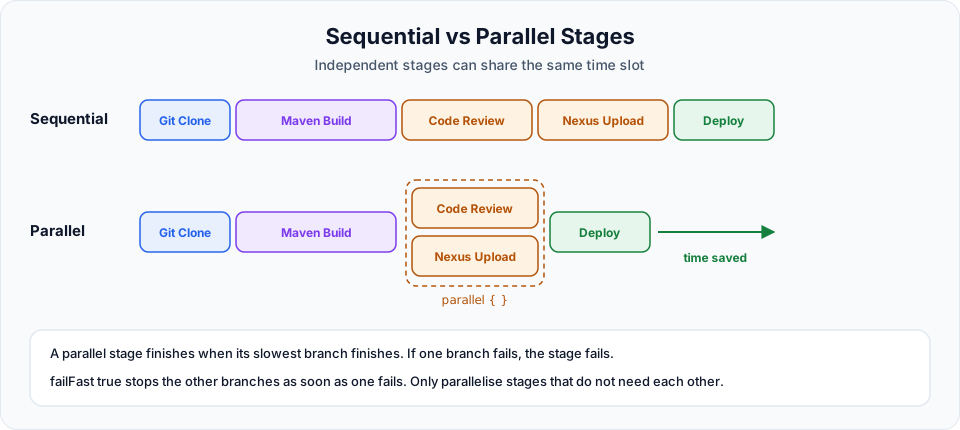
The flow we want
Git Clone -> Maven Build -> [ Code Review | Nexus Upload ] -> Deploy
                              (run at the same time)
Syntax
In a declarative pipeline, parallel goes inside a normal stage, in place of steps. Inside parallel you put the stages that should run together:
stage('Parallel Stage') {
    parallel {
        stage('Branch A') {
            steps { echo 'On branch A' }
        }
        stage('Branch B') {
            steps { echo 'On branch B' }
        }
    }
}
A stage can have steps, or parallel, or nested stages, but only one of them.
The demo pipeline
We extend First-pipeline from the previous lesson. The code review and Nexus upload only print messages here, because the real tools are outside this course, but the structure is exactly what you would use with real SonarQube and Nexus steps.
pipeline {
    agent any

    tools {
        maven "maven"
    }

    stages {

        stage('Git Clone') {
            steps {
                git branch: 'main', url: 'https://github.com/Haider7214/springboot-mvnapp.git'
            }
        }

        stage('Building Project Using Maven') {
            steps {
                sh 'mvn clean package'
            }
        }

        stage('Parallel Stage') {
            parallel {

                stage('Code Review') {
                    steps {
                        echo 'Running Code Review'
                    }
                }

                stage('Nexus Upload') {
                    steps {
                        echo 'Uploading Artifact to Nexus'
                    }
                }
            }
        }

        stage('Deploying') {
            steps {
                echo 'Application Deployed Successfully'
            }
        }
    }
}
Read the closing braces from the inside out: steps, stage('Nexus Upload'), parallel, stage('Parallel Stage'). In the video, the first save failed twice because of one brace too many and then one too few. If Jenkins reports something like Expected a stage or Not a valid stage section definition, count the braces of the block it names. The editor's fold arrows on the left show where each block ends.
Save and click Build Now.
See the parallel branches
The console output interleaves both branches, each line prefixed with its branch name:
[Pipeline] parallel
[Pipeline] { (Branch: Code Review)
[Pipeline] { (Branch: Nexus Upload)
[Pipeline] stage
[Pipeline] { (Code Review)
[Pipeline] stage
[Pipeline] { (Nexus Upload)
[Pipeline] echo
Running Code Review
[Pipeline] echo
Uploading Artifact to Nexus
A graph shows it more clearly:
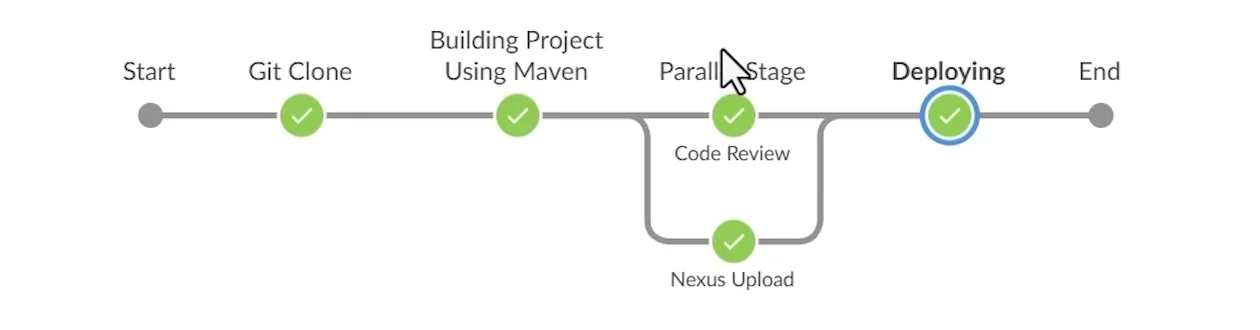
Code Review and Nexus Upload appear as two branches of the same stage (this is the Blue Ocean view used in the video).
Blue Ocean is deprecated
In the video, this graph comes from the Blue Ocean plugin, installed from Manage Jenkins > Plugins, along with Pipeline: Stage View. The Jenkins project deprecated Blue Ocean in July 2026, and it no longer gets security fixes, so do not install it on new servers. Use Pipeline Graph View instead (already part of the suggested plugins). It shows parallel branches the same way under the Stages link of a build. Pipeline: Stage View is still maintained if you like its table layout.
How failures behave
- The parallel stage succeeds only if all branches succeed.
- By default, when one branch fails, the other branches keep running until they finish, and then the stage is marked as failed.
- Add
failFast trueto stop the other branches as soon as one fails:
stage('Parallel Stage') {
    failFast true
    parallel {
        ...
    }
}
To apply that to every parallel block in the pipeline, use options { parallelsAlwaysFailFast() } at the top level.
What makes stages safe to run in parallel
| Safe in parallel | Not safe in parallel |
|---|---|
| Unit tests and static code analysis on the same build | Build and test (test needs the build) |
| Uploading the artifact and scanning it | Build image and push image |
| Tests on different OSes or Java versions (each on its own agent) | Two stages writing the same file in the same workspace |
| Deploying to two independent test environments | Deploy and the smoke test of that deployment |
All branches of a parallel block share the same workspace unless you give them their own agent. If two branches write to the same files, the result is unpredictable. Real speedups also need executors: two branches on one node with one free executor still run one at a time.
Try It Yourself
- Add the parallel stage to your pipeline and run it. Find the
Branch:lines in the console output. - Add
sleep 10to both branches (steps { sleep 10; echo '...' }) and check in the stage view that the parallel stage takes about 10 seconds, not 20. - Make the Nexus branch fail with
error 'Nexus not reachable'. Run with and withoutfailFast trueand compare what happens to Code Review. - Add a third parallel branch called
Security Scan. - If your agent is online, give one branch
agent { label 'slave-node' }and check where each branch ran.
Official references
- Jenkins Pipeline Syntax: parallel
- Pipeline Graph View plugin
- Jenkins: Blue Ocean (deprecation notice)
Written By: Shramik Masti
How is this guide?
Last updated on
Building a Java Application Using Jenkins Pipeline
Turn the echo-only pipeline into a real one that clones the Spring Boot project from GitHub and builds it with Maven, using the Snippet Generator to write each step.
Shared Libraries in Jenkins: Reusing Pipeline Code
Move repeated pipeline code into a Jenkins shared library in Git, register it as a global pipeline library, load it with @Library, and call custom steps from vars/ in any pipeline.