
JavaControl flow
Nested If
1. Introduction
In Java, nested if statements allow you to place one if (or else) statement inside another.
They help in writing multi-level decision-making logic where one condition depends on another.
Nested if is useful when:
- Multiple conditions must be checked in sequence
- One condition should be evaluated only if another is true
- You need structured, hierarchical decision logic
- Handling real-world workflows (authentication → role validation → permissions, etc.)
2. What Is a Nested If?
A nested if means one if statement inside another:
if (condition1) {
    if (condition2) {
        // executes when both conditions are true
    }
}
Flow:
- Check
condition1 - If
true→ checkcondition2 - If both are
true→ inner block executes
3. Basic Example
int age = 20;
boolean hasId = true;

if (age >= 18) {
    if (hasId) {
        System.out.println("Entry Allowed");
    }
}
Output:
Entry AllowedExplanation:
- First condition:
age >= 18→ true - Second condition:
hasId→ true - Both true → message prints
4. Nested If…Else Example
int marks = 85;

if (marks >= 40) {
    if (marks >= 75) {
        System.out.println("Distinction");
    } else {
        System.out.println("Pass");
    }
} else {
    System.out.println("Fail");
}
Output:
DistinctionWhy?
- Marks >= 40 → true
- Marks >= 75 → true → Distinction
5. Multi-Level Nested If Example
You can nest multiple levels, though it affects readability.
int year = 2024;
boolean hasPassport = true;
boolean hasVisa = true;

if (hasPassport) {
    if (hasVisa) {
        if (year >= 2023) {
            System.out.println("Travel Approved");
        }
    }
}
Output:
Travel Approved6. Nested If with Range Checks
int score = 92;

if (score >= 0 && score <= 100) {
    if (score >= 90) {
        System.out.println("Grade A");
    } else if (score >= 75) {
        System.out.println("Grade B");
    } else if (score >= 60) {
        System.out.println("Grade C");
    } else {
        System.out.println("Grade D");
    }
} else {
    System.out.println("Invalid Score");
}
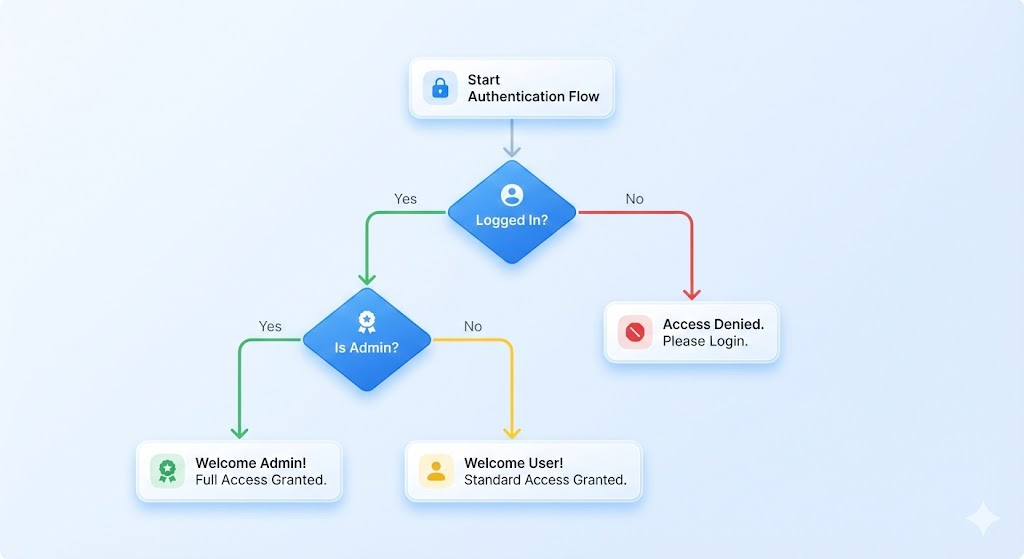
7. Real-World Example: Login + Role
Common scenario: first verify login, then check role.
boolean loggedIn = true;
String role = "admin";

if (loggedIn) {
    if (role.equals("admin")) {
        System.out.println("Welcome Admin");
    } else {
        System.out.println("Welcome User");
    }
} else {
    System.out.println("Please log in first");
}
8. When to Use Nested If
Use nested if when:
- You need to verify conditions in order
- One condition depends on another
- Logic becomes incorrect if conditions are flattened
- You want structured validation (e.g., form validation)
Example:
- Check if form submitted
- Check if fields are valid
- Check if user exists
- Check if payment is approved
9. When Not to Use Nested If
Avoid nested if when:
- Logic becomes too deep and confusing
- Multiple independent conditions exist → use
else ifchain - Switch-case is more readable
- You can simplify with logical operators (
&&,||)
Bad example (too deep):
if (a) {
    if (b) {
        if (c) {
            if (d) {
                // complex logic
            }
        }
    }
}
Better rewritten using &&:
if (a && b && c && d) {
    // logic
}
10. Summary
- Nested
ifmeans placing oneifinside another. - Used for multi-level decision-making.
- Inner condition executes only when outer condition is true.
- Useful for structured workflows like login, validation, grading, etc.
- Avoid overly deep nested structures-rewrite using
&&,||, orswitchwhen possible.
Written By: Shiva Srivastava
How is this guide?
Last updated on