
Break and Continue
1. Introduction
break and continue are jump statements in Java used to change the normal flow of loops and switch statements.
- break → immediately terminates the loop (or switch)
- continue → skips the current iteration and moves to the next one
They are powerful tools for controlling program flow, especially in complex loops, searching algorithms, and conditional iterations.
2. The break Statement
Purpose:
- Stops the loop immediately
- Control jumps to the first statement after the loop
Syntax:
break;Example 1: Stop Loop When Condition Met
for (int i = 1; i <= 10; i++) {
    if (i == 5) {
        break;
    }
    System.out.println(i);
}
Output:
1
2
3
4
Explanation: Loop stops when i becomes 5.
Example 2: break in a while Loop
int i = 1;
while (i <= 10) {
    if (i == 7) break;
    System.out.println(i);
    i++;
}
Example 3: break in switch
switch (day) {
    case 1: System.out.println("Monday"); break;
    case 2: System.out.println("Tuesday"); break;
    default: System.out.println("Invalid");
}
Without break, execution would fall through to the next case.
3. The continue Statement
Purpose:
- Skips the remaining code in the loop body
- Moves to the next iteration immediately
Syntax:
continue;Example 1: Skip Even Numbers
for (int i = 1; i <= 6; i++) {
    if (i % 2 == 0) continue;
    System.out.println(i);
}
Output:
1
3
5
Explanation: When i is even, continue skips printing.
Example 2: continue in while
int i = 0;

while (i < 5) {
    i++;
    if (i == 3) continue;
    System.out.println(i);
}
4. Difference Between Break and Continue
| Feature | break | continue |
|---|---|---|
| Effect | Exits the loop | Skips current iteration |
| Flow jumps | Outside loop | To next iteration |
| Use cases | Searching, early exit | Skipping unwanted cases |
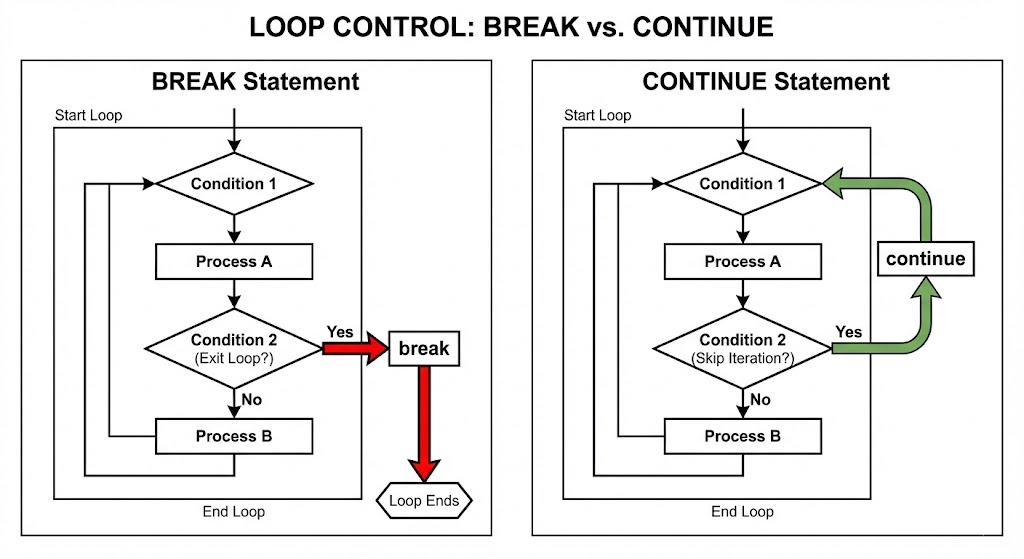
Image prompt
A diagram showing two loops side-by-side:
One loop showing break jumping out of the entire loop,
Another showing continue skipping one iteration and looping back to the next.
5. Labeled Break and Continue (Advanced)
Useful for nested loops.
A label allows break or continue to target a specific loop.
5.1 Labeled Break
outer:
for (int i = 1; i <= 3; i++) {
    for (int j = 1; j <= 3; j++) {
        if (j == 2) break outer;
        System.out.println(i + " " + j);
    }
}
Stops both loops when j == 2.
5.2 Labeled Continue
outer:
for (int i = 1; i <= 3; i++) {
    for (int j = 1; j <= 3; j++) {
        if (j == 2) continue outer;
        System.out.println(i + " " + j);
    }
}
Skips inner loop and continues the next iteration of outer loop.
6. Real-World Use Cases
✔ Searching Algorithms
for (int n : arr) {
    if (n == target) {
        found = true;
        break;
    }
}
✔ Skipping Invalid Input
for (String s : data) {
    if (s.isEmpty()) continue;
    process(s);
}
✔ Exiting Loops Based on Conditions
while (true) {
    if (exitRequested()) break;
}
7. Common Mistakes
- Using
continuewhenbreakis needed (or vice versa) - Forgetting that
continueinwhilemay cause infinite loops if increment is skipped - Overusing labeled break/continue (reduces readability)
- Confusing
breakin switch vs loop
8. Summary
breakends the loop immediately.continueskips the rest of the loop body and moves to the next iteration.- Both help control flow efficiently in complex conditions.
- Labeled versions allow control in nested loops.
- Use them carefully for clarity and maintainability.
Written By: Shiva Srivastava
How is this guide?
Last updated on