
Enhanced For Loop
1. Introduction
The enhanced for loop (also called the for-each loop) is a simpler way to iterate over:
- Arrays
- Collections (like
List,Set, etc.)
It was introduced in Java 5 to make iteration more readable and less error-prone compared to the traditional for loop with an index.
Use the enhanced for loop when:
- You want to visit every element in a collection or array
- You do not need the index position
- You are not modifying the structure (size) of the collection while iterating
2. Syntax
General syntax:
for (ElementType variable : collectionOrArray) {
    // use variable
}
Meaning:
ElementType→ type of each element in the array/collectionvariable→ temporary variable that holds each elementcollectionOrArray→ the array or collection being iterated
Example:
int[] numbers = {10, 20, 30};

for (int n : numbers) {
    System.out.println(n);
}
Output:
10
20
30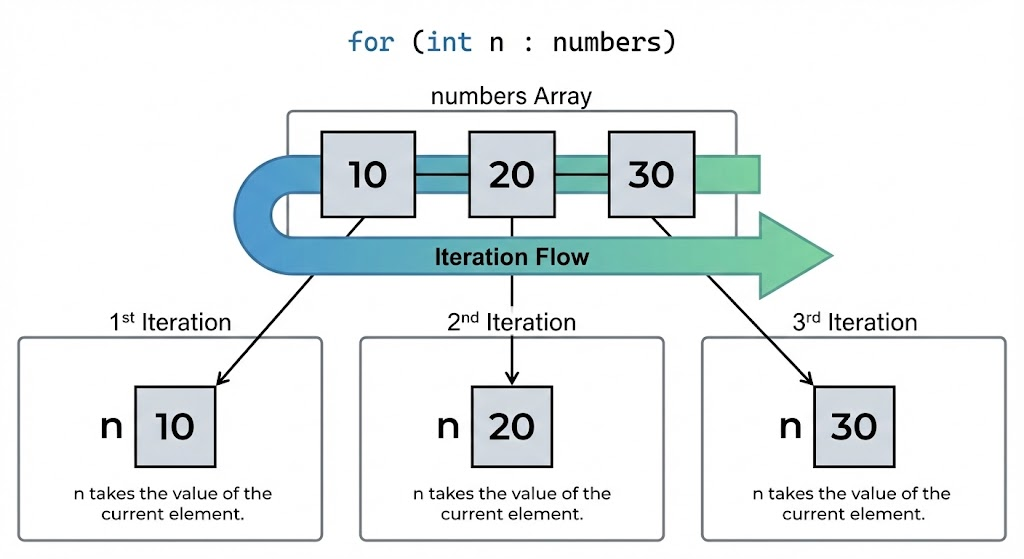
3. Enhanced For with Arrays
Example 1: Integer Array
int[] marks = {85, 90, 76, 88};

for (int mark : marks) {
    System.out.println("Mark: " + mark);
}
Example 2: String Array
String[] names = {"Amit", "Sara", "John"};

for (String name : names) {
    System.out.println("Hello, " + name);
}
You do not manage indexes or length manually. The loop automatically goes from the first to the last element.
4. Enhanced For with Collections
Works with any class that implements Iterable, like List, Set, etc.
Example: List
import java.util.*;

public class Main {
    public static void main(String[] args) {
        List<String> cities = new ArrayList<>();
        cities.add("Mumbai");
        cities.add("Pune");
        cities.add("Delhi");

        for (String city : cities) {
            System.out.println(city);
        }
    }
}
Example: Set
Set<Integer> numbers = Set.of(1, 2, 3, 4);

for (int num : numbers) {
    System.out.println(num);
}
Note: Set does not guarantee order.
5. Comparison: Normal For vs Enhanced For
Normal For Loop
int[] arr = {10, 20, 30};

for (int i = 0; i < arr.length; i++) {
    System.out.println(arr[i]);
}
Enhanced For Loop
for (int value : arr) {
    System.out.println(value);
}
When to prefer enhanced for:
- You do not need the index
i - You just want to read each element
When to prefer normal for:
- You need the index (e.g.,
ifor position) - You want to iterate in reverse order
- You need to skip or jump using
i += 2etc. - You need to modify the array at specific indices
Image prompt
A side-by-side visual showing a traditional for (int i = 0; i < n; i++) loop on the left and for (int x : array) on the right, with labels “index-based” vs “for-each” and arrows pointing to how each accesses array elements.
6. Modifying Elements Inside Enhanced For
For arrays, modifying the loop variable does not change the original array:
int[] numbers = {1, 2, 3};

for (int n : numbers) {
    n = n * 2;      // modifies only local copy
}

System.out.println(numbers[0]); // still 1
To modify the array, use index-based loop:
for (int i = 0; i < numbers.length; i++) {
    numbers[i] = numbers[i] * 2;
}
For collections, you can modify the object itself (if it is mutable), but you must be careful not to change the collection structure (add/remove elements) while iterating with enhanced for.
7. Limitations of Enhanced For Loop
-
No access to index directly
- If you need to know “position”, use a normal
forloop.
- If you need to know “position”, use a normal
-
Cannot easily iterate in reverse
- For reverse iteration, use index-based loop or list iterator.
-
Cannot safely add or remove elements from a collection inside the loop
- Doing so may cause
ConcurrentModificationException.
- Doing so may cause
Bad example:
for (String city : cities) {
    if (city.equals("Pune")) {
        cities.remove(city); // may cause exception
    }
}
Use Iterator instead in such scenarios.
8. When to Use Enhanced For Loop
Good use cases:
- Reading values from arrays or collections
- Printing elements
- Calculating sums, averages, etc.
- Simple traversal with no index logic
Example: Sum of array elements
int[] nums = {1, 2, 3, 4, 5};
int sum = 0;

for (int n : nums) {
    sum += n;
}

System.out.println("Sum = " + sum);
9. Summary
- Enhanced for loop provides a clean, readable way to iterate over arrays and collections.
- Syntax:
for (Type var : collectionOrArray) { } - Best when you only need to read each element.
- Not suitable when you need indices, reverse traversal, or structural modification.
- It helps reduce boilerplate code and potential off-by-one errors.
Written By: Shiva Srivastava
How is this guide?
Last updated on