
Labels in java
1. Introduction
In Java, labels are identifiers placed before statements.
They are most commonly used with break and continue inside nested loops to control loop flow more precisely.
A label allows you to:
- Break out of multiple nested loops at once
- Continue an outer loop from inside an inner loop
- Improve readability in certain complex loop scenarios
Labels are not used for goto (Java does not support goto).
They only work with loops (for, while, do-while) and blocks.
2. Syntax of Labels
A label is simply a name followed by a colon:
labelName:
    statement;
Most commonly:
outerLoop:
for (...) {

    innerLoop:
    for (...) {

    }

}
Labels do not change program logic by themselves;
they only serve as a target for break and continue.
Image prompt
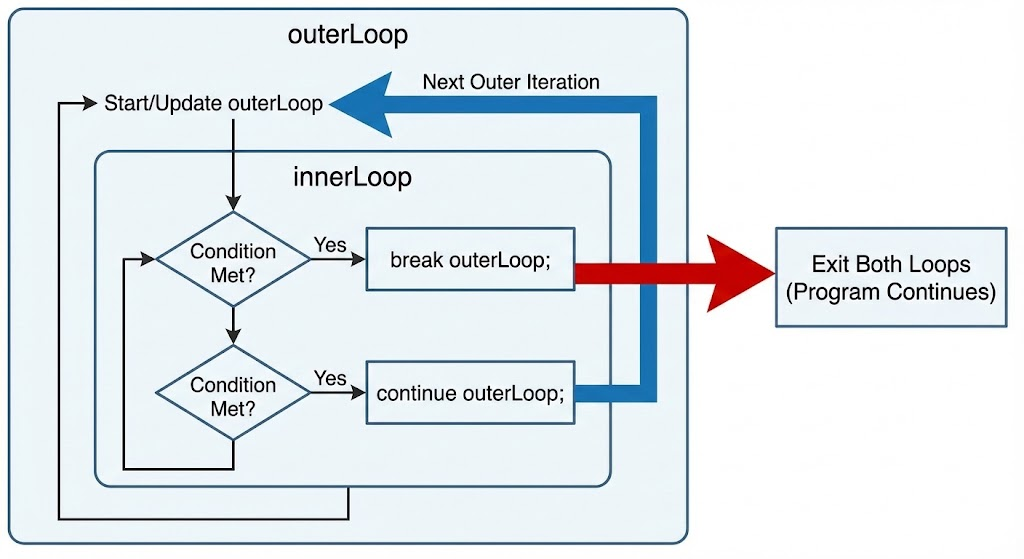
A diagram showing two nested loops labeled “outerLoop” and “innerLoop,” with arrows demonstrating how break outerLoop exits both loops, and continue outerLoop skips to the next outer iteration.
3. Labeled Break
A labeled break lets you exit more than one loop at the same time.
Example: Breaking Out of Nested Loops
outer:
for (int i = 1; i <= 3; i++) {
    for (int j = 1; j <= 3; j++) {
        if (i == 2 && j == 2) {
            break outer; // exits BOTH loops
        }
        System.out.println(i + " " + j);
    }
}
Output:
1 1
1 2
1 3
2 1
Once i == 2 and j == 2, the program jumps out of the outer loop completely.
4. Labeled Continue
A labeled continue skips the remaining loop body and continues the next iteration of the labeled loop.
Example: Continue Outer Loop
outer:
for (int i = 1; i <= 3; i++) {
    for (int j = 1; j <= 3; j++) {
        if (j == 2) {
            continue outer;  // skips to next iteration of outer loop
        }
        System.out.println("i=" + i + ", j=" + j);
    }
}
Output:
i=1, j=1
i=2, j=1
i=3, j=1
Explanation:
- When
j == 2, instead of continuing inner loop, it jumps to nexti(outer loop).
5. Labels with Blocks (Less Common)
Labels can also be used with non-loop blocks, though rarely needed.
block1: {
    System.out.println("Inside block 1");
    break block1;
    // code below is skipped
}
This is legal but not recommended because it behaves like a restricted goto.
6. Real-World Use Cases
✔ Searching in a 2D Array
search:
for (int i = 0; i < matrix.length; i++) {
    for (int j = 0; j < matrix[i].length; j++) {
        if (matrix[i][j] == target) {
            found = true;
            break search;
        }
    }
}
✔ Skipping expensive computations
outer:
for (Task task : tasks) {
    for (User user : users) {
        if (!user.isActive()) continue outer;
        task.process(user);
    }
}
7. Things Labels Cannot Do
-
Labels CANNOT jump forward or backward arbitrarily like
goto. -
Labels CANNOT be used inside expressions.
-
Labels ONLY work with:
breakcontinue
-
Labels DO NOT change execution order by themselves.
8. Best Practices
Use labels only when necessary
Unlabeled loops are clearer and easier to maintain.
Prefer refactoring complex nested loops
Break logic into methods instead of deep nesting.
Use meaningful label names
Bad:
x:
for (...) {}
Good:
searchLoop:
for (...) {}
Avoid overusing labels
They can make control flow harder to follow.
9. Summary
- Labels are identifiers used to control flow in nested loops.
- They work only with
breakandcontinue. break labelexits multiple loops.continue labeljumps to the next iteration of the labeled loop.- Useful in nested loop scenarios like matrix searches.
- Should be used sparingly to maintain readability.
Written By: Shiva Srivastava
How is this guide?
Last updated on