
Github Marketplace and Reusable Workflows
GitHub Actions does not require you to build every automation step from scratch. You can reuse existing actions, create your own reusable components, and even share complete workflows across repositories.
This makes GitHub Actions easier to maintain and helps teams follow consistent CI/CD practices.
GitHub Actions Marketplace
The GitHub Actions Marketplace is a central place to discover reusable actions created by GitHub, organizations, and the community.
Instead of implementing common tasks yourself, you can find an existing action and add it to your workflow.
For example:
steps:
  - name: Checkout repository
    uses: actions/checkout@v4

  - name: Setup Node.js
    uses: actions/setup-node@v4
    with:
      node-version: '20'
Here, checkout and setup-node are reusable actions.

Before creating an action yourself, check whether a reliable action already exists.
Choosing an Action Version
You will commonly see actions referenced in three ways.
Major Version
uses: actions/checkout@v4This is convenient and generally provides a balance between stability and receiving compatible updates.
Commit SHA
uses: actions/checkout@8ade135a41bc03ea155e62e844d188df1ea18608A full commit SHA pins the workflow to an exact revision.
This provides stronger reproducibility and is useful when security and supply-chain control are especially important.
Branch
uses: actions/checkout@mainA branch reference can change over time, meaning the same workflow file could execute different action code later.
Practical Recommendation
For production workflows:
Prefer a trusted version tag or, when stronger supply-chain control is required, pin to a specific commit SHA.
Also review third-party actions before using them, especially when they have access to repository contents, credentials, or deployment environments.
Creating Your Own Custom Action
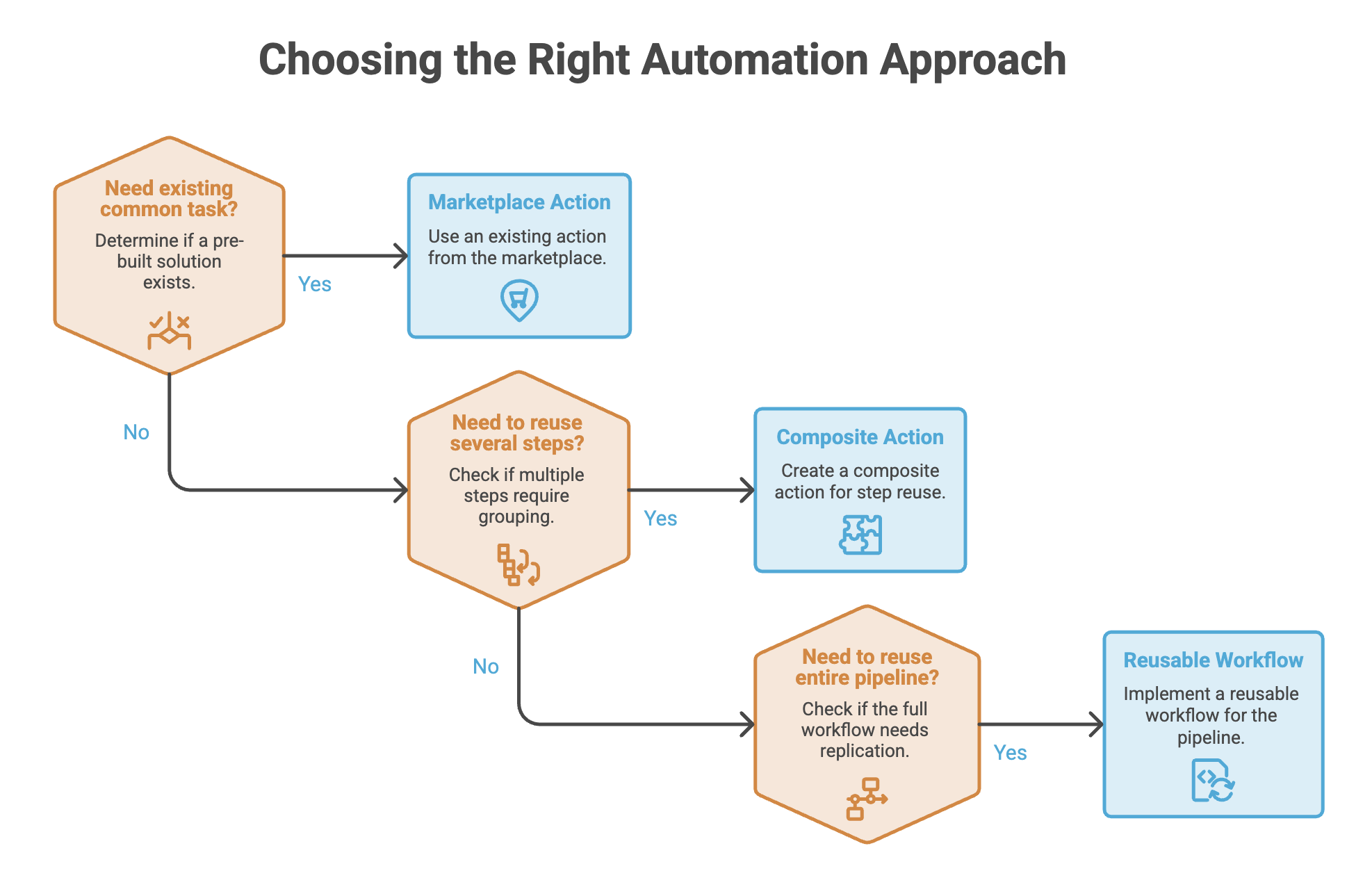
Sometimes no existing Marketplace action fits your requirement.
You can create a custom action for functionality specific to your project or organization.
GitHub supports three main types of custom actions:
| Type | Main Technology | Suitable For |
|---|---|---|
| JavaScript Action | JavaScript/Node.js | Custom logic executed directly by the runner |
| Docker Action | Docker | Custom execution environments |
| Composite Action | YAML | Combining multiple steps into one reusable action |
For most beginners, composite actions are the easiest place to start.
Composite Actions
A composite action combines multiple workflow steps into a single reusable action.
Suppose several projects repeatedly perform:
Setup Node.js
      ↓
Install dependencies
      ↓
Build application
Instead of copying these steps into every workflow, you can package them as a composite action.
Example Structure
.github/
└── actions/
    └── setup-and-build/
        └── action.yml
action.yml
name: Setup and Build
description: Install dependencies and build the project

inputs:
  node-version:
    description: Node.js version
    required: false
    default: '20'

runs:
  using: composite
  steps:
    - name: Setup Node.js
      uses: actions/setup-node@v4
      with:
        node-version: ${{ inputs.node-version }}

    - name: Install dependencies
      run: npm ci
      shell: bash

    - name: Build application
      run: npm run build
      shell: bash
Now the workflow can use the entire group as one step:
steps:
  - name: Checkout code
    uses: actions/checkout@v4

  - name: Setup and build
    uses: ./.github/actions/setup-and-build
    with:
      node-version: '20'
The workflow stays cleaner, while the implementation is maintained in one place.
Why Use Composite Actions?
Composite actions are useful when the same group of steps is repeated across workflows.
For example:
Without Composite Action

Project A → Setup → Install → Build
Project B → Setup → Install → Build
Project C → Setup → Install → Build
With a composite action:
             ┌→ Project A
Composite ───┼→ Project B
 Action      └→ Project C
Benefits
- Reduce duplicated workflow steps
- Centralize common logic
- Make workflows easier to read
- Simplify maintenance
- Standardize common tasks
Reusable Workflows
A reusable workflow takes reuse one level further.
Instead of reusing a few steps, you can reuse an entire workflow.
A reusable workflow is enabled with:
on:
  workflow_call:
For example:
name: Reusable CI

on:
  workflow_call:
    inputs:
      node-version:
        required: false
        type: string
        default: '20'

jobs:
  build:
    runs-on: ubuntu-latest

    steps:
      - name: Checkout code
        uses: actions/checkout@v4

      - name: Setup Node.js
        uses: actions/setup-node@v4
        with:
          node-version: ${{ inputs.node-version }}

      - name: Install dependencies
        run: npm ci

      - name: Build
        run: npm run build

      - name: Test
        run: npm test
This workflow can now be called by another workflow.
Calling a Reusable Workflow
A caller workflow uses uses at the job level:
name: CI

on:
  push:
    branches: [main]

jobs:
  ci:
    uses: ./.github/workflows/reusable-ci.yml
    with:
      node-version: '20'
Notice where uses appears:
jobs:
  ci:
    uses: ...
This is different from a normal action:
steps:
  - uses: ...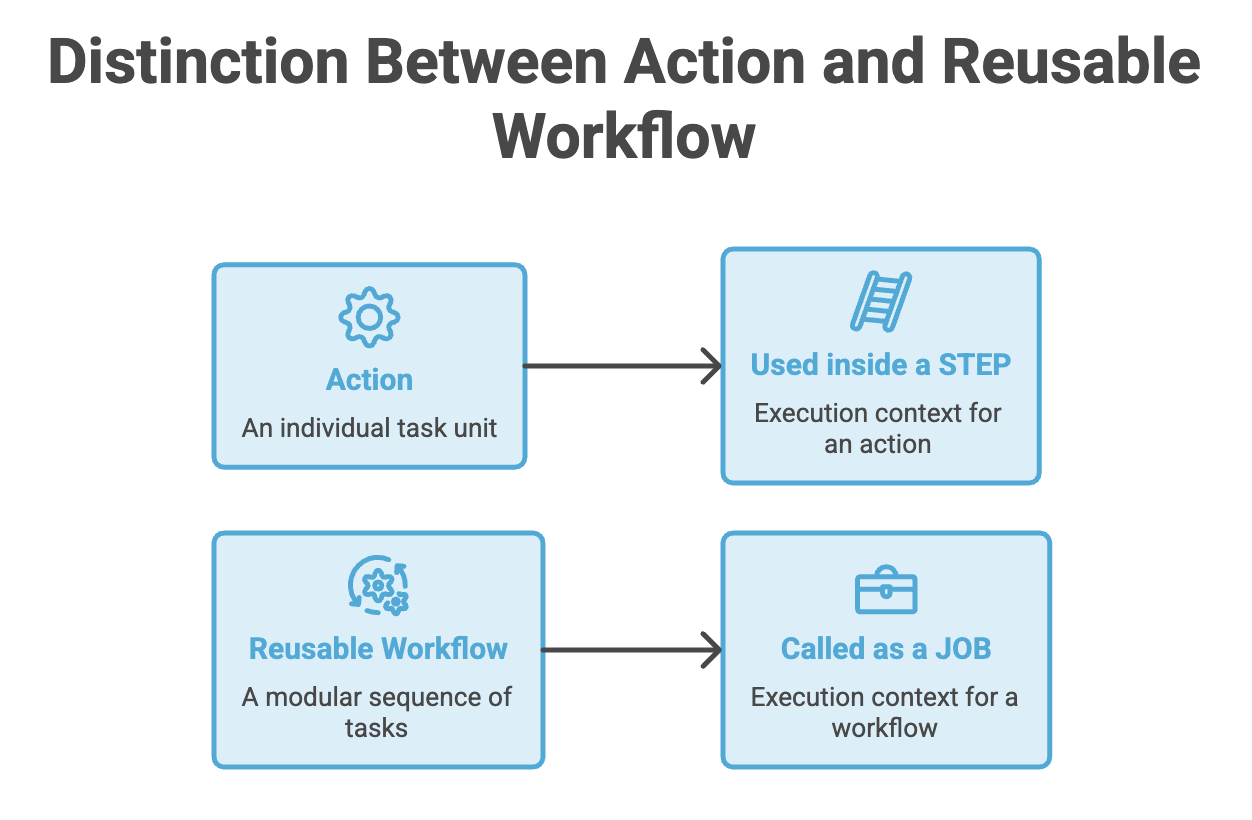
Reusable Workflows Across Repositories
Reusable workflows are especially powerful for organizations with multiple repositories.
A shared workflow can be stored in one repository:
company-workflows/
└── .github/
    └── workflows/
        └── standard-ci.yml
Another repository can call it:
jobs:
  ci:
    uses: company/shared-workflows/.github/workflows/standard-ci.yml@main
Now multiple projects can follow the same CI standard.
              Shared CI Workflow
                     │
          ┌──────────┼──────────┐
          ↓          ↓          ↓
       Project A  Project B  Project C
If the organization changes its standard CI process, the shared workflow can be updated centrally.
Composite Actions vs Reusable Workflows
This distinction is frequently asked in interviews.
| Feature | Composite Action | Reusable Workflow |
|---|---|---|
| Reuses | Multiple steps | Entire workflow |
| Used at | Step level | Job level |
| Can contain jobs | ❌ No | ✅ Yes |
| Trigger | Used through uses | workflow_call |
| Best for | Repeated step sequences | Standard CI/CD pipelines |
| Typical location | .github/actions/ or another action directory | .github/workflows/ |
| Cross-repository use | Possible when referenced appropriately | Yes |
| Main purpose | Package repeated steps | Share complete workflow logic |
Best Practices
1. Prefer existing trusted actions
Check the Marketplace before implementing common functionality yourself.
2. Review third-party actions
An action runs code in your workflow environment, so understand what it does and what permissions or secrets it may access.
3. Pin important actions
Use version tags or exact commit SHAs according to your project's security requirements.
4. Avoid unnecessary duplication
If the same steps appear in multiple workflows, consider a composite action.
5. Standardize organization-wide pipelines
Use reusable workflows when multiple repositories should follow the same CI/CD process.
6. Keep reusable components focused
A reusable component should solve a clear problem rather than becoming a huge collection of unrelated tasks.
Summary
- Marketplace Actions let you reuse functionality instead of building everything yourself.
usesis used to reference reusable Actions and reusable workflows.- Composite Actions package multiple steps into a reusable component.
- Reusable Workflows allow complete workflows to be shared and called from other workflows.
- Composite Actions are used at the step level, while Reusable Workflows are called at the job level.
workflow_callmakes a workflow reusable.- Reusable workflows are especially useful for standardizing CI/CD across multiple repositories.
- Review third-party actions carefully and use appropriate version pinning for security and reproducibility.
Written By: Muskan Garg
How is this guide?
Last updated on