
Events, Runners & Execution Context
A GitHub Actions workflow needs four things to execute effectively:
When should it run? → What work should it perform? → What tasks should it execute? → Where should it run?
Workflow Events
An event is an activity that causes a workflow to run.
Events are configured using the on keyword.
For example:
on:
  push:
    branches: [main]
This workflow runs when code is pushed to the main branch.
GitHub Actions supports many different events, allowing workflows to respond to code changes, pull requests, issues, schedules, releases, and manual requests.
Common Events
| Event | When it runs |
|---|---|
push | Code or tags are pushed |
pull_request | A pull request activity occurs |
issues | An issue activity occurs |
workflow_dispatch | Workflow is manually started |
schedule | Workflow runs at a scheduled time |
release | A release activity occurs |
create | A branch or tag is created |
delete | A branch or tag is deleted |
Think of an event as the trigger that starts the workflow.
Controlling When a Workflow Runs
Events can be configured more precisely using filters.
Branch Filter
Run only when code is pushed to specific branches:
on:
  push:
    branches:
      - main
      - develop
Path Filter
A workflow can also be restricted to changes in specific files or directories.
on:
  push:
    paths:
      - 'src/**'
Now the workflow runs only when the push includes changes under src/.
When both branches and paths filters are specified, both conditions must be satisfied.
Pull Request Events
You can control which pull request activities trigger a workflow.
on:
  pull_request:
    types: [opened, synchronize, reopened]
    branches: [main]
This workflow runs for selected pull request activities targeting main.
Scheduled Workflows
Workflows can run automatically according to a schedule using schedule.
on:
  schedule:
    - cron: '0 9 * * 1'
This represents 9:00 AM UTC every Monday.
Cron follows this structure:
minute hour day-of-month month day-of-weekScheduled workflows are useful for tasks such as:
- Regular maintenance
- Dependency checks
- Scheduled reports
- Automated cleanup
- Periodic builds or tests
Manual Workflows with workflow_dispatch
Sometimes you don't want a workflow to run automatically.
For example, you may want a deployment to be started manually.
Use:
on:
  workflow_dispatch:
GitHub then provides a Run workflow option in the Actions interface, provided the workflow is available on the default branch.
You can also define inputs:
on:
  workflow_dispatch:
    inputs:
      environment:
        description: 'Deployment environment'
        required: true
        default: 'staging'
        type: choice
        options:
          - staging
          - production
The person running the workflow can select the required environment.
Inputs can be accessed through the inputs context:
${{ inputs.environment }}GitHub also exposes them through github.event.inputs, although the inputs context is generally preferable because it preserves Boolean values as Booleans.
Multiple Events
A single workflow can respond to multiple events.
on:
  push:
    branches: [main]

  pull_request:
    branches: [main]

  workflow_dispatch:
This workflow can run when:
- Code is pushed to
main - A pull request targets
main - Someone manually starts the workflow
Understanding Jobs
A job is a group of related steps that execute together on a runner.
For example:
jobs:
  build:
    runs-on: ubuntu-latest

    steps:
      - name: Build application
        run: npm run build
A workflow can contain multiple jobs:
jobs:
  build:
    ...

  test:
    ...

  deploy:
    ...
The important point is that each job runs on a runner.
GitHub's workflow model describes a workflow as one or more jobs, with each job running on a runner and containing one or more steps.
Job Execution
Independent jobs can run in parallel.
             ┌── Build ──┐
             │            │
Workflow ────┼── Test ────┼──→ Result
             │            │
             └── Security┘
If one job depends on another, use needs.
jobs:

  build:
    runs-on: ubuntu-latest
    steps:
      - run: echo "Building..."

  test:
    needs: build
    runs-on: ubuntu-latest
    steps:
      - run: echo "Testing..."

  deploy:
    needs: test
    runs-on: ubuntu-latest
    steps:
      - run: echo "Deploying..."
Execution becomes:
Build
  ↓
Test
  ↓
Deploy
This was covered in more detail in the previous lecture, so remember the core rule:
Independent jobs can run in parallel,
needscreates dependencies.
Passing Data Between Jobs
Steps in different jobs do not automatically share their step outputs.
If one job needs to provide information to another job, use job outputs.
jobs:

  build:
    runs-on: ubuntu-latest

    outputs:
      version: ${{ steps.version.outputs.value }}

    steps:
      - name: Get version
        id: version
        run: echo "value=1.0.0" >> "$GITHUB_OUTPUT"

  deploy:
    needs: build
    runs-on: ubuntu-latest

    steps:
      - run: echo "Deploying ${{ needs.build.outputs.version }}"
The flow is:
Build Job
   │
   │ output: version
   ↓
Deploy Job
The receiving job uses:
needs.build.outputs.versionGitHub officially supports job outputs for passing data from one job to dependent downstream jobs.
Steps
A step is an individual task inside a job.
Steps execute in order on the same runner.
There are two common ways to define a step.
Using run
Use run to execute a shell command:
- name: Install dependencies
  run: npm install
Using uses
Use uses to run a reusable action:
- name: Checkout repository
uses: actions/checkout@v4| Part | Example | Meaning |
|---|---|---|
| Owner | actions | User or organization that owns the action |
| Action | checkout | Name of the action |
| Version | @v4 | Version, tag, branch, or commit |
You can also execute multiple commands:
- name: Build and test
  run: |
    npm run build
    npm test
Because steps in the same job use the same runner environment, data created during one step can generally be used by later steps in that job.
Passing Data Between Steps
A step can produce an output that another step can consume.
steps:

  - name: Get version
    id: version
    run: echo "value=1.0.0" >> "$GITHUB_OUTPUT"

  - name: Display version
    run: echo "Version: ${{ steps.version.outputs.value }}"
Here:
Step 1
  ↓
creates output
  ↓
Step 2
  ↓
uses output
The id gives the step a name that can be referenced later.
What is a Runner?
A runner is the machine that actually executes a GitHub Actions job.
When a workflow starts, GitHub assigns each job to an available runner that matches the job's requirements.
Workflow
   ↓
  Job
   ↓
Runner
   ↓
Commands & Actions execute
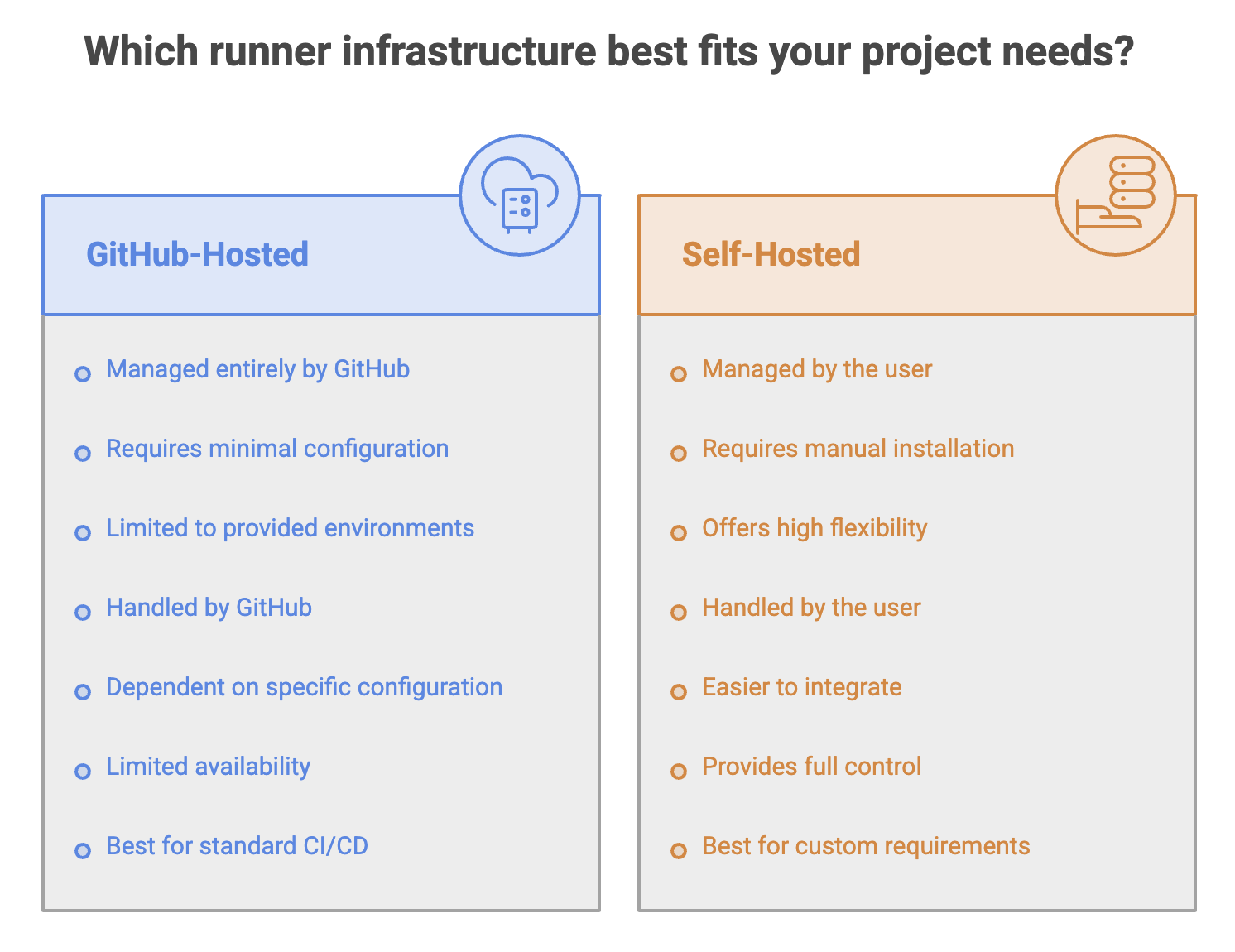
GitHub provides two main runner options:
1. GitHub-Hosted Runners
GitHub-hosted runners are virtual machines managed by GitHub.
For example:
jobs:
  build:
    runs-on: ubuntu-latest
Common runner labels include:
ubuntu-latest
windows-latest
macos-latest
GitHub provides these environments with tools, packages, and settings commonly required for Actions workflows.
Advantages
- No machine setup required
- GitHub manages the environment
- Easy to start with
- Suitable for most CI/CD workflows
- Multiple operating systems available
2. Self-Hosted Runners
A self-hosted runner is a machine that you manage and connect to GitHub Actions.
jobs:
  build:
    runs-on: self-hosted
The machine could be:
- A physical server
- A virtual machine
- A machine inside your company network
- A specialized machine with specific hardware
GitHub describes self-hosted runners as machines that you host and customize for your workflow requirements.
Why use a self-hosted runner?
They are useful when you need:
- Specialized hardware
- Custom software
- Access to private infrastructure
- Specific operating system configurations
- More control over the execution environment
Summary
- Events determine when a workflow runs. Branches, paths, or activity types can filter events.
workflow_dispatchallows manual workflow execution.- A job groups related steps and runs on a runner. Steps within a job execute in order.
runexecutes shell commands, whileusesinvokes reusable actions.- Step outputs can pass data between steps, and Job outputs can pass data to dependent jobs.
- A runner is the machine where a job actually executes.
- GitHub manages gitHub-hosted runners, while Self-hosted runners give you greater control over the execution environment.
Written By: Muskan Garg
How is this guide?
Last updated on