
Terraform Module Project Implementation
Build a root module that calls EC2 and S3 child modules, pass an input from the root, fix a real module output error, and create both resources with one apply.
In the theory lesson we drew a plan: one root folder with a provider, a main.tf that calls child modules, an output.tf, and a modules/ folder with one sub-folder per piece of infrastructure. Now we build that plan on the Linux VM and create an EC2 instance and an S3 bucket with a single terraform apply.
This project pulls together almost everything from the course: providers, resources, input variables, outputs, init, validate, plan, apply and destroy.
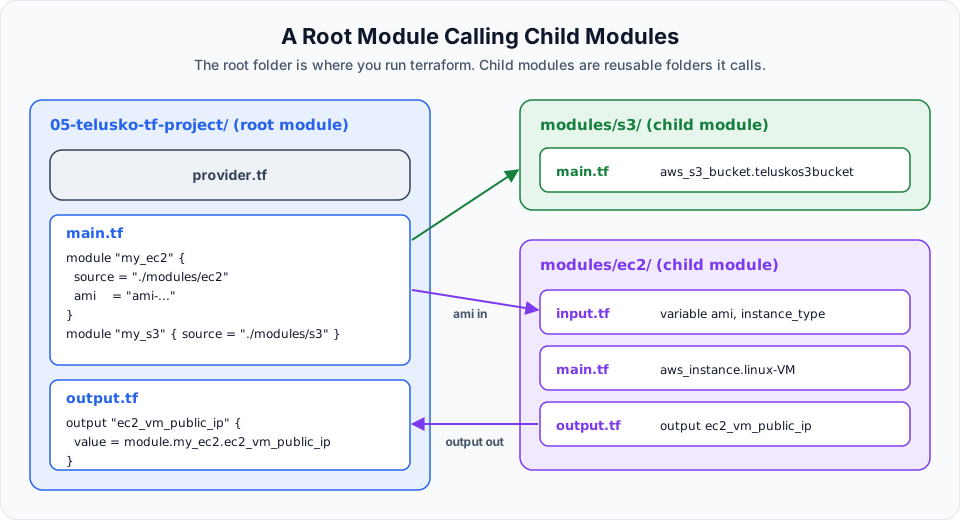
Step 1: Create the folder structure
Connect to the VM and export your AWS credentials first. Then create the empty structure. touch creates empty files that we fill in later.
mkdir 05-telusko-tf-project
cd 05-telusko-tf-project

mkdir modules
touch provider.tf main.tf output.tf

mkdir modules/ec2 modules/s3
touch modules/ec2/input.tf modules/ec2/main.tf modules/ec2/output.tf
touch modules/s3/main.tf
The S3 module only gets a main.tf to keep things short. It could have its own inputs and outputs exactly like the EC2 module.
Check the result with tree. It is not installed on Amazon Linux by default:
sudo yum install -y tree     # on Ubuntu: sudo apt install -y tree
cd ~
tree 05-telusko-tf-project
05-telusko-tf-project
├── main.tf
├── modules
│ ├── ec2
│ │ ├── input.tf
│ │ ├── main.tf
│ │ └── output.tf
│ └── s3
│ └── main.tf
├── output.tf
└── provider.tf
3 directories, 7 filesIt matches the plan.
Step 2: The EC2 child module
variable "ami" {
  description = "Amazon Linux Image info"
  type        = string
}

variable "instance_type" {
  description = "Type of instance"
  default     = "t2.micro"
}
Notice the difference between the two variables. instance_type has a default, so it is optional. ami has only a type and no default, which makes it required: whoever calls this module must pass a value. The lecture does this deliberately to show that inputs can come from the root module.
resource "aws_instance" "linux-VM" {
  ami             = var.ami
  instance_type   = var.instance_type
  key_name        = "terraform_keypair"
  security_groups = ["default"]

  tags = {
    Name = "Telusko_Terraform_Linux_VM"
  }
}
This time the references are written as var.ami instead of "${var.ami}". As explained in Using Variables in Terraform, this is the modern form and it works the same way.
output "ec2_vm_public_ip" {
  value = aws_instance.linux-VM.public_ip
}
There is no provider block in the module. Child modules use the provider configured in the root.
Step 3: The S3 child module
The lecture's version:
resource "aws_s3_bucket" "teluskos3bucket" {
  bucket = "telusko4354"
  acl    = "private"

  versioning {
    enabled = true
  }
}
It works, but as we saw in Terraform to create s3 bucket on aws, both acl and the inline versioning block are deprecated and print warnings. Here is the same module written for the current AWS provider:
resource "aws_s3_bucket" "teluskos3bucket" {
  bucket        = "telusko-tf-project-sm-4354" # must be globally unique
  force_destroy = true                         # practice only
}

resource "aws_s3_bucket_versioning" "teluskos3bucket" {
  bucket = aws_s3_bucket.teluskos3bucket.id

  versioning_configuration {
    status = "Enabled"
  }
}
No acl is needed, because new buckets are private with ACLs disabled.
Step 4: The root files
terraform {
  required_providers {
    aws = {
      source  = "hashicorp/aws"
      version = "~> 6.0"
    }
  }
}

provider "aws" {
  region = "ap-south-1"
}module "my_ec2" {
source = "./modules/ec2"
ami = "ami-062f0cc54dbfd8ef1" # use the Amazon Linux AMI ID from your region
}
module "my_s3" {
source = "./modules/s3"
}| Part | Meaning |
|---|---|
module "my_ec2" | Calls a module and gives this call the name my_ec2. The same child module could be called twice under different names, for example web and worker |
source = "./modules/ec2" | Path to the child module, relative to the root folder. Local paths must start with ./ or ../ |
ami = "..." | Sets the child's ami input variable. Because ami has no default in input.tf, leaving this out is an error |
instance_type is not passed, so the child uses its default t2.micro. We could override it here with instance_type = "t3.micro" without touching the module.
output "ec2_vm_public_ip" {
  value = module.my_ec2.public_ip
}
This looks reasonable. It is wrong, and that is useful.
Step 5: init and validate, and a module error
terraform initinit now does one extra thing: it installs the modules. You will see Initializing modules... with my_ec2 and my_s3 listed before the provider download.
terraform fmt
terraform validate
With the lecture's S3 code, you first see the deprecation warning for versioning (and one more for acl). Then a real error:
Error: Unsupported attribute

  on output.tf line 2, in output "ec2_vm_public_ip":
   2:   value = module.my_ec2.public_ip

    module.my_ec2 is a object

This object does not have an attribute named "public_ip".
The reason is the rule from the theory lesson: from outside, a module is a closed box. The root cannot see the aws_instance inside it, so public_ip (an attribute of the instance) is not available. The only things visible from outside are the module's outputs. Look at the child's output file:
cat modules/ec2/output.tfThe output is named ec2_vm_public_ip. So the root must use that name:
output "ec2_vm_public_ip" {
  value = module.my_ec2.ec2_vm_public_ip
}
The pattern is always module.<module call name>.<output name>.
terraform validateSuccess! The configuration is valid.Step 6: plan and apply
terraform planPlan: 2 to add, 0 to change, 0 to destroy.
Changes to Outputs:
+ ec2_vm_public_ip = (known after apply)With the current S3 code it says 3 to add, because versioning is its own resource. Resource addresses now include the module path, for example module.my_ec2.aws_instance.linux-VM.
terraform apply -auto-approvemodule.my_s3.aws_s3_bucket.teluskos3bucket: Creation complete after 2s [id=telusko4354]
module.my_ec2.aws_instance.linux-VM: Creation complete after 32s [id=i-0abc1234def567890]
Apply complete! Resources: 2 added, 0 changed, 0 destroyed.
Outputs:
ec2_vm_public_ip = "203.0.113.25"The bucket and the instance are created in parallel, because neither depends on the other. Check both in the console: the instance under EC2 > Instances and the bucket under S3.
Run terraform state list to see how module resources are addressed:
module.my_ec2.aws_instance.linux-VM
module.my_s3.aws_s3_bucket.teluskos3bucket
module.my_s3.aws_s3_bucket_versioning.teluskos3bucket
This is also the address you would pass to terraform apply -replace=... from the taint lesson.
Step 7: Destroy
terraform destroy -auto-approveRun it from the root folder. Terraform destroys everything in every module.
Common errors with modules
| Error | Cause | Fix |
|---|---|---|
Module not installed | You added or changed a module block | Run terraform init |
Missing required argument: "ami" | The child variable has no default and the root did not pass it | Add ami = "..." to the module block |
Unsupported argument in a module block | You passed a value the child has no variable for | Add the variable to the child, or fix the spelling |
This object does not have an attribute named ... | Root tries to read a resource attribute directly | Add an output in the child and use module.<name>.<output> |
Unreadable module directory | Wrong source path | Paths are relative to the root and must start with ./ |
What you have built
The same folder layout scales to real projects. Adding a VPC means a new modules/vpc folder and one more module block in the root. Creating a second environment can mean a second root folder that calls the same modules with different inputs. Combined with a remote S3 backend for state, this is how many teams organise Terraform day to day.
Try It Yourself
- Build the full project, reproduce the
Unsupported attributeerror on purpose, then fix it. - Pass
instance_type = "t3.micro"from the rootmodule "my_ec2"block and runterraform planto see the default being overridden. - Give the S3 module a
bucket_nameinput variable and an output for the bucket ARN, pass the name from the root, and print the ARN from the rootoutput.tf. - Call the EC2 module a second time as
module "my_ec2_test"with a differentNametag (you will need anamevariable in the module). Apply and check that two instances appear. - Destroy everything from the root folder and confirm in the console.
Official references
Written By: Shramik Masti
How is this guide?
Last updated on
Terraform Modules Theory
Understand what a Terraform module is, why one big folder stops scaling, and how a root module with child modules keeps EC2, S3 and other infrastructure organised.
Getting Started
A roadmap for the Ansible course, from the configuration management problem to a working AWS lab, ad hoc commands, playbooks, variables, Vault, handlers and tags.