
Terraform to create s3 bucket on aws
Create an S3 bucket with Terraform, understand why the acl argument now shows a deprecation warning, and add versioning and public access blocking the current way.
So far every resource we created was an EC2 instance. Terraform is not limited to servers, of course. The same workflow creates S3 buckets, RDS databases, IAM users, VPCs and hundreds of other resource types. In this lesson we create an S3 bucket, and along the way we meet two very practical topics: using AI tools to draft Terraform code, and dealing with deprecated arguments.
If S3 itself is new, the AWS course covers it in the storage section.
Step 1: A new folder
mkdir 04-tf-s3bucket
cd 04-tf-s3bucket
Using variables and outputs is optional here. The lecture keeps it simple with two files, provider.tf and main.tf.
Step 2: Drafting the code with an AI tool
The lecture asks ChatGPT for "a Terraform script to create an S3 bucket on AWS", then refines the request: first with versioning, then without, then "with ACL". This is a perfectly reasonable way to work once you understand HCL, because you can read what the tool gives you and judge it.
The important word is judge. AI tools are trained on years of public Terraform code, much of it written for older provider versions. The code you get often works but uses outdated patterns, and that is exactly what happens in this lecture. Always:
- Read every line and make sure you know what it does
- Run
terraform validateand read the warnings, not only the errors - Check the resource page in the provider documentation when something looks unfamiliar
Step 3: The code from the lecture
provider "aws" {
  region = "ap-south-1"
}
The AI suggested us-east-1; change it to the region you use.
resource "aws_s3_bucket" "my_bucket" {
  bucket = "telusko4545b" # Replace with a globally unique name

  # ACL options: private, public-read, public-read-write, authenticated-read, etc.
  acl = "private"
}| Part | Meaning |
|---|---|
aws_s3_bucket | Resource type for an S3 bucket |
my_bucket | Local name, used to refer to it inside Terraform |
bucket | The real bucket name in AWS |
acl | Access control list. private means only the owner has access |
Bucket names must be globally unique
S3 bucket names are shared across all AWS accounts in the world, not just yours. If someone anywhere already owns telusko4545b, your apply fails with BucketAlreadyExists. Rules:
- 3 to 63 characters
- Lowercase letters, numbers, dots and hyphens only
- Must start and end with a letter or number
A safe pattern is project name plus your initials plus a random number, for example telusko-tf-demo-sm-48213.
Step 4: init, fmt, validate, and a warning
terraform init
terraform fmt
terraform validate
Warning: Argument is deprecated
with aws_s3_bucket.my_bucket,
on main.tf line 5, in resource "aws_s3_bucket" "my_bucket":
5: acl = "private"
acl is deprecated. Use the aws_s3_bucket_acl resource instead.
Success! The configuration is valid, but there were some validation warnings as shown above.The lecture treats this as "just a warning" and moves on, and the bucket is created successfully. That is true today, but a deprecation warning is the provider telling you that this argument will be removed in a future major version. When that happens, your code stops working. It is worth understanding why it changed.
Why the warning: the S3 resource was split
Since version 4 of the AWS provider (2022), almost every bucket setting moved out of aws_s3_bucket into its own resource:
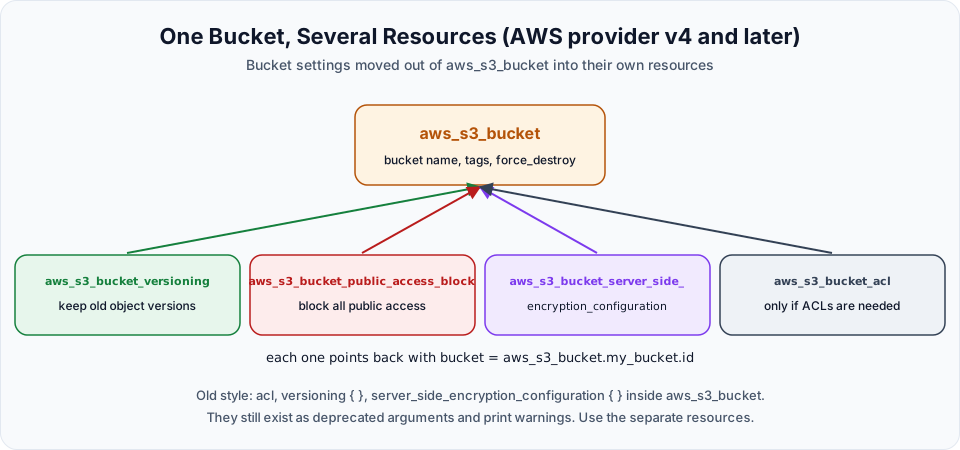
Old argument inside aws_s3_bucket | Separate resource now |
|---|---|
acl | aws_s3_bucket_acl |
versioning { } | aws_s3_bucket_versioning |
server_side_encryption_configuration { } | aws_s3_bucket_server_side_encryption_configuration |
lifecycle_rule { } | aws_s3_bucket_lifecycle_configuration |
website { } | aws_s3_bucket_website_configuration |
policy | aws_s3_bucket_policy |
There is a second reason the acl = "private" line is unnecessary. Since April 2023, every new S3 bucket is created with ACLs disabled (Object Ownership set to "bucket owner enforced") and with Block Public Access turned on. A new bucket is already private. AWS itself now recommends controlling access with bucket policies and IAM rather than ACLs.
The current way to write it
Here is the same bucket written for the current provider, with the versioning the lecture first asked the AI tool for:
terraform {
  required_providers {
    aws = {
      source  = "hashicorp/aws"
      version = "~> 6.0"
    }
  }
}

provider "aws" {
  region = "ap-south-1"
}resource "aws_s3_bucket" "my_bucket" {
bucket = "telusko-tf-demo-sm-48213" # must be globally unique
force_destroy = true # practice only: lets destroy delete a non-empty bucket
tags = {
Project = "terraform-course"
}
}
resource "aws_s3_bucket_versioning" "my_bucket" {
bucket = aws_s3_bucket.my_bucket.id
versioning_configuration {
status = "Enabled"
}
}
resource "aws_s3_bucket_public_access_block" "my_bucket" {
bucket = aws_s3_bucket.my_bucket.id
block_public_acls = true
block_public_policy = true
ignore_public_acls = true
restrict_public_buckets = true
}What changed:
| Code | Why |
|---|---|
No acl | The bucket is private by default, and ACLs are disabled on new buckets |
aws_s3_bucket_versioning | Turns on versioning. bucket = aws_s3_bucket.my_bucket.id links it to our bucket and makes Terraform create the bucket first |
aws_s3_bucket_public_access_block | Makes the "no public access" setting explicit in code, so nobody can quietly turn it off in the console without Terraform noticing |
force_destroy = true | Without it, terraform destroy fails with BucketNotEmpty if the bucket holds any objects or old versions. Handy for practice; think twice before using it on real data |
tags | Optional, but tagging everything you create with Terraform makes billing and cleanup much easier |
Same local name, different types
All three resources use the local name my_bucket. That is allowed, because the full address includes the type: aws_s3_bucket.my_bucket and aws_s3_bucket_versioning.my_bucket are different addresses. Many teams use this pattern to show which resources belong together.
Step 5: plan, apply and check
terraform validate   # no warnings now
terraform plan
terraform apply -auto-approve
With the lecture's version, the plan says 1 to add. With the current version it says 3 to add. Open the S3 console and you will find the bucket. Open it and check:
- Properties > Bucket Versioning: Enabled
- Permissions > Block public access: On
- Permissions > Object Ownership: Bucket owner enforced (ACLs disabled)
Try uploading a file, upload a changed copy with the same name, and turn on Show versions to see both.
Step 6: Destroy
terraform destroy -auto-approveS3 storage is cheap but not free beyond the free tier, so delete practice buckets when you are done. If you did not set force_destroy and uploaded files, empty the bucket first (including all versions) or the destroy fails with BucketNotEmpty.
Try It Yourself
- Create the lecture version with
acl = "private", runterraform validate, and read the deprecation warning yourself. - Rewrite it in the current style with versioning and the public access block, and confirm
validateshows no warnings. - Add a
bucket_nameinput variable and an output that printsaws_s3_bucket.my_bucket.arn. - Ask an AI tool for "Terraform code for an S3 bucket with encryption". Check whether it uses the deprecated inline block or
aws_s3_bucket_server_side_encryption_configuration, and fix it if needed. - Upload a file, then run
terraform destroywith and withoutforce_destroyand compare the results.
Official references
- aws_s3_bucket
- aws_s3_bucket_versioning
- Controlling ownership of objects and disabling ACLs
- Bucket naming rules
Written By: Shramik Masti
How is this guide?
Last updated on
Terraform Output Variables
Add an output.tf that prints the public IP of the new EC2 instance after apply, and learn how to read, format and protect output values.
Terraform Taint and Untaint
Force Terraform to destroy and recreate a resource without changing code, using terraform taint and untaint, and the modern replacement terraform apply -replace.