
Introduction
What Terraform is, why infrastructure as code exists, the core vocabulary of providers, resources, state and modules, and how Terraform fits with the other DevOps tools.
Ask a team how their production servers were set up, and often the honest answer is "someone clicked through the console two years ago". The security group has rules nobody remembers adding. The test environment is "almost the same" as production. When a region goes down, rebuilding everything elsewhere would take days of guesswork.
Infrastructure as code (IaC) is the answer to that. Instead of clicking, you describe the infrastructure you want in text files. A tool reads the files and makes reality match them. The files go into Git, so every change has an author, a date and a review, and you can build the same environment again whenever you need it.
Terraform, made by HashiCorp, is the most widely used IaC tool for this job.
What Terraform does
You write .tf files in HCL (HashiCorp Configuration Language) that say what you want:
resource "aws_instance" "web" {
  ami           = "ami-xxxxxxxxxxxxxxxxx"
  instance_type = "t3.micro"
}
Then you run two commands:
terraform plan    # show me what you would change
terraform apply   # make it so
Terraform compares what you asked for with what already exists, shows you the difference, and on your approval calls the AWS APIs to create, update or delete exactly what is needed. Run it again with no changes and it does nothing. Change one line and it changes one thing.
This style is called declarative: you describe the end state, not the steps. You never write "call RunInstances, wait, then tag it". Terraform works out the order itself, including dependencies such as "create the security group before the instance that uses it".
Core vocabulary
| Term | Meaning |
|---|---|
| HCL | The configuration language Terraform files are written in, saved as .tf |
| Provider | A plugin that knows one platform's API, such as hashicorp/aws. Downloaded by terraform init |
| Resource | One piece of infrastructure Terraform manages, such as aws_instance or aws_s3_bucket |
| Data source | Read-only information fetched from the platform, such as the latest AMI ID |
| State | terraform.tfstate, Terraform's record of which real objects belong to which resource blocks |
| Plan | The list of changes Terraform intends to make, shown before anything happens |
| Input variable | A named, configurable value (var.instance_type) so code is not hardcoded |
| Output | A value printed after apply and shared between modules (public_ip) |
| Module | A folder of .tf files used together. The folder you run commands in is the root module |
| Backend | Where state is stored: a local file by default, or remote storage such as S3 |
You will meet each of these in the course, roughly in this order.
Why not just use CloudFormation?
AWS has its own IaC service, CloudFormation, and Azure and Google Cloud have theirs. They work well, but each one only speaks to its own cloud. Terraform uses the same language and the same workflow for every platform that has a provider: AWS, Azure, Google Cloud, Kubernetes, GitHub, Cloudflare, Datadog and thousands more. Learn it once, use it everywhere.
Terraform also gives you the plan step as a first class part of the workflow, and a huge public registry of providers and community modules.
Where Terraform fits with other DevOps tools
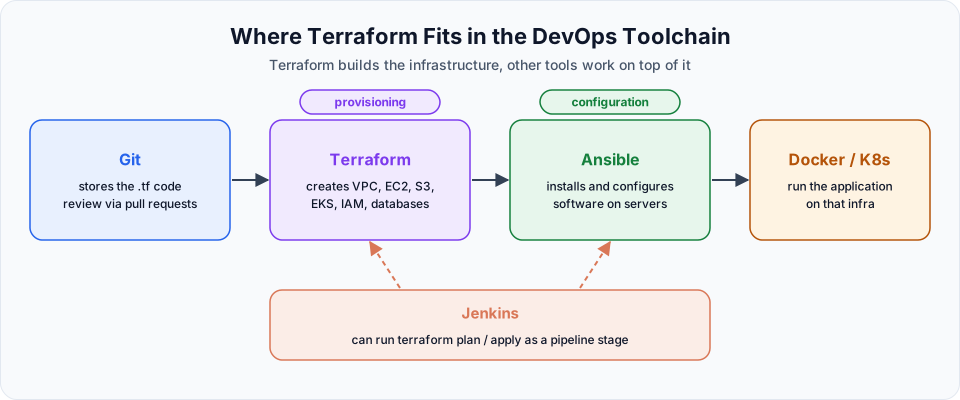
Terraform's job is provisioning: creating the infrastructure. It is not the best tool for installing and configuring software inside servers, which is configuration management, the job of tools like Ansible.
| Tool | Job | Course |
|---|---|---|
| Git and GitHub | Store and review the Terraform code | Git |
| AWS | The platform where resources are created | AWS |
| Terraform | Create VPCs, EC2 instances, S3 buckets, IAM, EKS clusters | This course |
| Ansible | Install packages and configure the servers Terraform created | Ansible |
| Docker and Kubernetes | Package and run the application on that infrastructure | Docker, Kubernetes |
| Jenkins | Run terraform plan and apply as stages in a pipeline | Jenkins |
A typical flow in a company: an engineer changes a .tf file and opens a pull request, the pipeline runs terraform plan and posts the result, a reviewer approves, and the pipeline runs terraform apply. Nobody touches the console.
Things to know before you start
Terraform is free to use
You do not pay to run Terraform. You pay AWS for whatever resources it creates, exactly as if you created them by hand. Since version 1.6 Terraform is published under the Business Source License, which still allows normal use inside companies; the open source fork is called OpenTofu.
- State is precious. Terraform's memory of what it created lives in the state file. Lose it, and Terraform loses track of your infrastructure. The course shows you what that looks like and how teams protect it.
- Credentials stay out of code. Terraform reads AWS credentials from the environment, a profile or an IAM role. They never belong in
.tffiles. - Always read the plan.
terraform applywill happily delete a database if your code says so. The plan is where you catch that. - Clean up.
terraform destroyremoves everything a configuration created. Use it at the end of every practice session.
Start with Why Terraform and What is Terraform and work through the sidebar in order. Each lesson builds on the files from the one before.
Written By: Shramik Masti
How is this guide?
Last updated on
Getting Started
A practical roadmap for learning Terraform, from installation and credentials to state, variables, outputs, S3 buckets, taint and reusable modules on AWS.
Why Terraform and What is Terraform
Understand the problems with creating cloud infrastructure by hand, why cloud specific automation is not enough, and how Terraform solves this with infrastructure as code.