
Why Terraform and What is Terraform
Understand the problems with creating cloud infrastructure by hand, why cloud specific automation is not enough, and how Terraform solves this with infrastructure as code.
Almost every project today runs on cloud infrastructure: servers for hosting, buckets for storage, managed databases, CI/CD runners. Someone has to create all of that. The question this lesson answers is simple: how should we create it?
Before we write a single line of Terraform, it helps to feel the pain that Terraform removes.
Creating a server the manual way
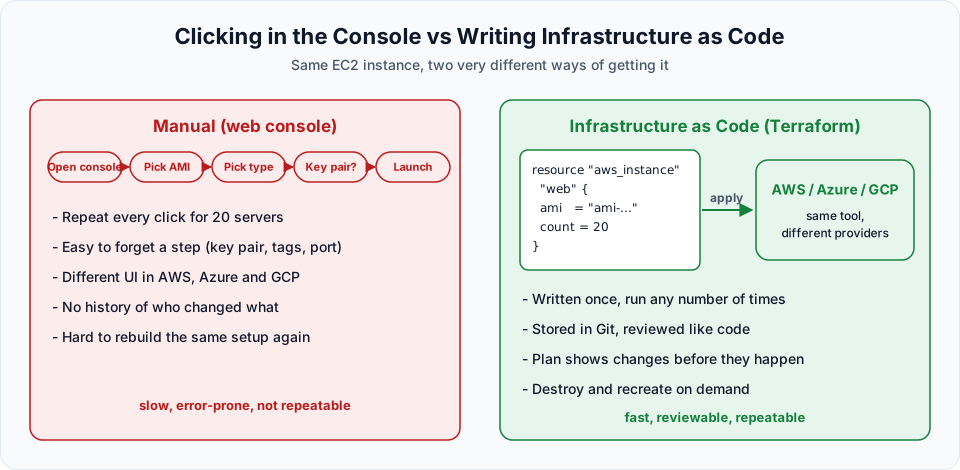
Open your AWS account, search for EC2, and click Launch instance. To create one Linux virtual machine, you go through a form:
- Give the instance a name, for example
linux-vm - Choose an Amazon Machine Image (AMI), for example Amazon Linux
- Choose an instance type, for example a free tier eligible
t2.microort3.micro - Choose or create a key pair so you can log in later
- Choose a security group
- Click Launch instance
In the lecture, the key pair step was skipped on purpose, and AWS stopped at launch asking for one. That is a small mistake, and AWS caught it. Many mistakes are not caught: a missing tag, a wrong port in the security group, the wrong region, the wrong instance size. You only find out later, when something does not work.
Every cloud provider gives you this web console, and it is great for learning. It is a poor way to build real infrastructure.
What goes wrong with the console
| Problem | What it looks like in real life |
|---|---|
| Error prone | You forget a step (key pair, tag, security group rule) and struggle later |
| Slow for many resources | Creating 20 servers means clicking through the same form 20 times |
| Different UI per cloud | The Azure portal and Google Cloud console look nothing like the AWS console |
| No history | Nobody can tell who changed a security group last week, or why |
| Not repeatable | Rebuilding the same setup in another region or account means doing it all again from memory |
Cloud specific automation helps, but only on one cloud
Every cloud provider has its own automation service:
| Cloud | Native automation service |
|---|---|
| AWS | CloudFormation |
| Microsoft Azure | Azure Resource Manager (ARM templates and Bicep) |
| Google Cloud | Infrastructure Manager (earlier Deployment Manager) |
These solve the clicking problem, but each one works only on its own cloud. A CloudFormation template cannot create anything in Azure. If your company uses two clouds, your team has to learn two different tools and two different syntaxes. You can see how CloudFormation works in the AWS course lesson on CloudFormation.
So the real wish list looks like this:
- One tool that works with AWS, Azure, GCP and many other platforms
- Infrastructure written as code, so it can be stored in Git with full history
- Code that is written once and reused any number of times
- A way to preview changes before they touch real infrastructure
That is exactly where Terraform comes in.
What Terraform is
Terraform is an infrastructure as code tool built by HashiCorp. The official definition says it "lets you build, change, and version cloud and on-prem resources safely and efficiently."
Infrastructure as code (IaC) means you describe the infrastructure you want (servers, networks, buckets, databases) in text files, and a tool creates it for you. You stop clicking and start writing code.
A few facts to keep in mind:
- Language: Terraform files are written in HCL, the HashiCorp Configuration Language, and saved with the
.tfextension. - Multi-cloud: Terraform talks to each platform through a plugin called a provider. There are providers for AWS, Azure, Google Cloud, Kubernetes, GitHub and thousands of other services in the Terraform Registry.
- Declarative: You describe the end result ("I want one
t3.microinstance with this tag"), not the steps. Terraform works out the steps. - Free to use: You do not pay anything to download or run Terraform. You pay the cloud provider for the resources Terraform creates, exactly as if you created them by hand.
Here is a small taste of what HCL looks like. Do not worry about the details yet, we will write this for real in the first Terraform script lesson.
provider "aws" {
  region = "ap-south-1"
}

resource "aws_instance" "linux_vm" {
  ami           = "ami-xxxxxxxxxxxxxxxxx"
  instance_type = "t3.micro"

  tags = {
    Name = "linux-vm"
  }
}
Compare this to the console form. Every field you clicked is now a line of code. If you want 20 servers, you change one line instead of filling 20 forms.
A note on the licence
The lecture calls Terraform "free and open source". It is still free to use, but since version 1.6 (2023) HashiCorp releases Terraform under the Business Source License (BSL 1.1), which is source available rather than open source. The community fork OpenTofu continues under the open source MPL 2.0 licence. For learning and for using Terraform inside your company, nothing changes.
Who pays for what
This confuses many beginners, so let us be clear. Suppose you use Terraform to create an S3 bucket:
| Item | Cost |
|---|---|
| Downloading and running Terraform | Free |
| Writing HCL code | Free |
| The S3 bucket and the data stored in it | Billed by AWS, same as a bucket created by hand |
So the free tier rules still apply. When you practise, use free tier eligible resources and always destroy what you create.
How we will practise
The next lessons install Terraform in two ways, and you can follow either one:
| Option | Where Terraform runs | When to choose it |
|---|---|---|
| Linux VM on AWS | An Amazon Linux EC2 instance you connect to over SSH | Works the same for every learner, whatever laptop you have |
| Local install on Windows | Your own laptop, with VS Code as the editor | You prefer working locally with a proper editor |
Continue with Terraform Installation on Linux VM on AWS or jump to Terraform Installation Locally on Windows.
Try It Yourself
- Launch one EC2 instance manually from the console and write down every choice you made (name, AMI, type, key pair, security group, storage). Count how many decisions it took. Terminate the instance afterwards.
- Open the CloudFormation console and look at a sample template. Note that it only mentions AWS resource types.
- Visit the Terraform Registry and search for providers for AWS, Azure and Google Cloud. Notice that they all use the same HCL style.
- Write one sentence in your own words that explains the difference between Terraform and CloudFormation.
Official references
Written By: Shramik Masti
How is this guide?
Last updated on
Introduction
What Terraform is, why infrastructure as code exists, the core vocabulary of providers, resources, state and modules, and how Terraform fits with the other DevOps tools.
Terraform Installation on Linux VM on AWS
Launch an Amazon Linux EC2 instance, connect to it over SSH from Git Bash, and install Terraform from the official HashiCorp repository.