
Using Variables in Terraform
Split a Terraform project into provider.tf, vars.tf and main.tf, define input variables for the AMI and instance type, and learn every way to pass variable values.
Look at the code we have written so far. The AMI ID, the instance type and the region are typed directly inside the resource block. That is called hardcoding, and it causes trouble quickly. Want t3.micro instead of t2.micro? You open main.tf and edit the resource. Want the same server in a test and a production environment with different sizes? You copy the whole file and edit both copies.
Input variables fix this. You declare a named value once, give it a default, and use the name wherever the value is needed. Changing the value no longer means touching the resource code.
Splitting the project into files
At the same time, we stop putting everything in one file. Terraform reads every .tf file in the folder and merges them, so the file names are only for us humans. The lecture uses three files:
| File | Contains |
|---|---|
provider.tf | The provider "aws" block (and the terraform { required_providers } block) |
vars.tf | All variable blocks |
main.tf | The resources |
Many projects call the variables file variables.tf instead of vars.tf. Both work. Pick one name and use it consistently across your projects.
Step 1: A new folder
On the Linux VM:
mkdir 03-tf-ec2vars
cd 03-tf-ec2vars
Step 2: Declare the variables
variable "ami" {
  description = "Amazon Linux Image info"
  default     = "ami-062f0cc54dbfd8ef1"
}

variable "instance_type" {
  description = "Type of instance"
  default     = "t2.micro"
}
A variable block has a name ("ami") and a few optional arguments:
| Argument | Meaning |
|---|---|
description | Explains what the variable is for. Shows up in prompts and docs, so write something useful |
default | The value used when nobody provides another one. Without a default, the variable is required |
type | Restricts the value, for example string, number, bool, list(string), map(string) |
sensitive | true hides the value in plan and apply output (it is still stored in state) |
validation | A rule the value must pass, with a custom error message |
The lecture uses only description and default. Adding type is a good habit, because Terraform then catches mistakes such as passing a list where a string is expected:
variable "instance_type" {
  description = "Type of instance"
  type        = string
  default     = "t2.micro"
}
Watch out for a copy and paste slip that happens in the lecture too: the first draft of instance_type had the AMI ID as its default. Terraform would have accepted it, and AWS would have failed at apply with an invalid instance type error. A validation block can catch this kind of mistake early:
variable "instance_type" {
  type    = string
  default = "t2.micro"

  validation {
    condition     = can(regex("^t[23]\\.", var.instance_type))
    error_message = "Use a t2 or t3 instance type for this course."
  }
}
Step 3: Use the variables
resource "aws_instance" "linux-VM" {
  ami             = "${var.ami}"
  instance_type   = "${var.instance_type}"
  key_name        = "terraform_keypair"
  security_groups = ["default"]

  tags = {
    Name = "Linux_VM"
  }
}
var.<name> reads the value of a variable. The name after var. must match the name in the variable block exactly.
The "${...}" form in the lecture is the old syntax from Terraform 0.11 and earlier, when every expression had to be wrapped in a string. It still works, but since Terraform 0.12 you write the reference directly. This is the style the official docs and terraform fmt conventions use:
resource "aws_instance" "linux-VM" {
  ami             = var.ami
  instance_type   = var.instance_type
  key_name        = "terraform_keypair"
  security_groups = ["default"]

  tags = {
    Name = "Linux_VM"
  }
}
Keep "${...}" for when you really are building a string, for example Name = "web-${var.instance_type}".
Step 4: The provider file
terraform {
  required_providers {
    aws = {
      source  = "hashicorp/aws"
      version = "~> 6.0"
    }
  }
}

provider "aws" {
  region = "ap-south-1"
}
The region could be a variable too. Try that in the exercises.
Step 5: Run it
ls
# main.tf  provider.tf  vars.tf

terraform init
terraform fmt
terraform validate
terraform plan
In the lecture, terraform plan failed at this point:
Error: No valid credential sources foundThe reason: the SSH session was new, and export variables do not survive a reconnect. Export AWS_ACCESS_KEY_ID and AWS_SECRET_ACCESS_KEY again (or attach an IAM role to the VM, as explained in Terraform Security Credentials), then:
terraform plan
terraform apply -auto-approve
The console shows a new instance called Linux_VM. Same result as before, but now the values live in one place.
Changing a value without touching main.tf
Here is where variables pay off. You can override a default in several ways, and none of them requires editing main.tf.
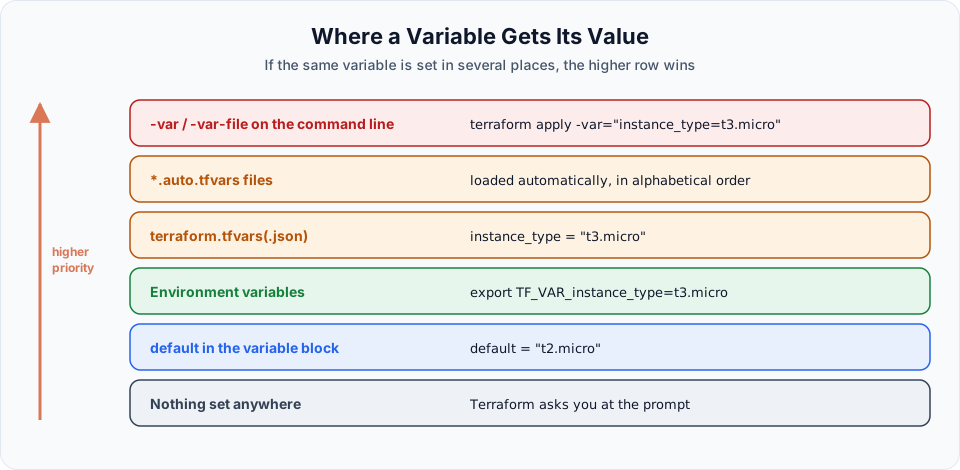
terraform plan -var="instance_type=t3.micro"Good for a quick one-off test. Easy to forget, so not ideal for values you need every time.
Create terraform.tfvars in the same folder. Terraform loads it automatically:
instance_type = "t3.micro"For several environments, create files like dev.tfvars and prod.tfvars and pick one with terraform plan -var-file="prod.tfvars". This is the most common approach in real projects.
export TF_VAR_instance_type=t3.micro
terraform plan
Any environment variable named TF_VAR_<variable name> sets that variable. Common in CI pipelines.
Remove the default from a variable and run terraform plan. Terraform stops and asks:
var.instance_type
  Type of instance

  Enter a value:
Useful to see once. In automation it is a problem, because nobody is there to type the answer.
Whatever method you use, terraform plan now shows:
  ~ instance_type = "t2.micro" -> "t3.micro"

Plan: 0 to add, 1 to change, 0 to destroy.
Changing the instance type of a running instance is an in-place update: AWS stops the instance, changes the type and starts it again.
tfvars files and secrets
If a variable holds a password or token, mark it sensitive = true and keep the real value out of Git. The .gitignore from the credentials lesson already ignores *.tfvars for this reason. Commit an example file such as terraform.tfvars.example instead.
Clean up
terraform destroy -auto-approveTry It Yourself
- Create
03-tf-ec2varswithprovider.tf,vars.tfandmain.tfas above and apply it. - Replace
"${var.ami}"withvar.amiand runterraform plan. Confirm it saysNo changes, proving both styles mean the same. - Add a
regionvariable with defaultap-south-1and use it in the provider block. - Create
terraform.tfvarswithinstance_type = "t3.micro", runterraform plan, then runterraform plan -var="instance_type=t2.micro"and see which value wins. - Remove the
defaultfrominstance_type, runterraform plan, and answer the prompt. Then put the default back and destroy everything.
Official references
Written By: Shramik Masti
How is this guide?
Last updated on
Creating EC2 VM with user Data using Terraform
Use Terraform's user_data argument and the file() function to launch an EC2 instance that installs Apache and serves a static web page on first boot.
Terraform Output Variables
Add an output.tf that prints the public IP of the new EC2 instance after apply, and learn how to read, format and protect output values.