
Terraform Modules Theory
Understand what a Terraform module is, why one big folder stops scaling, and how a root module with child modules keeps EC2, S3 and other infrastructure organised.
Look at the 03-tf-ec2vars folder from the earlier lessons:
03-tf-ec2vars/
├── provider.tf
├── vars.tf
├── main.tf
└── output.tf
Without knowing it, you have already written a module. In Terraform, a module is simply a folder of .tf files that are used together. Every Terraform configuration is a module. The folder you run terraform commands in is called the root module.
So the real question of this lesson is not "what is a module", but "how should we organise modules when the project grows?"
The problem with one big folder
One folder works fine for one or two resources. Now imagine the Telusko application needs real infrastructure:
- EC2 instances for the application servers
- S3 buckets for uploads and backups
- IAM users and roles
- A VPC with subnets
If everything goes into the same four files:
| File | What it turns into |
|---|---|
vars.tf | Dozens of variables for EC2, S3, IAM and VPC mixed together |
main.tf | Hundreds of lines of unrelated resources |
output.tf | Outputs for every service in one list |
Finding anything becomes slow, two people editing the same file collide, and you cannot reuse the EC2 part in another project without copying it and cleaning out everything else.
Root module and child modules
The solution is to give each piece of infrastructure its own folder, a child module, and have the root module call those child modules.
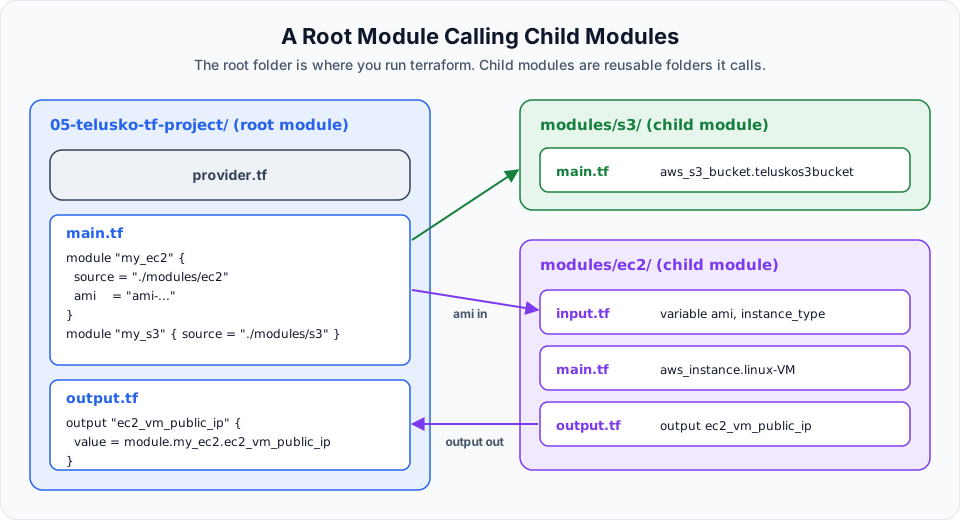
For the Telusko project the plan looks like this:
05-telusko-tf-project/          <- root module (you run terraform here)
├── provider.tf                 <- which cloud and region, only at the root
├── main.tf                     <- calls the child modules
├── output.tf                   <- re-exports values from child modules
└── modules/
    ├── ec2/                    <- child module
    │   ├── input.tf            <- variables for EC2
    │   ├── main.tf             <- aws_instance
    │   └── output.tf           <- public IP etc.
    └── s3/                     <- child module
        └── main.tf             <- aws_s3_bucket
Each child module is a small, complete unit with its own inputs, resources and outputs. Adding IAM or a VPC later means adding modules/iam/ or modules/vpc/, without touching the EC2 and S3 code.
How they connect
A child module does nothing by itself. The root module's main.tf calls it with a module block:
module "my_ec2" {
  source = "./modules/ec2"
}
That is the whole idea, and the three directions of data flow are worth remembering:
| Direction | How | Example |
|---|---|---|
| Root to child | Arguments in the module block set the child's input variables | ami = "ami-..." inside module "my_ec2" |
| Child to root | The child declares an output; the root reads it as module.<name>.<output> | module.my_ec2.ec2_vm_public_ip |
| Root to user | The root's own output blocks are what terraform apply prints | output "ec2_vm_public_ip" at the root |
A child module can only see what it is given. It cannot read the root's variables or another module's resources directly. That strictness is what makes modules reusable: everything a module needs is visible in its input variables.
Rules that save you trouble
- Run Terraform only in the root folder. Never run
terraform applyinsidemodules/ec2. The root holds the state. - Provider configuration lives in the root. Child modules inherit it. Do not put
provider "aws"blocks inside child modules. - Run
terraform initafter adding or changing amoduleblock. Init installs modules, even local ones. - Expose what callers need. If the root needs a value from a child, the child must have an
outputfor it. The root cannot reach inside the child's resources. You will see this rule produce a real error in the next lesson.
Where modules come from
The source argument decides where Terraform gets the module code:
| Source | Example |
|---|---|
| Local folder | source = "./modules/ec2" |
| Terraform Registry | source = "terraform-aws-modules/vpc/aws" with a version |
| Git repository | source = "git::https://github.com/org/repo.git//modules/ec2?ref=v1.2.0" |
In this course we use local folders. In companies you will often see shared modules in a private Git repository or registry, so every team builds VPCs or EKS clusters the same tested way. The public Terraform Registry also has well maintained community modules, such as the terraform-aws-modules collection, which are worth reading even if you do not use them.
Naming
The lecture names the variable file of each child module input.tf. The convention you will see most often in real projects and in HashiCorp's own docs is:
| File | Contents |
|---|---|
main.tf | Resources |
variables.tf | Input variables |
outputs.tf | Outputs |
Terraform does not care about file names, so input.tf works. Pick a convention and use it across all your modules.
Now let us build this exact structure in Terraform Module Project Implementation.
Try It Yourself
- Draw the folder tree for a project with three child modules:
ec2,s3andiam. Mark which files sit at the root and which inside each module. - For the
ec2module, list which values should be inputs (things that change between environments) and which outputs the root will need. - Browse the
terraform-aws-modules/vpc/awsmodule on the Terraform Registry and find its Inputs and Outputs tabs. Notice it follows exactly the same idea.
Official references
Written By: Shramik Masti
How is this guide?
Last updated on
Terraform Taint and Untaint
Force Terraform to destroy and recreate a resource without changing code, using terraform taint and untaint, and the modern replacement terraform apply -replace.
Terraform Module Project Implementation
Build a root module that calls EC2 and S3 child modules, pass an input from the root, fix a real module output error, and create both resources with one apply.