
OpenAI Python SDK Usage
Modern AI-powered applications rely on Large Language Models (LLMs) to perform tasks such as:
Content generation Question answering Summarization Recommendations Chatbots and virtual assistants Code generation
OpenAI provides powerful models that can be accessed programmatically using APIs. Python developers can integrate these models into applications using either direct HTTP requests or the official OpenAI Python SDK.
The SDK simplifies communication with OpenAI services and allows developers to focus on building AI features rather than handling low-level API details.
Ways to Run AI Models
OpenAI models can be accessed in two ways:
- Run locally - Using open-source models (e.g., Llama) on your own machine (limited by hardware)
- Run on OpenAI servers - Access proprietary models via API (requires payment for compute/energy costs)
Proprietary models like GPT-4o can only be accessed on OpenAI's servers via API. The OpenAI Python SDK simplifies this integration by abstracting HTTP request details into clean, readable code.
API Setup and Cost Management
Step 1: Configure Billing
- Login to openai.com and navigate to the API Platform
- Add a balance (recommended: $5 for learning purposes)
- Disable auto-recharge to prevent unexpected charges from infinite loops or buggy code
OpenAI charges based on tokens consumed in both requests and responses.
Step 2: Create an API Key
- Go to Profile -> API Keys -> Create a new secret key
- Copy and securely store the key (it will not be shown again)
Step 3: Store the Key Securely
Never hardcode API keys in your script. Store them in environment variables to prevent accidental exposure in version control or shared repositories.
# .env file
OPENAI_API_KEY=your_openai_key_here
API Request Architecture
Every OpenAI API request consists of three main components.
1. Endpoint URI
The endpoint identifies where the request should be sent.
Example:
https://api.openai.com/v1/chat/completions2. Headers
Headers contain metadata and authentication details.
Example:
headers = {
    "Authorization": f"Bearer {api_key}",
    "Content-Type": "application/json"
}
3. JSON Payload
The payload contains:
- Model name
- User input
- System instructions
Example:
{
  "model": "gpt-4o",
  "messages": [
    {
      "role": "system",
      "content": "You are a movie reviewer bot."
    },
    {
      "role": "user",
      "content": "Name a Bollywood comedy movie with SRK as the lead actor."
    }
  ]
}
Project Setup with UV Package Manager
UV is a modern Python package manager used to simplify dependency management.
Create a New Project
uv initInstall Required Libraries
Environment Variable Support
uv add python-dotenvHTTP Requests
uv add requestsOpenAI SDK
uv add openaiVirtual Environment Activation
Locate:
.venv/Scripts/activate.ps1Run the activation script in the terminal.
Example:
.\.venv\Scripts\activate.ps1After activation:
python main.pyCreating the Environment File
Create a file named:
.envAdd:
OPENAI_API_KEY=your_openai_key_hereThis allows secure access to the API key.
Approach 1: Raw HTTP Request (Using requests Library)
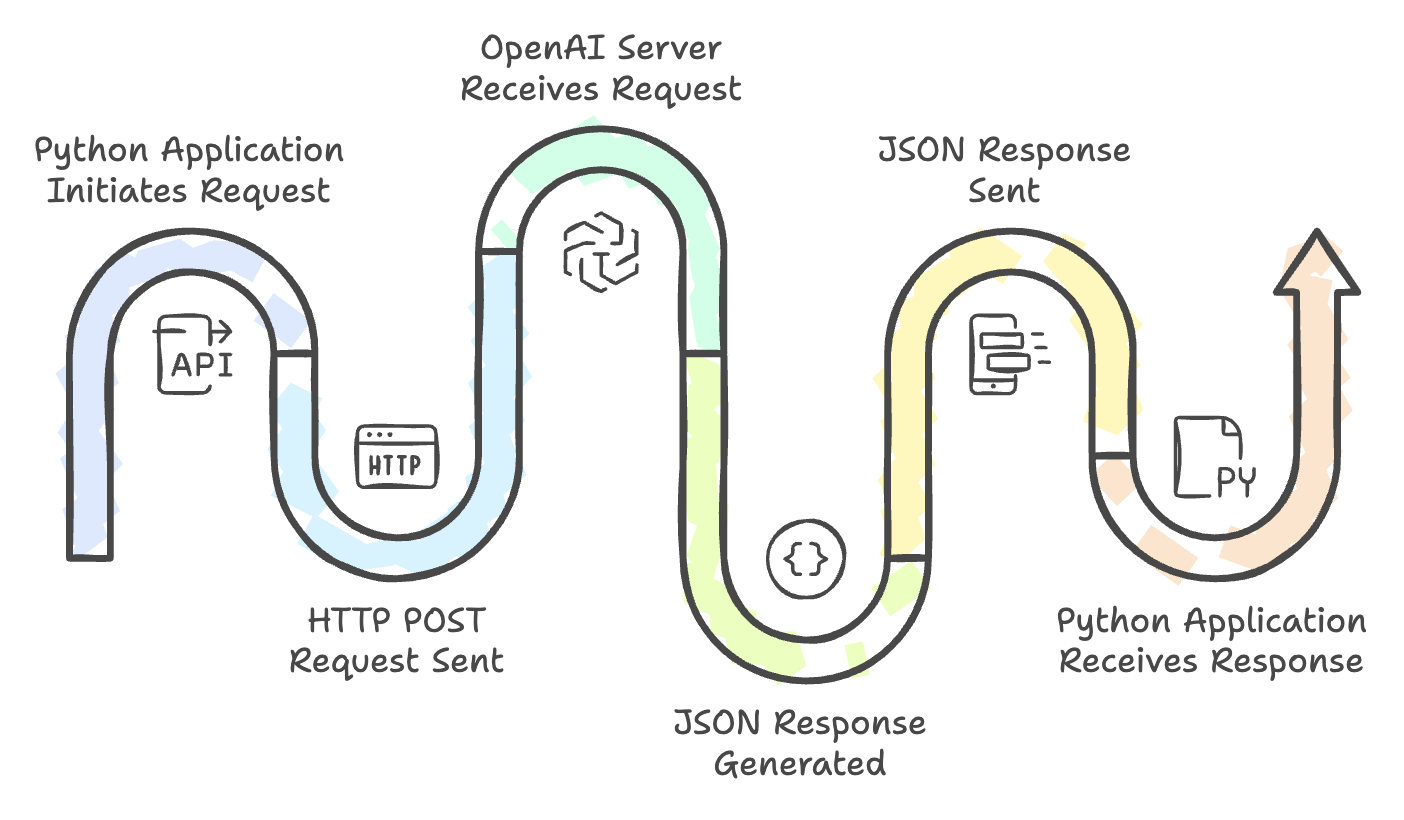
Before SDKs existed, developers communicated directly with APIs using HTTP requests.
Complete Code Example
import os
import requests
import json
from dotenv import load_dotenv

load_dotenv()
api_key = os.getenv("OPENAI_API_KEY")
uri = "https://api.openai.com/v1/chat/completions"

headers = {
    "Authorization": f"Bearer {api_key}",
    "Content-Type": "application/json"
}

payload = {
    "model": "gpt-4o",
    "messages": [
        {"role": "system", "content": "You are a movie reviewer bot."},
        {"role": "user", "content": "Name a bollywood comedy movie with SRK as lead? Give me just the name."}
    ]
}

response = requests.post(uri, headers=headers, json=payload)
print(response.json())
How It Works
- Loads the API key from the
.envfile usingpython-dotenv - Defines the endpoint URI and authorization headers
- Constructs a JSON payload with model and messages
- Sends a POST request to the OpenAI server
- Prints the JSON response containing the generated text and token usage
Understanding the Response
The API returns a JSON response containing:
- Generated text
- Metadata
- Token usage statistics
Typical response contains:
{
  "choices": [...],
  "usage": {
      "prompt_tokens": 10,
      "completion_tokens": 8,
      "total_tokens": 18
  }
}
Approach 2: Official OpenAI Python SDK
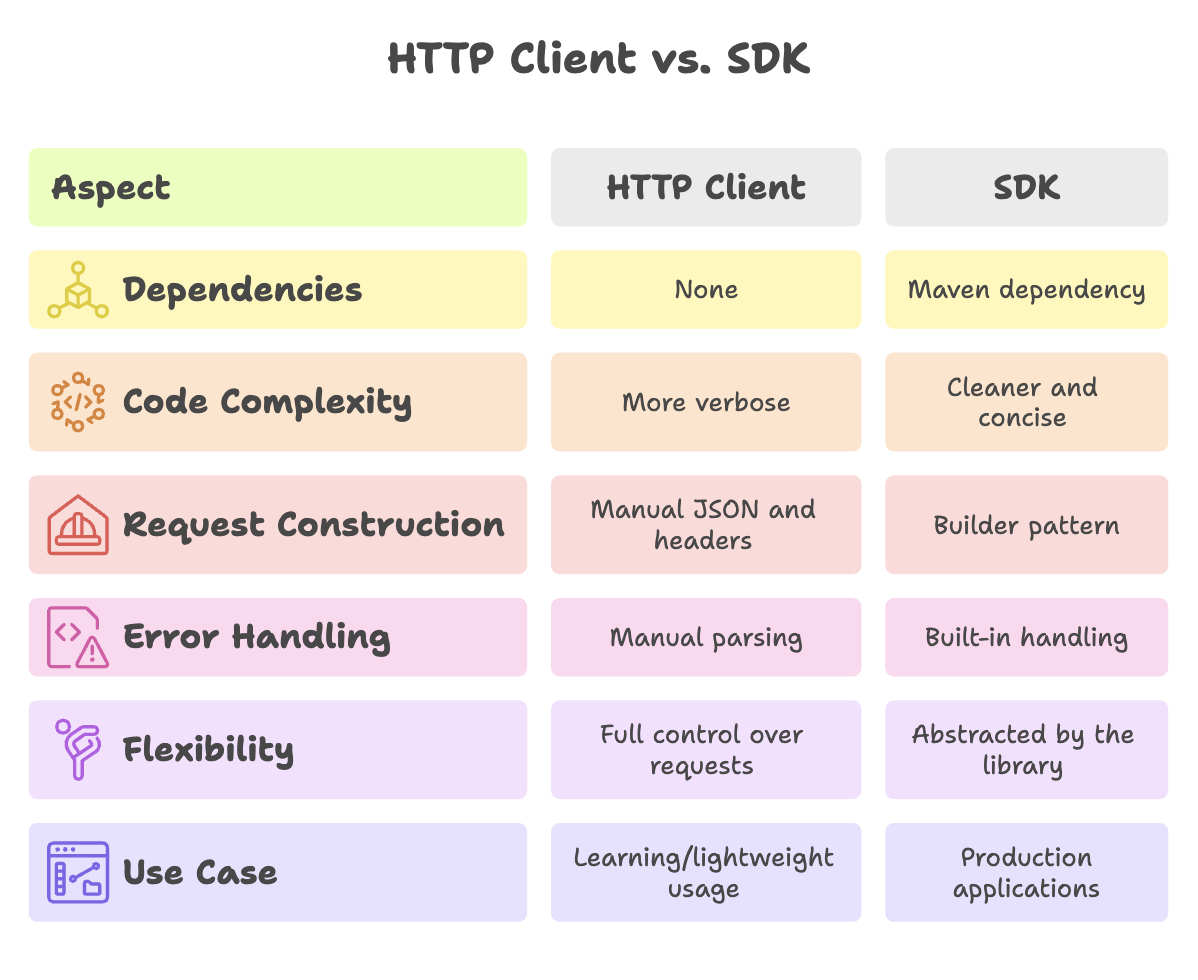
The SDK abstracts HTTP details, producing cleaner code with fewer potential bugs.
Installation
uv add openaiComplete Code Example
from openai import OpenAI
from dotenv import load_dotenv

load_dotenv()

client = OpenAI()

response = client.responses.create(
    model="gpt-4o",
    input="Name a bollywood comedy movie with SRK as the lead actor, name just the movie title"
)

print(response.output_text)
How It Works
load_dotenv()loads environment variables from.envfileOpenAI()creates a client object (automatically readsOPENAI_API_KEYfrom environment)client.responses.create()sends the request with the specified model and inputresponse.output_textdirectly gives the generated text (no manual JSON parsing needed)
Response Handling and Token Tracking
API responses include:
- Model's text output - The generated answer
- Token usage breakdown:
prompt_tokens- Tokens consumed by the input (system + user messages)completion_tokens- Tokens consumed by the generated responsetotal_tokens- Sum of both (used for billing calculation)
This breakdown enables precise billing tracking and usage optimization.
Prompt Engineering with Python
Prompt engineering refers to designing effective prompts to guide model behavior.
A well-crafted prompt improves:
- Accuracy
- Relevance
- Consistency
Example:
Basic Prompt:
Recommend a movie.Improved Prompt:
Recommend a Bollywood comedy movie starring Shah Rukh Khan.
Return only the movie title.
The second prompt produces more targeted and useful results.
Building AI-Enabled Applications
Using the Python SDK, AI capabilities can be integrated into applications such as:
- Quiz generators
- Chatbots
- Recommendation systems
- Content creation tools
- Customer support assistants
- Educational platforms
The model receives a prompt and generates intelligent responses that enhance application functionality.
Summary
- OpenAI models can be run locally (where supported) or accessed through OpenAI-hosted infrastructure using APIs.
- API keys should always be stored securely in environment variables and never hardcoded into source code.
- OpenAI pricing is token-based, making it important to monitor usage and manage billing carefully.
- API requests consist of an endpoint, authentication headers, and a structured payload containing model and message data.
- System messages define model behavior, while user messages provide the actual input prompt.
- The official OpenAI Python SDK simplifies development by handling authentication, request creation, and response processing automatically.
- Prompt engineering plays a crucial role in improving response quality and enabling intelligent AI-powered applications.
- For production applications, the SDK approach is preferred because it produces cleaner, more maintainable, and less error-prone code.
Official Document Reference: OpenAI Libraries
Written By: Muskan Garg
How is this guide?
Last updated on