
OpenAI Model Call Using Java
OpenAI provides SDKs for multiple programming languages, enabling developers to integrate AI capabilities into their applications. Java can be integrated with OpenAI's API to make model calls, generate responses, and add AI features to existing projects using two primary approaches:
- HTTP Client (Without SDK) - Using Java's built-in
HttpClientto make direct API requests - OpenAI Java SDK - Using the official OpenAI Java library for cleaner integration
Why Integrate OpenAI with Java?
Java is one of the most widely used programming languages for:
- Enterprise applications
- Backend services
- Microservices
- Banking systems
- E-commerce platforms
Integrating OpenAI models allows Java applications to leverage advanced AI capabilities without building machine learning models from scratch.
Common use cases include:
- AI-powered search
- Automated content creation
- Chat assistants
- Knowledge retrieval systems
- Educational platforms
- Business process automation
Approaches to Integrating OpenAI in Java
There are two primary approaches:
1. HTTP Client (Without SDK)
Use Java's built-in HTTP client to directly communicate with OpenAI APIs.
Characteristics
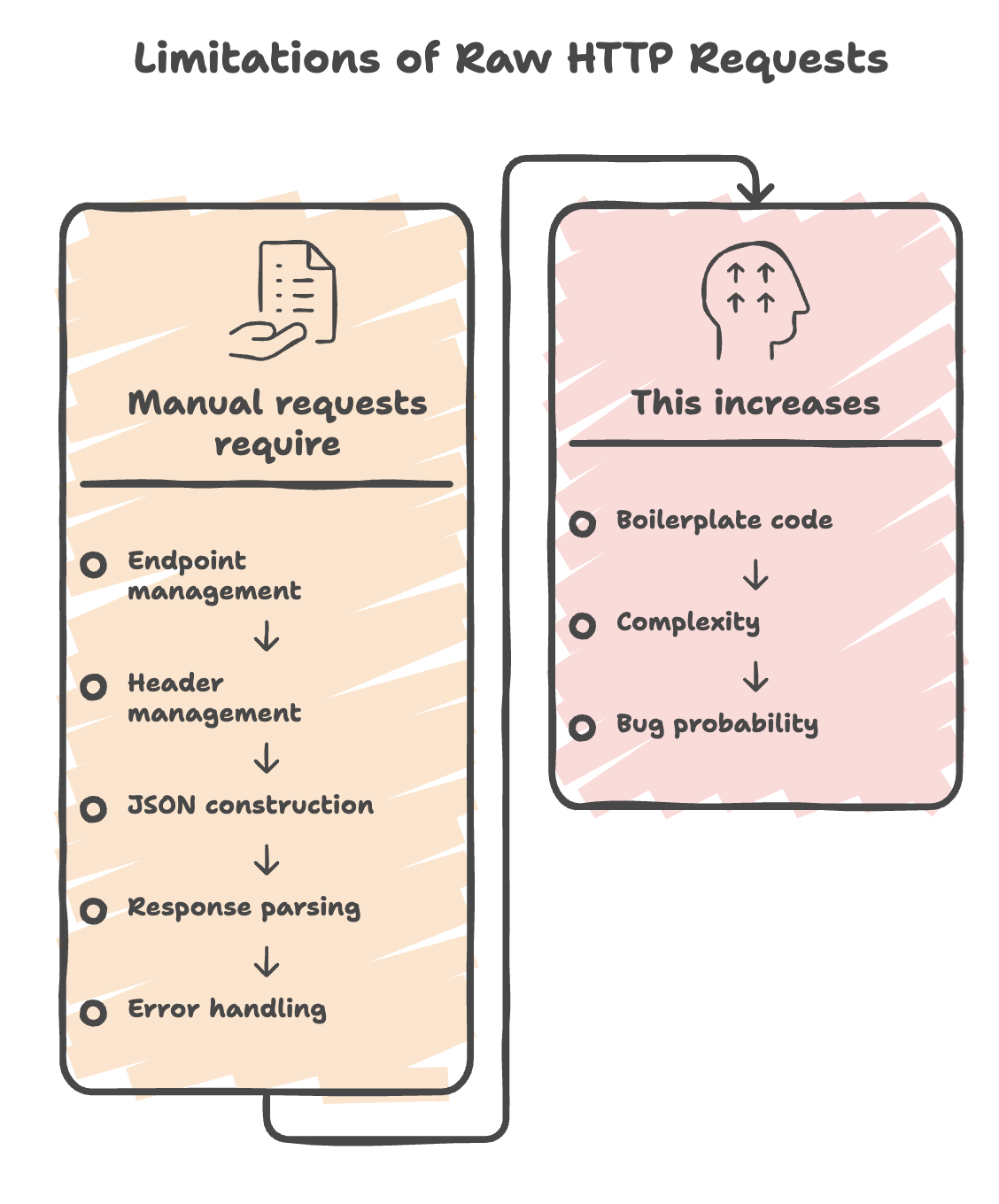
- Full control over HTTP requests
- No external OpenAI dependency required
- More boilerplate code
- Manual handling of requests and responses
2. OpenAI Java SDK
Use the official OpenAI Java library.
Characteristics
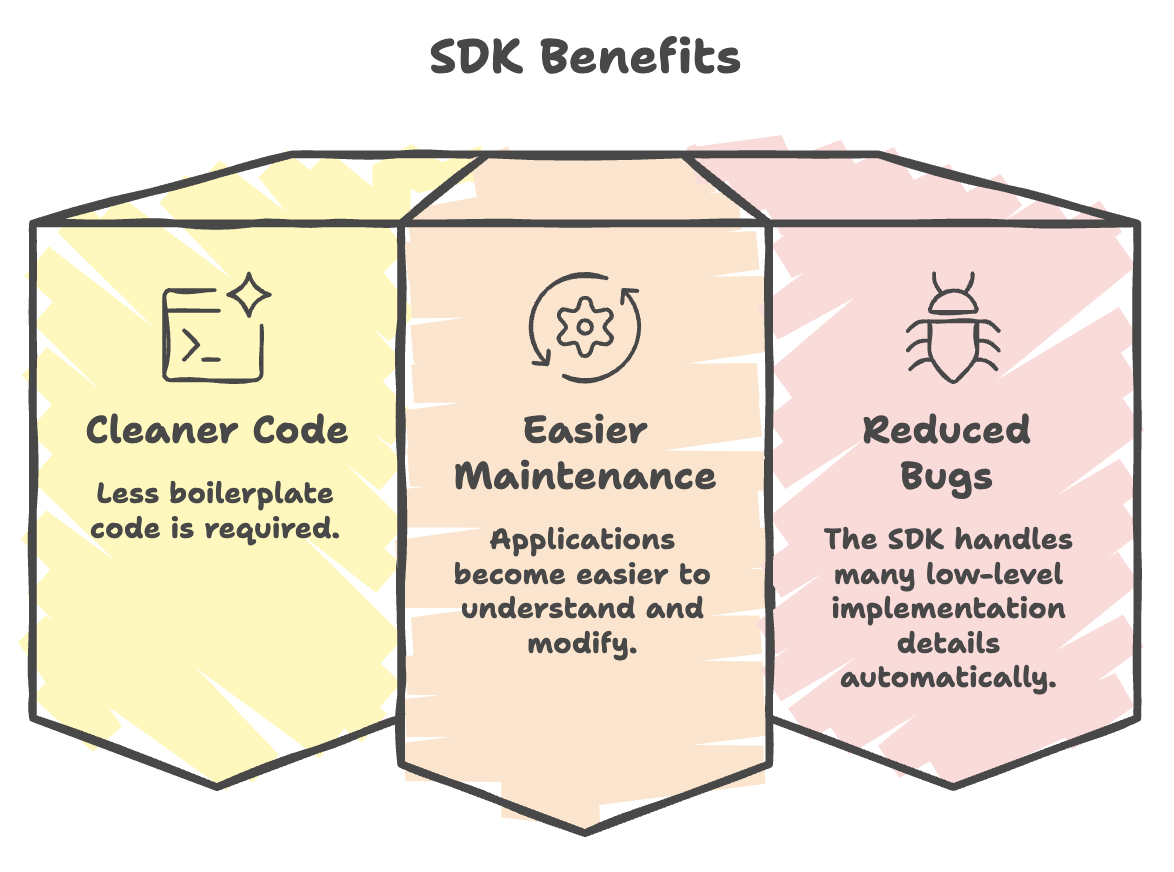
- Cleaner implementation
- Less code
- Built-in request handling
- Easier maintenance
- Better suited for production applications
API Setup and Security
Step 1: Create an API Key
- Login to OpenAI and select the API Platform
- Navigate to your Profile -> API Keys -> Create a new secret key
- Save the key securely (it will not be shown again)
Step 2: Configure Billing
- Go to Billing and add a balance (e.g., $5 for starters)
- Ensure auto-recharge is OFF to avoid unexpected costs
Step 3: Store the API Key as an Environment Variable
Never hardcode API keys in source code. Store them as environment variables for secure handling:
String apiKey = System.getenv("OPENAI_API_KEY");IntelliJ IDEA Configuration:
- Click Edit Configuration -> Add New Configuration -> Application
- Set the main class name
- In Environment Variables, add:
- Name:
OPENAI_API_KEY - Value:
<your-secret-key>
- Name:
- Click Apply and OK
Understanding Messages
OpenAI APIs use structured messages.
The two most common message types are:
1. System Message
Defines:
- AI behavior
- Tone
- Personality
- Context
Example:
{
  "role": "system",
  "content": "You are a movie reviewer bot."
}
This instructs the model how it should behave.
2. User Message
Contains the actual prompt or question.
Example:
{
  "role": "user",
  "content": "Recommend a Bollywood comedy movie."
}
Why System Messages Are Important
System messages help:
- Control AI behavior
- Improve consistency
- Restrict responses
- Create specialized assistants
Examples:
- Coding assistant
- Travel advisor
- Interview coach
- Movie recommender
Approach 1: HTTP Client (Without SDK)
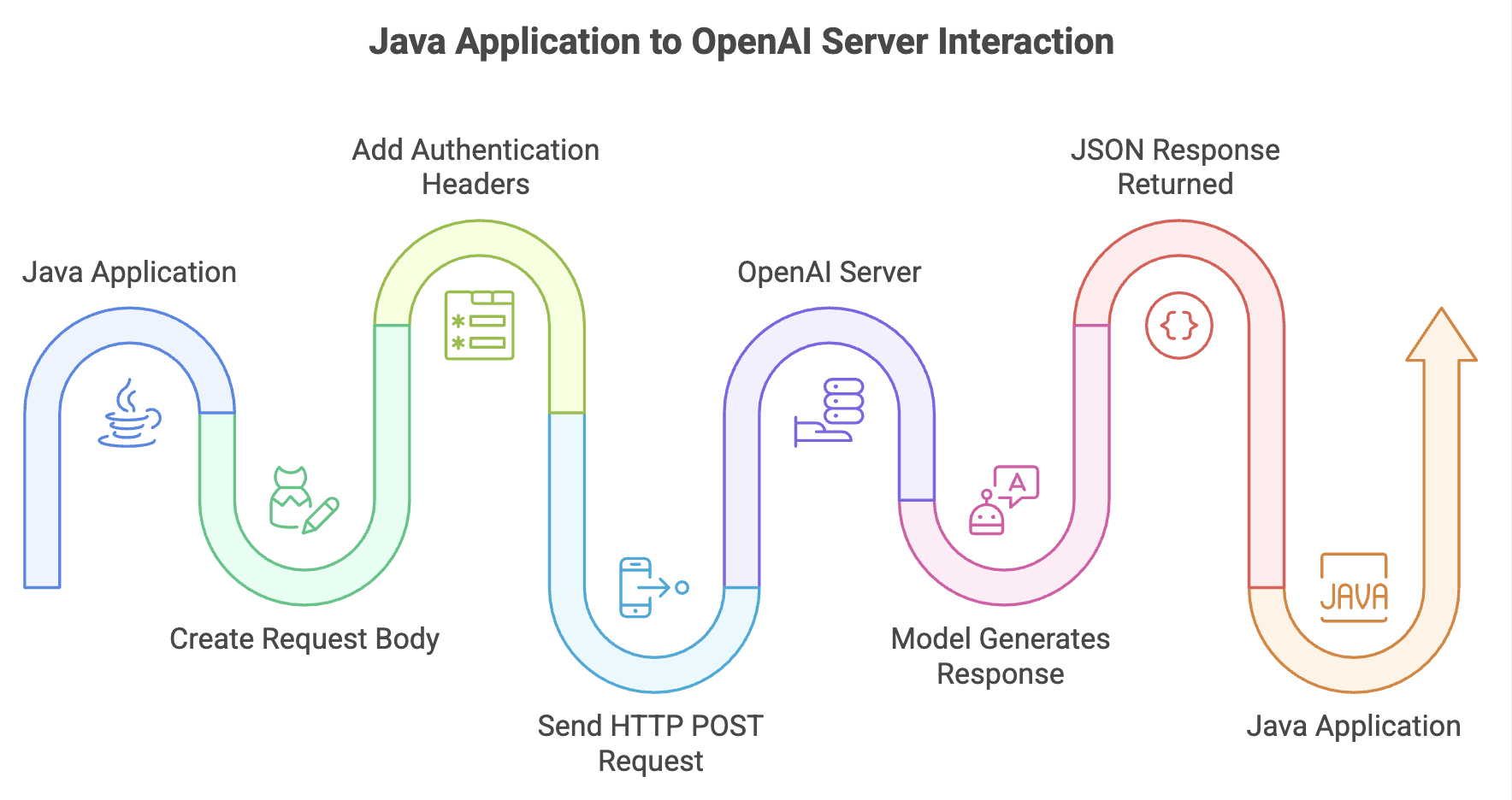
Java's built-in HttpClient enables direct API calls without any external dependencies. This approach gives full control over the HTTP request structure.
Key Components
| Component | Value |
|---|---|
| Endpoint | https://api.openai.com/v1/chat/completions |
| Method | POST |
| Content-Type | application/json |
| Authorization | Bearer <API_KEY> |
Request Body Structure
The request body is a JSON object containing:
- model - The model to use (e.g.,
gpt-4o) - messages - An array of message objects with:
systemmessage - Defines the AI's role/personausermessage - The actual prompt/question
Complete Code Example
package com.telusko;

import java.io.IOException;
import java.net.URI;
import java.net.http.HttpClient;
import java.net.http.HttpRequest;
import java.net.http.HttpResponse;

public class Main {
    public static void main(String[] args) throws IOException, InterruptedException {

        String apiKey = System.getenv("OPENAI_API_KEY");

        HttpClient client = HttpClient.newHttpClient();

        String requestBody = """
                {
                    "model": "gpt-4o",
                    "messages": [
                        {"role": "system", "content": "You are a movie review expert"},
                        {"role": "user", "content": "name one bollywood comedy movie, just the name"}
                    ]
                }
                """;

        HttpRequest request = HttpRequest.newBuilder()
                .uri(URI.create("https://api.openai.com/v1/chat/completions"))
                .header("Content-Type", "application/json")
                .header("Authorization", "Bearer " + apiKey)
                .POST(HttpRequest.BodyPublishers.ofString(requestBody))
                .build();

        HttpResponse<String> response = client.send(request, HttpResponse.BodyHandlers.ofString());

        System.out.println(response.body());
    }
}
How It Works
- Retrieves the API key from environment variables
- Creates an
HttpClientinstance - Builds a JSON request body with model and messages
- Constructs an
HttpRequestwith URI, headers, and POST body - Sends the request and receives the response as a string
- Prints the full JSON response (includes generated text and token usage)
Approach 2: OpenAI Java SDK (With SDK)
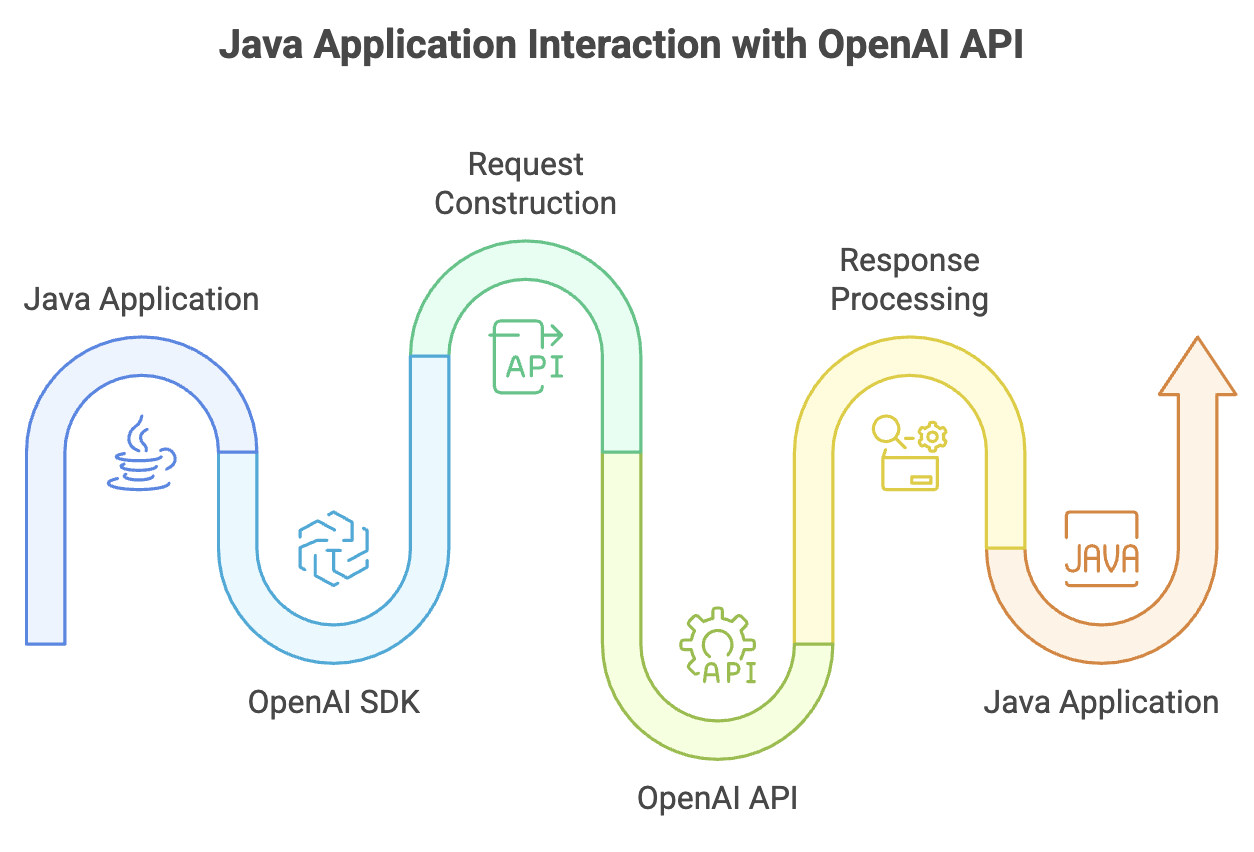
The official OpenAI Java SDK provides a simpler, more structured integration compared to raw HTTP calls.
Maven Dependency
Add the following dependency to your pom.xml:
<dependency>
    <groupId>com.openai</groupId>
    <artifactId>openai-java</artifactId>
    <version>4.0.0</version>
</dependency>
Complete Code Example
package com.telusko;

import com.openai.client.OpenAIClient;
import com.openai.client.okhttp.OpenAIOkHttpClient;
import com.openai.models.responses.Response;
import com.openai.models.responses.ResponseCreateParams;

public class OpenAIDemo {
    public static void main(String[] args) {

        OpenAIClient client = OpenAIOkHttpClient.fromEnv();

        ResponseCreateParams params = ResponseCreateParams.builder()
                .input("name one bollywood comedy movie, just the name")
                .model("gpt-4o")
                .build();

        Response response = client.responses().create(params);

        System.out.println(response);
    }
}
How It Works
OpenAIOkHttpClient.fromEnv()automatically readsOPENAI_API_KEYfrom environment variablesResponseCreateParams.builder()constructs the request using the builder pattern- The SDK handles HTTP connection, headers, serialization, and error handling internally
- Response object contains the AI-generated output
Note: Edit the run configuration for this class as well to include the
OPENAI_API_KEYenvironment variable.
Model Selection and Cost Management
- OpenAI offers multiple models:
gpt-4o,gpt-4,gpt-3.5-turbo, etc. - Pricing is token-based (input tokens + output tokens)
- Each API response includes token usage information for tracking consumption
- Choose models based on application needs (cost vs capability trade-off)
Summary
-
Java applications can integrate with AI services using either raw HTTP requests or the official SDK, depending on the project's complexity and requirements.
-
API credentials should always be managed securely through environment variables or configuration management tools, avoiding hardcoded keys in source code.
-
AI interactions are driven by structured messages, where system messages define behavior and context, while user messages provide the actual request or prompt.
-
AI model responses are inherently non-deterministic, meaning identical prompts may generate different outputs across multiple executions.
-
The official SDK approach is generally preferred for production environments due to its cleaner implementation, better maintainability, and built-in support for common features.
-
Integrating AI capabilities into Java applications enables rapid development of features such as content generation, question-answering systems, chat assistants, recommendations, and intelligent automation.
Official Document Reference: OpenAI SDKs and Libraries
Written By: Muskan Garg
How is this guide?
Last updated on