
Super Keyword
1. Introduction
The super keyword in Java is used to refer to the immediate parent class.
It provides access to:
- Parent class variables
- Parent class methods
- Parent class constructor
Whenever a subclass wants to use or extend the behavior of its parent, the super keyword plays a crucial role.
It is especially important when:
- Parent and child have the same method names
- Parent and child have the same variable names
- Calling parent constructor is necessary before subclass initialization
2. Why Do We Need super?
2.1 To Access Parent Class Members Hidden by Child Members
If parent and child have a variable or method with the same name,
super helps in distinguishing them.
2.2 To Call Parent Class Constructor
Using super() ensures parent fields are initialized before child-specific initialization.
2.3 To Enhance Behavior Instead of Completely Overwriting
When overriding methods, super.methodName() allows calling the parent version.
3. Using super to Access Parent Class Variables
When parent and child have variables with the same name:
class Parent {
    int value = 10;
}

class Child extends Parent {
    int value = 20;

    void display() {
        System.out.println(value);        // 20
        System.out.println(super.value);  // 10
    }
}
super.value accesses the parent’s variable.
4. Using super to Access Parent Class Methods
When a child overrides a method but still wants to use the parent method:
class Parent {
    void show() {
        System.out.println("Parent show");
    }
}

class Child extends Parent {
    void show() {
        System.out.println("Child show");
    }

    void display() {
        super.show(); // calls Parent show
        show();       // calls Child show
    }
}
Output:
Parent show
Child show
super.show() helps extend functionality rather than replace it.
5. Using super to Call Parent Class Constructor
Rule:
super() must be the first statement inside a subclass constructor.
Example:
class Parent {
    Parent() {
        System.out.println("Parent Constructor");
    }
}

class Child extends Parent {
    Child() {
        super();  // calls Parent constructor
        System.out.println("Child Constructor");
    }
}
Output:
Parent Constructor
Child Constructor
Even if you don’t write super(), Java automatically inserts it.
6. Calling Parameterized Parent Constructor
Use super(parameters) to call parent’s constructor with arguments.
class Parent {
    Parent(int x) {
        System.out.println("Parent: " + x);
    }
}

class Child extends Parent {
    Child() {
        super(100); // calling parameterized constructor
        System.out.println("Child Constructor");
    }
}
Output:
Parent: 100
Child Constructor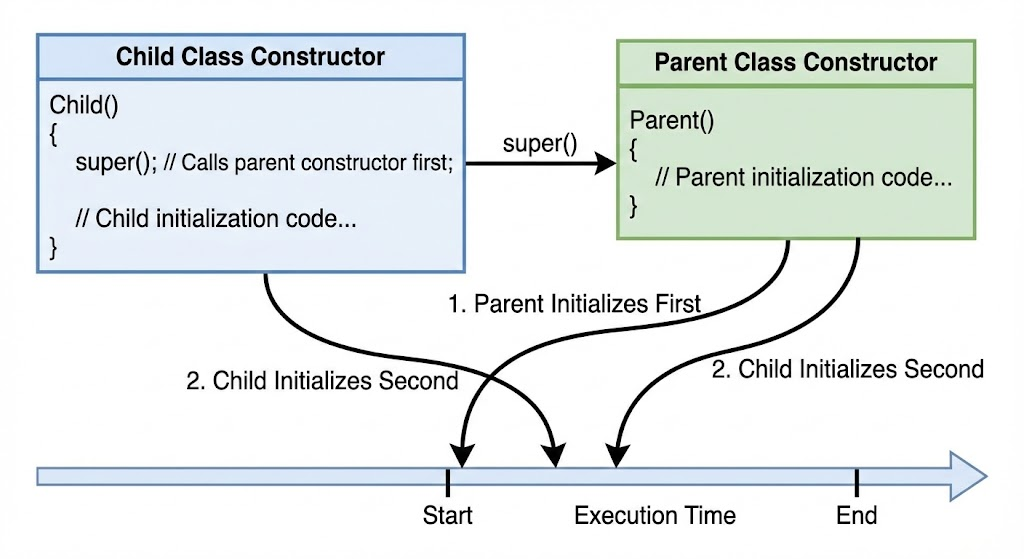
7. super() vs this()
| Feature | super() | this() |
|---|---|---|
| Refers to | Parent class | Current class |
| Used for | Accessing parent members | Accessing current members |
| Constructor call | Calls parent constructor | Calls current class constructor |
| Order requirement | Must be first statement | Must be first statement |
| Can both be used in same constructor? | No | No |
8. Real-World Example: Overriding and Enhancing Behavior
class Logger {
    void log(String msg) {
        System.out.println("LOG: " + msg);
    }
}

class FileLogger extends Logger {
    @Override
    void log(String msg) {
        super.log(msg); // log to console
        System.out.println("Saving to file: " + msg);
    }
}
Output:
LOG: Error occurred
Saving to file: Error occurred
super.log() ensures the parent logging still occurs.
9. Important Rules About super
- Must be first statement in constructor
- Cannot be used in static context
- Used only inside instance methods or constructors
- If parent has no default constructor, child must call parameterized constructor using super()
- Can access only immediate parent (not grandparents)
10. Summary
superrefers to the parent class.- It is used to access parent variables, parent methods, and parent constructors.
- Essential when overriding methods and avoiding ambiguity.
- Ensures proper initialization order in inheritance.
- Helps extend behavior rather than completely replacing it.
This completes super keyword in inheritance.
Written By: Shiva Srivastava
How is this guide?
Last updated on