
Worktrees and Parallel Tasks
Use git worktrees to run separate Claude Code sessions in parallel, compare SQLite and Postgres for our backend, and clean up afterwards.
Sub-agents let one session split work into parallel pieces. But sometimes you need something different: two completely separate experiments that must not touch each other's files. That is what git worktrees are for.
The scenario: SQLite or Postgres?
We know the backend will use FastAPI. But which database?
| SQLite | PostgreSQL | |
|---|---|---|
| Setup | A single file, nothing to install | A server to run (often via Docker) |
| Good for | Small apps, prototypes, single-instance deployments | Concurrency, scale, advanced features |
We could let Claude pick one. It would probably choose sensibly. But six months later, when someone asks "why SQLite?", we want a written decision based on actual experiments, not a guess.
So we will build a small spike with each database, in parallel, and have Claude write decision notes for both. Neither experiment should affect our main project.
What is a git worktree?
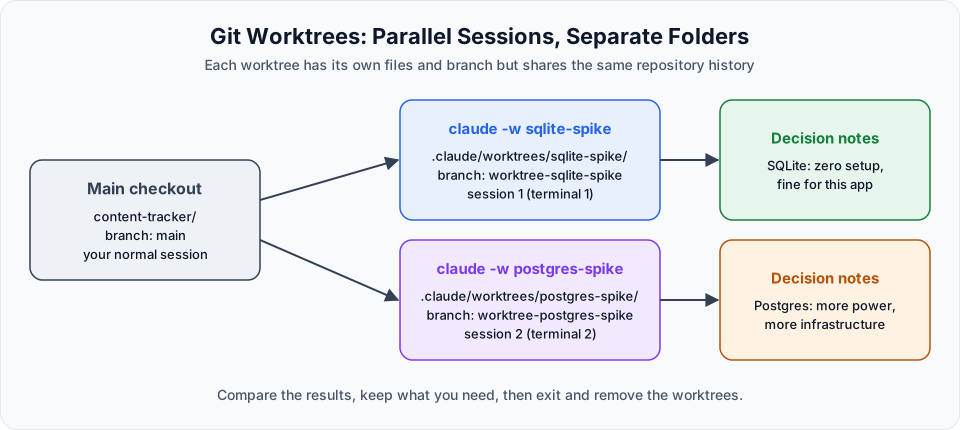
A git worktree is an extra working folder for the same repository. Each worktree has its own files and its own branch, but they all share the same git history.
It is like checking out a feature branch, except you do not have to switch back and forth: both branches exist side by side in different folders, and you can run a separate Claude Code session in each.
Running the experiment
Make sure the project is a git repository with a commit
Worktrees need git. Commit your current work so both worktrees start from the same point.
Open two terminals
In VS Code, open two integrated terminals side by side. Rename the tabs (for example "sqlite" and "postgres") so you do not mix them up.
Start Claude Code in a worktree in each terminal
claude -w sqlite-spikeclaude -w postgres-spike-w is short for --worktree. Claude Code creates the worktree under .claude/worktrees/<name>/ on a new branch called worktree-<name>, and starts the session inside it. The files you see in that session are the worktree's own copies, not your main files.
Switch each session to Sonnet with /model sonnet. This experiment does not need Opus.
Give each session its prompt
Scaffold a minimal FastAPI app in the backend folder. Use SQLite as the database.
Create a Task model matching specs/api-contract.md and load an initial fixture from
specs/seed-data.json. Then write short decision notes documenting what was easy,
what was hard, and what production trade-offs SQLite has for our use case.Scaffold a minimal FastAPI app in the backend folder. Use PostgreSQL as the database.
Create a Task model matching specs/api-contract.md and load an initial fixture from
specs/seed-data.json. Then write short decision notes documenting what was easy,
what was hard, and what production trade-offs PostgreSQL has for our use case.Both sessions now work at the same time, each in its own folder and branch.
Compare the decision notes
Read both notes yourself, or ask Claude to compare them. In our case the conclusion was clear:
- Postgres brought extra setup (a database server, Docker, connection configuration) that this small app does not need yet
- SQLite needs zero infrastructure and is perfectly fine for this project, with the known limitation that it struggles with heavy concurrent writes as the app grows
So we go with SQLite, and now the reasoning is written down.
Gitignored files are not copied
A worktree is a fresh checkout, so gitignored files such as .env or .claude/settings.local.json are not there. To copy specific gitignored files into every new worktree automatically, list them in a .worktreeinclude file at the project root.
Cleaning up
When you exit a worktree session with /exit, Claude Code checks whether the worktree has changes:
| Worktree state | What happens |
|---|---|
| No changes | Removed automatically, along with its branch (named sessions ask first) |
| Has changes or commits | You are asked whether to keep or remove it |
If you keep it, Claude Code prints a claude --worktree <name> --resume command so you can return later.
You can also manage worktrees with plain git:
git worktree list
git worktree remove .claude/worktrees/postgres-spike
If git refuses because files are modified or in use, add --force, but only after making sure you do not need anything in that folder.
Add .claude/worktrees/ to your .gitignore so worktree folders never show up as untracked files in your main project.
Sub-agents or worktrees?
| Sub-agents | Worktrees | |
|---|---|---|
| Runs in | The same session | Separate sessions |
| Files | The same working folder | Separate folders and branches |
| Best for | Small, independent jobs inside one task: extraction, research, reviews | Divergent work: experiments, spikes, two features at once, "two different realities" |
| Result | A summary back in your session | A separate branch you can merge, keep or throw away |
They also combine: a sub-agent with isolation: worktree in its frontmatter runs inside its own temporary worktree.
Try It Yourself
Before moving to the next section, practise what you learned:
- Create the two sub-agents from this section and run them together. Check that both spec files exist and make sense.
- Run
/contextafter the sub-agents finish and compare it with doing the same work in the main session. - Start two sessions with
claude -w <name>in two terminals, make a different change in each, and look atgit worktree list. - Exit both sessions and remove the worktrees cleanly.
Official references
Written By: Shramik Masti
How is this guide?
Last updated on
Sub-Agent Workflow Demo
Run the api-extractor and seed-data-extractor sub-agents in parallel, verify their output, and compare the main session's context before and after.
Integration Requirements and Flow
The plan for building the backend in small feature branches, the target architecture, and how the frontend, FastAPI and SQLite fit together.