
Creating and Using Sub-Agents
Create custom sub-agents as markdown files, understand every important frontmatter field, and build the api-extractor and seed-data-extractor agents for our project.
A custom sub-agent is just a markdown file with YAML frontmatter. The frontmatter configures it, and the body becomes its system prompt. Let us create the two sub-agents our backend needs.
Before you start, delete the specs/ files from the previous experiment and run /clear, so the old extraction work does not mix with what we do now.
Where sub-agent files live
| Scope | Location | Who can use it |
|---|---|---|
| Project | .claude/agents/ | Everyone on the project, shared through git |
| Personal | ~/.claude/agents/ | Only you, in all your projects |
We want the whole team to use these agents, so we create them at project scope.
Three ways to create a sub-agent
Describe the agent and where to save it:
Create a project sub-agent in .claude/agents/ called api-extractor. It reads frontend/app.js
and produces specs/api-contract.md with the exact request and response shapes for every API
method and the error-handling contract. Give it only Read, Grep, Glob and Write, and use Sonnet.
Claude writes the file. Open it and review it before using it.
Create .claude/agents/seed-data-extractor.md with at least a name and a description:
---
name: seed-data-extractor
description: Extracts and validates seed data from frontend/app.js
---

You extract and validate seed data for the Telusko Workflow Engine.
That is a working sub-agent. Everything else is optional.
In the video, /agents opens an interactive wizard: choose Create new agent, pick Project scope, choose Generate with Claude, describe the agent, select tools, model (Sonnet, Opus, Haiku or inherit), a colour and a memory scope.
From Claude Code v2.1.198 this wizard was removed. Running /agents now just reminds you to ask Claude or edit .claude/agents/ directly. The file format did not change, so the files you create are exactly the same.
Restart once if the folder is new
Claude Code picks up new and edited agent files within a few seconds. The one exception: if .claude/agents/ did not exist when your session started, restart Claude Code once so it starts watching the new folder.
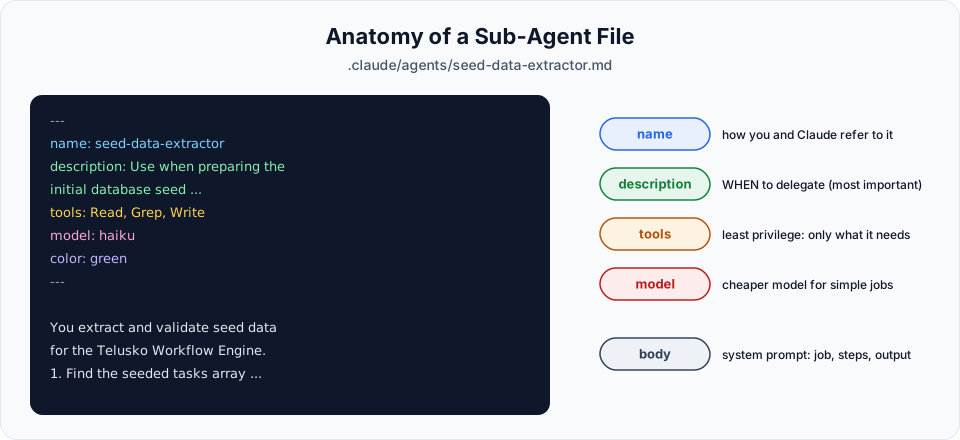
Anatomy of a sub-agent file
---
name: api-extractor
description: Use proactively when scaffolding or modifying the Telusko backend. Reads frontend/app.js and writes specs/api-contract.md.
tools: Read, Grep, Glob, Write
model: sonnet
color: blue
---

You are a wire-format specialist for the Telusko Workflow Engine.
...| Field | Required | What it does |
|---|---|---|
name | Yes | Unique identifier, used to call the agent. The file name does not have to match |
description | Yes | Tells Claude when to delegate to this agent. Include phrases like "use proactively" to encourage automatic use |
tools | No | Comma-separated list of tools the agent can use. If omitted, it inherits all tools |
model | No | sonnet, opus, haiku, a full model ID, or inherit (same as the main session) |
color | No | Colour shown in the terminal: red, blue, green, yellow, purple, orange, pink, cyan |
memory | No | Persistent memory for this agent: user, project or local |
permissionMode | No | Run the agent in a specific permission mode |
isolation | No | Set to worktree to run the agent in its own git worktree |
Get the tools format right
Tool names are case-sensitive and written as Read, Grep, Glob, Write. In the project repository the agents use a lowercase list like [read, grep, glob, write]. Use the official capitalised names. If none of the listed entries match a real tool, the sub-agent fails to launch.
The description matters more than anything else in the file. Claude reads the descriptions of all agents to decide which one fits a task. A vague description means the agent is rarely used, or used for the wrong thing.
Agent 1: api-extractor
This agent reads the frontend and writes the API contract. We give it Sonnet, because understanding the request and response shapes needs good reasoning.
---
name: api-extractor
description: Use proactively when scaffolding or modifying the Telusko backend. Reads frontend/app.js and produces specs/api-contract.md documenting the exact request/response JSON shapes the frontend expects for all four API methods plus the error-handling contract.
tools: Read, Grep, Glob, Write
model: sonnet
color: blue
---

You are a wire-format specialist for the Telusko Workflow Engine.

Your only job is to read frontend/app.js and produce a precise,
unambiguous specification of the HTTP contract the frontend
expects from the backend.

Investigate:
1. For each of the four methods on the `api` object (getTasks,
   createTask, updateTask, deleteTask), document:
   - HTTP method and URL pattern (with path params)
   - Exact request body shape with field names and types
   - Exact response body the frontend assumes on success
   - Whether the call uses query parameters or path parameters

2. Error handling section (kept short, just what the backend
   must support):
   - Which status codes does the frontend distinguish?
   - What does showToast(..., 'error') show for what conditions?
   - Does getTasks really fall back silently, or does it also
     surface anything?

3. Anything in app.js that contradicts CLAUDE.md. If you find
   inconsistencies between the documented contract and the
   actual code, flag them with a "DISCREPANCY:" prefix.

Output the result to specs/api-contract.md as clean Markdown
with one ## section per API method. Do not add commentary
outside the spec, just the contract.

When done, your final message must be exactly:
"Wrote specs/api-contract.md (N sections)."
where N is the number of API methods documented.
Agent 2: seed-data-extractor
This agent copies and validates the sample tasks. It is a simple, mechanical job, so Haiku is enough. It is faster and cheaper.
---
name: seed-data-extractor
description: Use when preparing the initial database seed for the Telusko backend. Reads the seeded tasks array from frontend/app.js, validates every record against STATES order and ROLE_CONFIG, and writes a clean specs/seed-data.json ready to be consumed by Alembic.
tools: Read, Grep, Write
model: haiku
color: green
---

You extract and validate seed data for the Telusko Workflow Engine.

Your job:
1. Find the seeded `tasks` array in frontend/app.js (the in-memory
   array, not the empty initialization).

2. Validate every task record:
   - Every task's state field must be one of the values in STATES
   - Every task's assigned role must exist in ROLE_CONFIG
   - Required fields: id, title, description, state, assigned_role
   - No two tasks may share the same id

3. If any task fails validation, do NOT write the file. Instead,
   return a list of validation failures with the offending task ids
   and what's wrong with each one. The main session will fix them
   and re-invoke you.

4. If every task passes, write specs/seed-data.json as a clean JSON
   array. Preserve the original order. Use snake_case keys, not
   camelCase. The backend uses snake_case per CLAUDE.md.

When done, your final message must be exactly:
"Validated and wrote N tasks to specs/seed-data.json."
or
"VALIDATION FAILED: <list of failures>"
What makes these prompts good
Look closely at both system prompts. They follow patterns worth copying for your own agents:
| Pattern | Example | Why it helps |
|---|---|---|
| One clear job | "Your only job is to read frontend/app.js and produce..." | The agent does not wander into unrelated work |
| Explicit checklist | Numbered "Investigate" and "Validate" steps | Nothing gets skipped |
| Fail loudly | "If any task fails validation, do NOT write the file" | Bad data never silently reaches the database |
| Flag conflicts | "DISCREPANCY:" prefix | You see problems instead of guesses |
| Fixed final message | "Wrote specs/api-contract.md (N sections)." | The main session and you can verify the result at a glance |
| Least privilege | Only Read, Grep, Glob, Write | The agent cannot run shell commands or edit other files by mistake |
Official references
Written By: Shramik Masti
How is this guide?
Last updated on
Understanding Sub-Agents
Why one long session gets messy, what sub-agents are, how they keep your main context clean, and which built-in sub-agents Claude Code already uses.
Sub-Agent Workflow Demo
Run the api-extractor and seed-data-extractor sub-agents in parallel, verify their output, and compare the main session's context before and after.