
Understanding Sub-Agents
Why one long session gets messy, what sub-agents are, how they keep your main context clean, and which built-in sub-agents Claude Code already uses.
We are about to build the backend. We could simply say "look at my frontend and build the backend", set a goal, give permissions and wait. Claude is smart enough to produce something.
But that is not our plan. We want to go step by step, with spec files that tell us exactly what Claude is going to build, so we can verify it follows our standards.
What the backend needs first
Before writing any backend code, we need two documents:
| Spec | Why we need it |
|---|---|
| API contract | The exact request and response shapes for the four API methods the frontend calls, plus which status codes it expects. The backend must match this exactly |
| Seed data | The sample tasks the frontend currently keeps in memory, cleaned and validated, so we can load them into the database |
Our CLAUDE.md mentions the states and roles, but it does not describe the endpoints properly. And it should not: CLAUDE.md must stay short. Detailed contracts belong in their own files under specs/.
The naive approach: one big prompt
We could ask the main session to do everything at once:
Before we build the backend, I need three things:
1. Go through app.js and document the exact JSON request body and response shape for all four API methods.
2. Go through app.js and extract the seed tasks array. Validate every record against STATES order and
   ROLE_CONFIG rules. Give me a clean JSON file.
3. Also pull out the error handling pattern so I know what status codes the frontend expects.
Do all three and put them in a specs folder.
(Points 1 and 3 are both about the API, so really these are two jobs.)
It works, but watch what happens:
- The main context fills up. Claude reads all ~500 lines of
app.jsinto your main conversation. From now on, every message you send carries that weight. - Tasks bleed into each other. Because one context is juggling two jobs, details meant for the API contract can end up in the seed data, and the other way round.
Run /context afterwards and you will see a big chunk of your window is now taken by this one-off extraction work.
The solution: sub-agents
A sub-agent is a helper that Claude delegates a task to. It runs in its own, separate context window, with its own tools and model. When it finishes, it sends back only a summary.
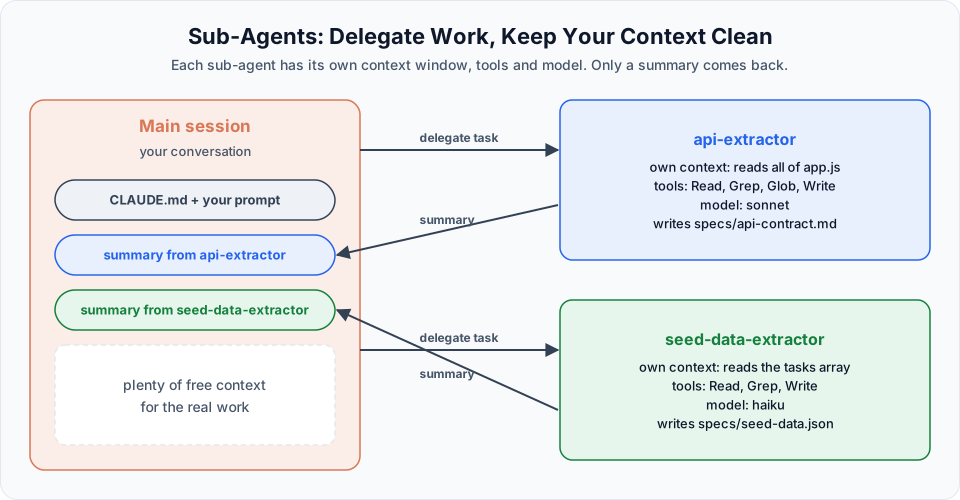
| Main session | Sub-agent | |
|---|---|---|
| Context | Your conversation | Its own fresh window |
| What it reads | Only what you need | Whatever its task needs, kept out of your context |
| Tools | Everything you allowed | Only the tools listed in its definition |
| Model | Your session model | Can be different (for example Haiku for simple work) |
| What comes back | A short summary |
Sub-agents still use tokens
A sub-agent does not make work free. It reads files and generates output, and those tokens count against your usage. What it saves is your main context, which keeps your session focused and accurate for longer.
Sub-agents you have already used
Without realising it, you have been using sub-agents already. Claude Code ships with built-in ones and delegates to them automatically:
| Built-in sub-agent | Purpose | Tools | Model |
|---|---|---|---|
| Explore | Fast, read-only search and analysis of the codebase | Read-only | Inherits your session model (capped at Opus) |
| Plan | Research during plan mode before presenting a plan | Read-only | Inherits your session model |
| General-purpose | Complex tasks that need both exploring and changing code | All tools | Inherits your session model |
When you ask "explain this project" and see an Explore(...) line in the output, that is a sub-agent at work. Explore and Plan also skip your CLAUDE.md, which keeps their research fast and cheap.
Changed in newer versions
In the video, Explore always ran on Haiku. From Claude Code v2.1.198, Explore inherits your session's model instead. If you want exploration to stay cheap, you can define your own sub-agent named Explore with model: haiku, and it overrides the built-in one.
Can sub-agents create sub-agents?
In the video, the rule was that only the main agent spawns sub-agents, which keeps things easy to follow. Newer versions allow nesting: by default a sub-agent can spawn its own sub-agents up to three layers below the main conversation. Only the top-level summary comes back to you.
If you prefer the simpler model while learning, turn nesting off in your settings:
{
  "env": {
    "CLAUDE_CODE_MAX_SUBAGENT_SPAWN_DEPTH": "1"
  }
}
When to use a sub-agent
Use a sub-agent when a task:
- Reads a lot of files or produces a lot of output you will not need later
- Is independent and can run in parallel with other work
- Benefits from a specialised prompt, restricted tools or a cheaper model
Keep the work in the main session when it needs frequent back-and-forth with you, or when the steps depend closely on each other.
In the next lesson we create two custom sub-agents: one for the API contract and one for the seed data.
Official references
Written By: Shramik Masti
How is this guide?
Last updated on
Slash Commands Recap
Planning, reviewing changes, session management with rename and resume, goals, diagnostics, and a complete cheat sheet of the commands used so far.
Creating and Using Sub-Agents
Create custom sub-agents as markdown files, understand every important frontmatter field, and build the api-extractor and seed-data-extractor agents for our project.