
Slash Commands Recap
Planning, reviewing changes, session management with rename and resume, goals, diagnostics, and a complete cheat sheet of the commands used so far.
We have covered the core commands. Let us finish with the ones for planning, reviewing your changes and managing sessions, and then put everything into one cheat sheet.
Planning: /plan
/plan add task filtering by state and role/plan switches into plan mode, optionally with a task description. Claude explores the code and proposes a plan, but does not edit your files until you approve. It is the same as pressing Shift+Tab until you see plan mode on. We will use it a lot when building features.
Reviewing changes
/diff
/diffShows the changes in your working tree, including everything Claude has edited so far. Untracked (new) files are listed. For tracked files, you see the actual line-by-line changes. Use it before every commit.
/review and /security-review
| Command | What it does |
|---|---|
/review (alias of /code-review) | Reviews the current diff, a branch, or a pull request number for correctness bugs |
/security-review | Reviews the changes on your branch against the default branch for vulnerabilities like injection, auth issues and data exposure |
These are a great second pair of eyes before you push. They do not replace your own review.
Undo: /rewind
/rewindThe same menu as pressing Esc twice. Restore code, the conversation, or both to an earlier prompt. See Permissions and Checkpoints.
Session management
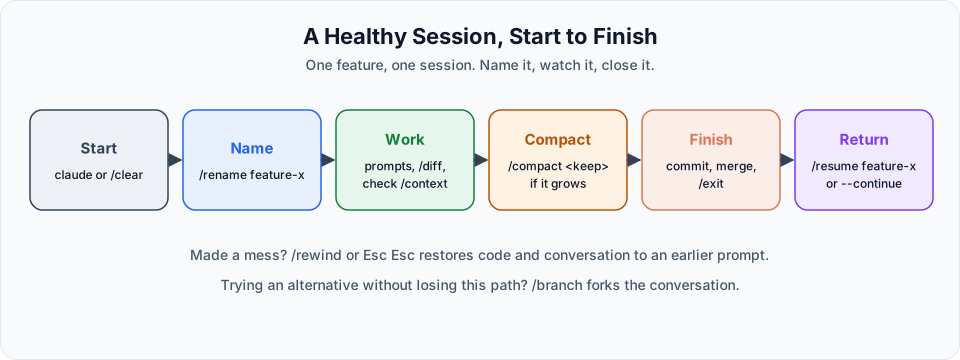
Each conversation with Claude Code is a session, saved locally under ~/.claude/projects/. You can name sessions, leave them and come back later.
/rename
By default, a session is labelled with the start of your first message, which is not very helpful when the first message was "hi". Give it a proper name:
/rename frontend-designThe name appears in the prompt bar and in the session list. Without a name, /rename generates one from the conversation.
/resume
Come back tomorrow and continue where you left off:
/resume frontend-designRun /resume without arguments to open a picker of recent sessions. You can also do this when launching Claude Code:
claude --continue            # continue the most recent session in this folder
claude --resume              # pick a session from a list
claude --resume frontend-design
Tip
Name a session as soon as you start a feature. A list of sessions called "backend-crud", "jwt-security" and "deploy-cloud-run" is much easier to work with than ten sessions called "hi".
/goal
/goal all tests in backend/tests passSets a completion condition. Claude keeps working across turns until the condition is met, instead of stopping after one reply. Useful for tasks like "make the test suite pass". Use /goal clear to remove it.
Diagnostics: /doctor
/doctorIf Claude Code behaves strangely, run this first. It checks your installation health, version, PATH problems and invalid settings files, and can fix many issues for you.
Cheat sheet
| Group | Command | Purpose |
|---|---|---|
| Setup | /init | Generate a CLAUDE.md |
/memory | Edit CLAUDE.md files and manage auto memory | |
/permissions | View and manage allow, ask and deny rules | |
/config | Open settings | |
/doctor | Diagnose and fix installation issues | |
| Context | /context | See what is using the context window |
/compact [focus] | Summarise the conversation, same task | |
/clear | Fresh conversation, new task | |
/btw <question> | Side question that is not added to the conversation | |
| Model | /model [name] | Switch model (opus, sonnet, haiku, opusplan) |
/effort [level] | Set reasoning effort | |
/usage | Plan usage and costs | |
| Workflow | /plan [task] | Enter plan mode |
/diff | Review working tree changes | |
/review | Code review of the diff, branch or PR | |
/security-review | Security review of your branch | |
/goal <condition> | Keep working until a condition is met | |
| Sessions | /rename <name> | Name the session |
/resume [name] | Continue a previous session | |
/rewind | Restore code or conversation to an earlier point | |
/exit | Leave Claude Code |
And three keyboard shortcuts you should know by heart:
| Shortcut | Action |
|---|---|
Shift+Tab | Cycle permission modes |
Esc | Stop Claude. Press twice on an empty prompt to rewind |
Ctrl+O | Open the detailed transcript view |
Try It Yourself
Before moving to the next section, practise what you learned:
- Run
/contextat the start of a session and again after a few prompts. Note which category grew. - Use
/btwfor a side question and confirm with/contextthat the conversation did not grow. - Name a session with
/rename, exit, and come back to it withclaude --resume <name>. - Run
/compactwith your own focus text and read the summary it creates.
Official references
Written By: Shramik Masti
How is this guide?
Last updated on
Essential Slash Commands
Master the commands that matter most: memory, permissions, context, compact, clear, btw, model and effort, with clear guidance on when to use each.
Understanding Sub-Agents
Why one long session gets messy, what sub-agents are, how they keep your main context clean, and which built-in sub-agents Claude Code already uses.