
Introduction to Slash Commands
What slash commands are, why they exist, and the three kinds you will use in Claude Code.
When you work with any coding assistant, you talk to it through prompts, and better prompts give better results. Models keep improving, so even rough prompts often work. But some activities you repeat again and again: initialise a project, check usage, clear the context, switch models.
Typing a fresh prompt for each of those is a waste of time. So Claude Code gives you slash commands: short, fixed commands that start with /. Some control Claude Code directly (like /clear), and others are packaged prompts that always do the same job well (like /init).
Seeing all the commands
Type a single / in the prompt. A list of available commands appears, and it filters as you type.
/You have already used a few without thinking of them as "commands":
| Command | What it did for us |
|---|---|
/init | Analysed the project and created CLAUDE.md |
/model | Switched between Opus, Sonnet and Haiku |
/usage | Showed session and weekly usage |
/login, /logout | Switched accounts |
/rewind | Opened the checkpoint menu |
/exit | Closed the session |
Three kinds of slash commands
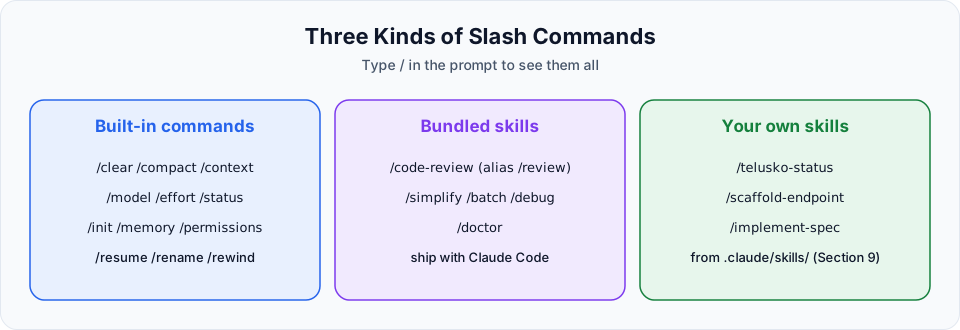
| Kind | What it is | Examples |
|---|---|---|
| Built-in commands | Control Claude Code itself: sessions, context, models, settings | /clear, /compact, /context, /model, /status |
| Bundled skills | Prompt-based workflows that ship with Claude Code | /code-review, /simplify, /batch, /debug |
| Your own skills | Commands you create for your project or team | /telusko-status, /scaffold-endpoint (Section 9) |
What happens behind the scenes
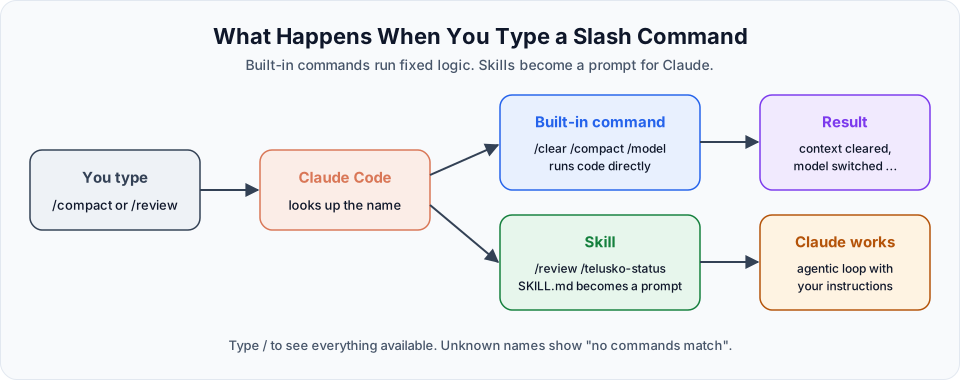
When you press Enter, Claude Code first checks whether the text starts with a known command name.
- Built-in commands like
/clear,/modelor/compactrun fixed logic inside Claude Code./cleardoes not ask the model anything. It simply starts a fresh conversation. - Skills, bundled or your own, are turned into instructions for Claude.
/reviewloads a carefully written review prompt, and Claude then works through it with its normal agentic loop.
This is why a skill can take a while and use tokens, while most built-in commands react instantly.
Anatomy of a command
Many commands accept arguments after the name, separated by a space:
| You type | Command | Argument | Effect |
|---|---|---|---|
/model sonnet | /model | sonnet | Switch straight to Sonnet, without opening the picker |
/compact keep the API decisions | /compact | focus text | Summarise, but keep what you asked for |
/rename backend-crud | /rename | a name | Label the current session |
/effort high | /effort | a level | Change the effort level |
/scaffold-endpoint GET /api/x | your skill | verb and path | Passed to the skill as $ARGUMENTS (Section 9) |
Run a command without arguments and it usually opens an interactive picker instead.
Finding the right command
| Method | How |
|---|---|
Type / | Shows the list and filters as you keep typing, for example /co shows /compact, /config, /context |
/help | Lists the commands available in your version |
/skills | Lists only skills, including your own |
| The commands reference | Full descriptions of every built-in command and bundled skill |
Commands, shell mode and shortcuts
These look similar but do very different things:
| Input | What it is | Example |
|---|---|---|
/name | A slash command or skill | /context |
!command | Shell mode: runs the command directly in your terminal, without the model | !git status |
@path | Attaches a file to your prompt | Read @specs/api-contract.md |
Shift+Tab, Esc, Ctrl+O | Keyboard shortcuts | Change permission mode, stop Claude, open transcript |
MCP servers can add commands too
Some MCP servers (Section 11) expose ready-made prompts. They appear as commands with the server name in them, such as /mcp__github__pr_review.
You do not need to memorise them
There are dozens of commands, and new ones arrive regularly. You will not use all of them. In daily work, most developers rely on a handful: /clear, /compact, /context, /model, /resume and a couple of custom skills.
In the next lesson we go through the essential ones in a logical order. Others, like /agents and /mcp, will appear when we need them.
Run /help at any time to see the commands available in your version. Since Claude Code updates frequently, /help and the commands reference are always more current than any tutorial.
Official references
Written By: Shramik Masti
How is this guide?
Last updated on
Testing Project Memory
Add your tech stack, coding style and rules to CLAUDE.md, protect secret files with deny rules, and understand how auto memory works alongside CLAUDE.md.
Essential Slash Commands
Master the commands that matter most: memory, permissions, context, compact, clear, btw, model and effort, with clear guidance on when to use each.