
Testing Project Memory
Add your tech stack, coding style and rules to CLAUDE.md, protect secret files with deny rules, and understand how auto memory works alongside CLAUDE.md.
/init gave us a good starting CLAUDE.md, but it can only describe what already exists. Our project has no backend yet, so Claude cannot know which tech stack we want or which rules to follow. That knowledge comes from you.
The workflow
- Generate: run
/initto get a first draft - Review: read every line. Remove anything wrong or noisy
- Add: write what Claude cannot discover on its own: the planned tech stack, coding style, hard rules
- Test: start a new session and check that Claude actually uses it
Adding the tech stack, style and rules
Here is the CLAUDE.md we ended up with for the Content Tracker. The first part came from /init. The Tech Stack, UV package manager, Code Style and Rules sections were added by hand.
# CLAUDE.md

This file provides guidance to Claude Code (claude.ai/code) when working with code in this repository.

## Project

Telusko Workflow Engine: a static, frontend-only Kanban board for tracking video production.
Everything lives in `frontend/` (`index.html`, `app.js`, `styles.css`). There is no build step,
no package manager, no test suite, and no backend yet.

## Running locally

Open `frontend/index.html` directly in a browser, or serve the folder with any static server
(e.g. `python -m http.server 8000 --directory frontend`).

## Architecture

The app is a single-file vanilla-JS SPA (`frontend/app.js`) with three load-bearing globals:

- **`STATES`**: ordered pipeline (`code_ready` → `recorded` → `editing` → `uploaded` → `published`)
- **`ROLE_CONFIG`**: per-role `canAdvance` whitelists for which stages each role may advance from
- **`tasks`**: in-memory array seeded with sample data, re-rendered via `renderBoard()`

`api.{getTasks,createTask,updateTask,deleteTask}` wraps a `mockFetch` that always rejects.
Swapping `mockFetch` for a real `fetch()` against the FastAPI backend (`localhost:8000`)
must be a one-function change. Do not bypass the `api` wrapper.

Role checks in the frontend are UX-only. The backend must re-enforce them server-side.

## Tech Stack

- FastAPI 0.115+
- SQLAlchemy 2.0 with async
- Pydantic v2 for schemas
- Alembic for migrations
- python-jose for JWT

## UV package manager

Use uv as the package manager. All Python commands run through uv: `uv add` for packages,
`uv run pytest` for tests, `uv run python` for scripts. Never use pip or python directly.

## Code Style

- Python: snake_case for functions and variables
- Always use type hints
- Never put business logic in routes. Use the service layer
- Schemas in `schemas/`, models in `models/`

## Rules

- NEVER modify files in /frontend
- NEVER commit .env files
- Always create a migration when changing models
In the repository the uv section says uv pip install for packages. Since our backend uses a pyproject.toml, uv add <package> is the better choice: it installs the package and records it in pyproject.toml and the lock file.
Why 'never modify the frontend'?
When Claude works on the backend and notices something odd in the frontend, it may try to "helpfully" fix it. We want backend changes only, so we say it explicitly. Later, when a spec genuinely needs frontend changes, the spec will override this rule on purpose.
We also considered "Always run tests after changes". It is a great rule for real projects, but while learning it makes every small change slow, so we left it out for now.
Testing it
Close the old session, start a new one and ask:
What is this project about, and what coding style does it prefer?Claude now answers with the project summary, the planned backend stack and the coding style, straight from CLAUDE.md. No full project scan. With this context in place, a prompt like "Build a FastAPI backend for this frontend" would already follow our conventions. We will do exactly that, more carefully, in Section 8.
Keeping secrets out of Claude's reach
Your project may contain .env files with API keys or database passwords. You would never commit them to git, so you list them in .gitignore. But .gitignore does not stop Claude from reading them.
That matters for two reasons:
- Whatever Claude reads is sent to the model as context
- A secret could end up in a summary, a log or a memory file
There is no .claudeignore
You may see people mention a .claudeignore file. It is not an official Claude Code feature. The supported way is a deny rule in your settings.
Add deny rules to the project settings:
{
  "$schema": "https://json.schemastore.org/claude-code-settings.json",
  "permissions": {
    "deny": [
      "Read(./.env)",
      "Read(./.env.*)",
      "Read(./secrets/**)"
    ]
  }
}
The $schema line is optional, but it gives you autocompletion and validation in VS Code.
Check the file name
In the project repository this file is committed as .claude/.settings.json, with an extra dot. Claude Code only reads .claude/settings.json (shared) and .claude/settings.local.json (personal). Use the correct name, otherwise your deny rules are silently ignored.
The safest option of all: keep real secrets outside the project folder, or in a secret manager, so there is nothing to leak in the first place.
Auto memory: Claude's own notes
CLAUDE.md is your memory for Claude. But Claude also keeps its own notes, called auto memory.
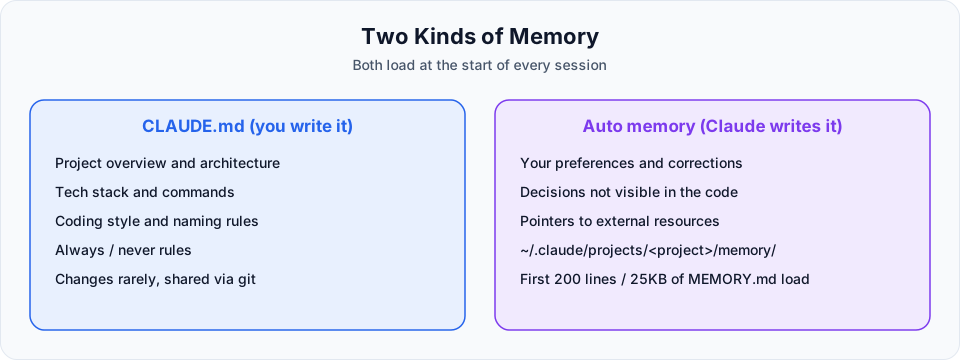
CLAUDE.md | Auto memory | |
|---|---|---|
| Who writes it | You | Claude |
| What it holds | Stable rules, architecture, conventions | Your preferences, corrections you gave, project context Claude cannot derive from the code |
| How often it changes | Rarely | Grows as you work |
| Where it lives | Your project (and the other levels) | ~/.claude/projects/<project>/memory/ |
| What loads each session | The whole file | The first 200 lines or 25KB of MEMORY.md, whichever comes first |
When you correct Claude ("don't use pip here, use uv"), it may save that as a note so it does not repeat the mistake next time. It skips anything it can work out from the code itself, and anything already in your CLAUDE.md.
Viewing and editing memory
/memoryThis opens a menu where you can:
- Open and edit your user
CLAUDE.md(~/.claude/CLAUDE.md) - Open and edit the project
CLAUDE.md - Open the auto memory folder and see what Claude saved
- Turn auto memory on or off
Adding something to memory yourself
Just ask in plain language:
Remember that the API tests need the backend running on port 8000.Claude saves it to auto memory. If you want it in CLAUDE.md instead, say so: "Add this to CLAUDE.md".
The # shortcut
In the video you may see a # prefix used to save a line to memory. That was a shortcut in earlier versions. In current versions, simply ask Claude to remember something, or edit the files through /memory.
Summary
CLAUDE.mdis what you tell Claude, loaded every session- Auto memory is what Claude learns, partly loaded every session
- The
.claudefolder holds settings, agents, skills and rules - Protect secrets with
denyrules, not withCLAUDE.mdinstructions
Try It Yourself
Before moving to the next section, practise what you learned:
- Ask "What is this project about?" in a fresh session without
CLAUDE.md, and note how many files Claude reads (Ctrl+O). - Run
/init, review the file, and add your own Tech Stack, Code Style and Rules sections. - Start a new session and ask the same question again. Compare the file reads.
- Open
/memoryand look at what is in your user, project and auto memory.
Official references
- How Claude remembers your project
- Auto memory
- Configure permissions: exclude sensitive files
- Settings files and precedence
Written By: Shramik Masti
How is this guide?
Last updated on