
Working with CLAUDE.md
Learn where CLAUDE.md files can live, how they combine across organisation, user, project and folder levels, and how to create one manually or with /init.
One CLAUDE.md in the project root is enough to start. But real teams quickly run into questions. I prefer one coding style, my teammate prefers another. The company has security rules that every project must follow. The tests folder needs different conventions from the backend. Claude Code handles all of this with multiple levels of CLAUDE.md.
The levels
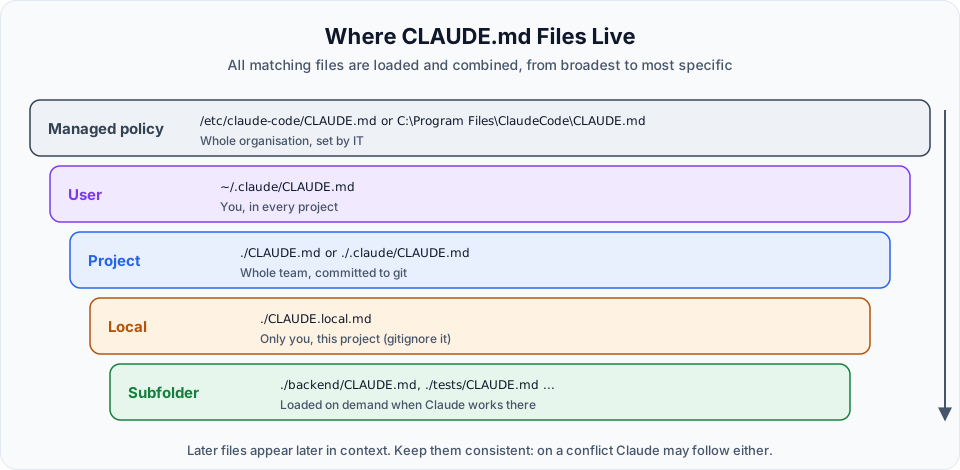
| Level | Location | Who it is for | Shared through |
|---|---|---|---|
| Managed policy | Linux/WSL: /etc/claude-code/CLAUDE.mdmacOS: /Library/Application Support/ClaudeCode/CLAUDE.mdWindows: C:\Program Files\ClaudeCode\CLAUDE.md | The whole organisation: security policies, compliance, deployment rules | IT or DevOps tooling |
| User | ~/.claude/CLAUDE.md | You, across all your projects | Only your machine |
| Project | ./CLAUDE.md or ./.claude/CLAUDE.md | Everyone working on this project | Git |
| Local | ./CLAUDE.local.md | Only you, only this project | Nobody. Add it to .gitignore |
| Subfolder | e.g. ./backend/CLAUDE.md, ./tests/CLAUDE.md | Rules for one part of the codebase | Git |
How they combine
This is a point where many tutorials get it slightly wrong, so let us be precise.
Claude Code does not pick one file and ignore the rest. It loads all of them and combines them into the context:
- Files from the managed policy, user and project levels load at launch, from the broadest scope to the most specific
- For each directory,
CLAUDE.local.mdis added afterCLAUDE.md CLAUDE.mdfiles in subfolders load on demand, only when Claude reads files in that folder
Because more specific files appear later in the context, they usually carry more weight in practice. But there is no strict override. If two files contradict each other, Claude may follow either one. So the real rule is: keep your files consistent.
Respect the organisation level
Organisation-level instructions usually contain guardrails: security rules, deployment flow, compliance requirements. Do not try to work around them in your own files. A managed policy file cannot be excluded by individual settings.
Keep it short
Every line in CLAUDE.md is loaded into context in every session. A 1,000-line file wastes context and, worse, makes Claude less likely to follow each instruction.
The official recommendation is to keep each CLAUDE.md under 200 lines. Some tips:
- Put only project-wide facts in the root file
- Move folder-specific rules into a
CLAUDE.mdinside that folder, so they load only when needed - Write concrete instructions that can be verified:
| Vague | Concrete |
|---|---|
| "Format code properly" | "Use 2-space indentation" |
| "Test your changes" | "Run uv run pytest before committing" |
| "Keep files organised" | "API handlers live in backend/app/api/v1/" |
You can also split large instruction sets into topic files under .claude/rules/ (for example testing.md, api-design.md), and scope them to specific paths with a paths field in their frontmatter.
Creating CLAUDE.md manually
If you know your project well, write the file yourself. Create CLAUDE.md at the project root and describe the project in plain markdown. Then start a new session and ask:
What is this project about?This time Claude answers directly from CLAUDE.md, without scanning every file. If you open the transcript with Ctrl+O, you will see far fewer file reads.
Creating CLAUDE.md with /init
Even better, let Claude write the first draft:
/initClaude explores the codebase, reads the project structure and existing files, detects patterns and conventions, and proposes a CLAUDE.md. Approve the file creation, then open it. For our project it produced sections like:
- Project: a static, frontend-only Kanban board, no build step or backend yet
- Running locally: open
frontend/index.htmlor serve it withpython -m http.server - Architecture: the three key globals
STATES,ROLE_CONFIGandtasks - Mock API layer: why
mockFetchalways rejects and how the backend will slot in - Roles and permissions: enforced in JavaScript only, so UX-only, not a trust boundary
If a CLAUDE.md already exists, /init suggests improvements instead of overwriting it.
Tip: /btw for side questions
While Claude is busy with something, you can ask a quick side question with /btw, for example /btw what does ROLE_CONFIG control?. The answer is shown to you but is not added to the conversation, so it does not use up your main context.
Moving it into .claude/
The project CLAUDE.md can live at ./CLAUDE.md or ./.claude/CLAUDE.md. Both work the same way. In our project we moved it into .claude/ to keep the root folder clean. If the .claude folder does not exist yet, simply create it.
Official references
- How Claude remembers your project
- How CLAUDE.md files load
- Organize rules with .claude/rules/
- Side questions with /btw
Written By: Shramik Masti
How is this guide?
Last updated on
Project Memory Basics
Understand the cold start problem, why Claude re-reads your project every session, and how CLAUDE.md and the .claude folder solve it.
Testing Project Memory
Add your tech stack, coding style and rules to CLAUDE.md, protect secret files with deny rules, and understand how auto memory works alongside CLAUDE.md.