
Project Memory Basics
Understand the cold start problem, why Claude re-reads your project every session, and how CLAUDE.md and the .claude folder solve it.
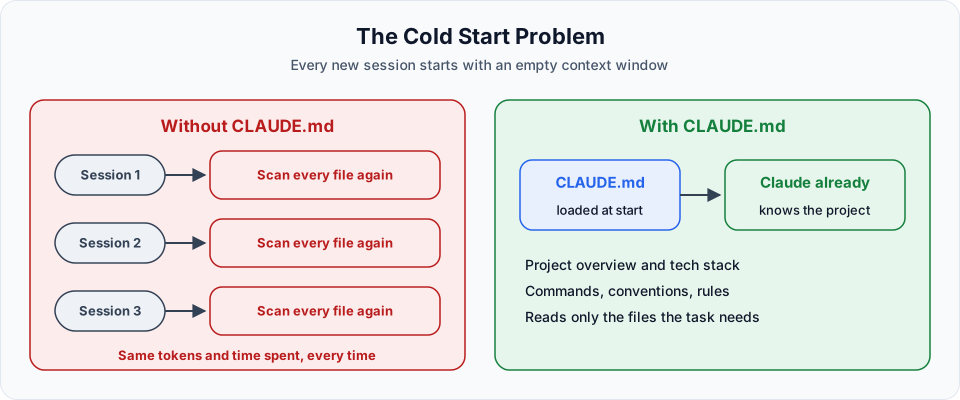
Every time you start a new Claude Code session, Claude begins with an empty context window. It does not remember yesterday's conversation. That has a cost, and in this lesson we see exactly what it is and how to fix it.
Seeing the problem
Start Claude Code in the project and ask:
What is this project about?Press Ctrl+O to open the transcript view and watch what Claude does. It searches for files, opens index.html, app.js and styles.css, maybe looks for a package.json, and only then writes a summary:
- It is the Telusko Workflow Engine, a Kanban board for video production
- Cards move through stages like
code_ready,recorded,editing,uploaded,published - There are roles: Admin, Content, Editor, Uploader
- Only the frontend exists. Data is in memory and the API calls fail on purpose
That is a decent summary. Now close the session, start a new one, and ask the same question.
Claude scans the files again. Different order, similar result, same cost. On this tiny project it takes seconds. On a project with hundreds of files, it means minutes of waiting and a lot of tokens, every single session.
The junior developer analogy
Imagine a new junior developer joins your team. On day one you spend two hours explaining the project. They read files, connect the dots and finally understand it.
Now imagine they come back the next day and ask, "Can you explain the project again?" And the next day. And the next.
A human remembers. Claude, by default, does not carry yesterday's session into today's. This is called the cold start problem.
The fix: CLAUDE.md
CLAUDE.md is a plain markdown file where you write down what Claude should know about your project. Claude Code reads it automatically at the start of every session and keeps it in context.
Fun fact: CLAUDE.md files are now so common that people have spotted them shipped by accident inside real production apps from big companies. Everyone building with Claude Code uses them.
A good CLAUDE.md typically contains:
| Section | Example |
|---|---|
| Project overview | "A Kanban board that tracks video production" |
| Architecture | "Single-page vanilla JS app. All state flows from STATES, ROLE_CONFIG and tasks" |
| Tech stack | FastAPI, SQLAlchemy 2.0 async, Pydantic v2, Alembic |
| Commands | How to run, test and build the project |
| Coding style | "snake_case for Python functions, always use type hints" |
| Rules | "NEVER modify files in /frontend", "Always create a migration when changing models" |
| Testing expectations | Which test command to run after changes |
With this file in place, Claude no longer needs to rediscover the basics. It reads the file, understands the project, and only opens the specific files a task requires.
The .claude folder
You will also notice a hidden folder called .claude. It does not exist in a fresh project. Claude Code creates it the first time it needs to save something, for example when you choose "Yes, and don't ask again" on a permission prompt.
There are two .claude folders to know about:
| Location | Purpose |
|---|---|
~/.claude/ (your home folder) | Machine-wide: your user settings, user-level CLAUDE.md, session history, auto memory |
<project>/.claude/ | Project-level: settings, permissions, agents, skills, rules, and optionally CLAUDE.md |
Here is what can live in the project's .claude folder:
.claude/
├── settings.json        # shared settings and permission rules (commit this)
├── settings.local.json  # your personal settings and saved approvals (gitignored)
├── CLAUDE.md            # alternative location for the project CLAUDE.md
├── agents/              # custom sub-agents (Section 7)
├── skills/              # custom skills (Section 9)
└── rules/               # topic-specific rules, optionally scoped to file paths
Open .claude/settings.local.json after the earlier demos and you will find the allow rules you created by choosing "don't ask again", such as permission to run start commands. You can clean these up any time. Deleting the file simply means Claude will ask again.
How a session starts
- You run
claude - Claude Code loads your
CLAUDE.mdfiles (user, project and others) - It loads the first part of the auto memory index (covered in Testing Project Memory)
- The session starts with that context already in place
You still pay for the tokens of CLAUDE.md in every session, because it is loaded into context every time. That is why it should be short and focused, which we cover next.
Official references
Written By: Shramik Masti
How is this guide?
Last updated on
Permissions and Checkpoints
Control what Claude Code can do with permission modes and rules, and undo its file edits with checkpoints and the rewind menu.
Working with CLAUDE.md
Learn where CLAUDE.md files can live, how they combine across organisation, user, project and folder levels, and how to create one manually or with /init.