
Permissions and Checkpoints
Control what Claude Code can do with permission modes and rules, and undo its file edits with checkpoints and the rewind menu.
Claude Code has two safety mechanisms, and you should understand both before letting it work on anything important:
- Permissions decide what Claude can do without asking you
- Checkpoints let you undo the file edits Claude made
Why permissions exist
Suppose your prompt was about fixing a bug, but Claude decides the cleanest fix is to delete a file. Maybe that is right, maybe it is a disaster. You want to be asked first. Every time Claude wants to edit a file, run a command or reach the network, the request goes through a permission check.
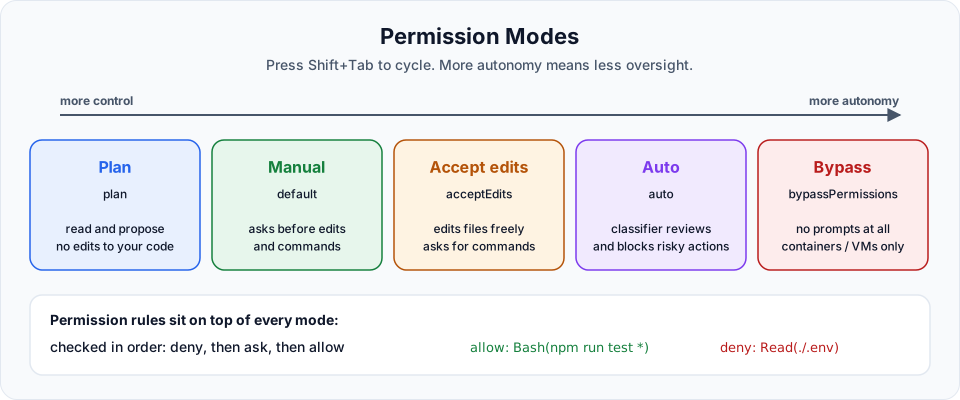
Permission modes
Press Shift+Tab during a session to cycle between modes. The current mode is shown at the bottom of the prompt, for example ⏵⏵ accept edits on or ⏸ plan mode on.
| Mode | Config value | What runs without asking | Use it when |
|---|---|---|---|
| Manual | default | Only reads | You want to approve every edit and command. The safest choice for important code |
| Accept edits | acceptEdits | Reads, file edits and common filesystem commands like mkdir, mv, cp | You trust the direction and want speed, but still want to approve other commands |
| Plan | plan | Reads only, no source edits | Exploring a codebase or designing a feature before writing code |
| Auto | auto | Most actions, while a separate classifier model reviews them in the background and blocks risky ones | Long, low-risk tasks where constant prompts slow you down |
| Bypass permissions | bypassPermissions | Everything | Only inside an isolated container or VM. Never on your own machine |
Your starting mode may differ from the video
In the video, sessions started in the mode that asks before every action (called "default" there, and "Manual" in newer versions). From Claude Code v2.1.283, auto mode is the built-in starting mode for interactive sessions. Press Shift+Tab to switch to Manual if you prefer to approve everything yourself while learning.
Which modes should you actually use?
- Manual: the default choice while learning and for sensitive work. Every prompt is a chance to catch a mistake.
- Accept edits: fine when you are reviewing diffs anyway and just want fewer interruptions.
- Plan: use this before building any non-trivial feature. Claude researches and proposes a plan, and nothing in your code changes until you approve it.
- Auto: reasonable for experiments and long autonomous runs, as long as you understand that a model is approving actions instead of you.
- Bypass: avoid it. If you ever use it, use it only in a throwaway sandbox.
You can also start a session in a specific mode:
claude --permission-mode planPermission rules
Modes set the baseline. Rules give you fine-grained control on top. You saw them already: when you choose "Yes, and don't ask again" for a shell command, Claude Code saves an allow rule to .claude/settings.local.json in your project.
You can manage rules with:
/permissionsOr write them yourself in a settings file:
{
  "permissions": {
    "allow": [
      "Bash(npm run test *)",
      "Bash(git status)",
      "Bash(git diff *)"
    ],
    "ask": [
      "Bash(git push *)"
    ],
    "deny": [
      "Read(./.env)",
      "Read(./.env.*)",
      "Read(./secrets/**)"
    ]
  }
}| Rule list | Meaning |
|---|---|
allow | Run without asking |
ask | Always ask, even in modes that would normally allow it |
deny | Never allowed, in any mode, including bypass |
Rules are checked in the order deny, then ask, then allow. The first match wins. A deny rule cannot be overridden by an allow rule.
CLAUDE.md is not a security boundary
Writing "never read .env" in CLAUDE.md shapes what Claude tries to do, but it is not enforced. Permission rules are enforced by Claude Code itself. For anything that must never happen, use a deny rule.
Where settings live
| File | Scope | Shared with team? |
|---|---|---|
~/.claude/settings.json | All your projects | No |
.claude/settings.json | This project | Yes, commit it |
.claude/settings.local.json | This project, only you | No, it is gitignored |
Checkpoints: undo for file edits
Even with permissions, you will sometimes approve a change and then regret it. You could use git, but only if you committed before the change. Claude Code gives you another safety net: checkpoints.
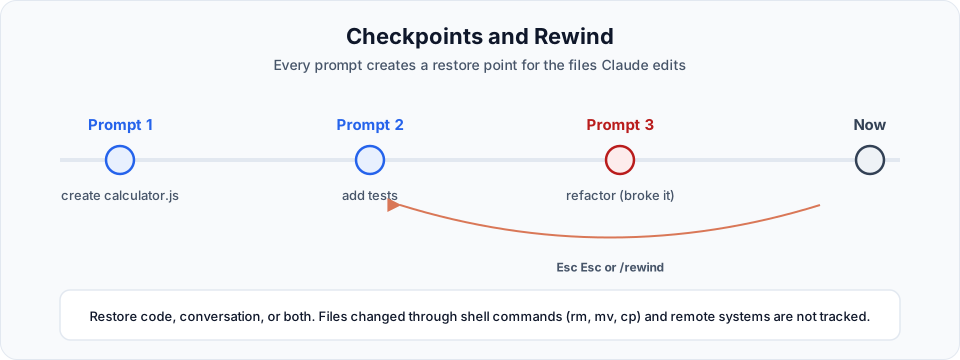
Before each prompt you send, Claude Code takes a snapshot of the files it is about to edit. You can jump back to any of those points.
Using rewind
Press Esc twice (with an empty input box), or type:
/rewindPick the prompt you want to go back to, then choose an action:
| Action | What happens |
|---|---|
| Restore code and conversation | Files and chat both go back to that point |
| Restore conversation | Chat goes back, your current files stay |
| Restore code | Files go back, the chat stays |
| Summarize from here | Compresses the conversation after this point to free context |
| Never mind | Cancel |
Try it
In the demo we asked Claude to:
- Delete
javascript-concepts.js - Rename the
calculatefunction tocalcincalculator.js - Add a function to
prime.jsthat adds two numbers
Then we opened the rewind menu, picked the prompt before those changes and chose Restore code and conversation. The calc rename and the new function were reverted.
The deleted file, however, did not come back on the first try. That is not a bug in your setup. It is a documented limitation.
What checkpoints do not cover
| Not tracked | Why it matters |
|---|---|
Files changed by shell commands (rm, mv, cp, Remove-Item) | Claude deleted the file with a command, not with its edit tool, so there was no snapshot to restore |
| Remote systems: databases, APIs, deployments | A dropped table or a pushed commit cannot be rewound |
| Edits made outside Claude Code or in other sessions | Only edits from the current session are tracked |
| Most sub-agent edits | Use git to revert those |
Checkpoints are not version control
Checkpoints are a quick, local undo for your current session. They are not a replacement for git. Commit working states often, so you always have a reliable point to return to.
Quick check
Before moving on, run two commands you already know:
/modelto confirm which model you are on/usageto see how much of your session the demos used
Try It Yourself
Before moving to the next section, practise what you learned:
- Start a session in Manual mode and press
Shift+Tabuntil you have seen every mode at least once. - Ask Claude to create two small files, change one of them, then use
/rewindto restore the code from before the change. - Let Claude delete a file with a shell command, try to rewind it, and confirm for yourself why it does not come back.
- Add a
denyrule forRead(**/.env)to.claude/settings.jsonand ask Claude to read a.envfile. Watch it get blocked.
Official references
Written By: Shramik Masti
How is this guide?
Last updated on
Agentic Loop Demo
Understand the think, act, observe cycle that drives Claude Code, see it live on a small task, and learn why the "act" step needs permissions.
Project Memory Basics
Understand the cold start problem, why Claude re-reads your project every session, and how CLAUDE.md and the .claude folder solve it.