
Agentic Loop Demo
Understand the think, act, observe cycle that drives Claude Code, see it live on a small task, and learn why the "act" step needs permissions.
When you hire a developer and say "something is wrong with the login page, fix it", a good developer does not start typing immediately. They first try to understand the problem, then make a change, then check whether it worked. If it did not, they go back and think again.
Claude Code works in exactly the same way. This repeating cycle is called the agentic loop.
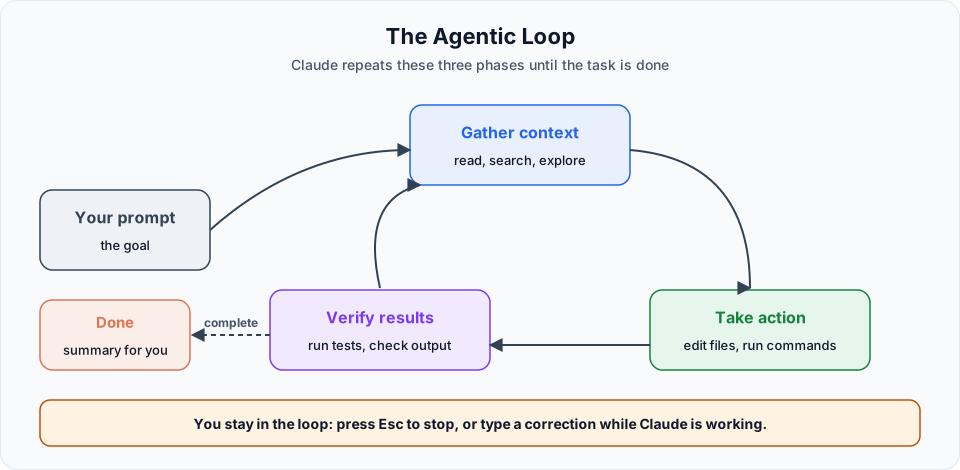
The three phases
| Phase | Also called | What Claude does |
|---|---|---|
| Gather context | Think | Reasons about the task, searches the codebase, reads the relevant files |
| Take action | Act | Uses tools to edit files, create files and run commands |
| Verify results | Observe | Reads the tool output, runs tests, checks whether the goal is met |
If the result is not right, Claude goes back to thinking, acts again and observes again. You do not need to tell Claude to loop. It does this on its own, chaining many small actions until the task is complete.
The official docs describe it like this: a question about your code might only need context gathering, a bug fix might cycle through all three phases many times, and a refactor might involve a lot of verification. Claude decides what each step needs based on what it learned in the previous step.
Why thinking first matters
Remember coding competitions in college? Many people open the editor and start typing #include before even reading the problem properly. The people who win read the statement, sketch the solution on paper, and only then write code.
Claude Code follows the second approach. It plans before acting, and you can make that even more explicit with plan mode, which we look at in the next lesson.
The scary part: the "act" phase
Reading files is mostly harmless. The two capabilities you should respect are:
| Capability | Why it needs care |
|---|---|
| Edit | Claude can rewrite whole files, many files, or delete them |
| Bash (shell commands) | A command can do anything you can do in a terminal: install packages, delete folders, push to git, call cloud APIs |
That is why every action in the loop passes through a permission check. Depending on your permission mode and rules, Claude either does it, asks you first, or is blocked.
What about privacy?
To work on your code, Claude Code sends the relevant file contents and command output to the model. Anthropic documents how this data is handled, and you can control what Claude is allowed to read with permission rules. For sensitive projects, read the data usage and security pages.
Live demo: watching the loop
Inside our project, ask Claude for something small and meaningless, just to watch the loop:
Create three JS files: one for a calculator, one for checking prime numbers, and one with random JavaScript code.Here is what happens step by step.
Think
Claude reads the request, looks at the folder and plans three files. You will see a short "thinking" indicator in the terminal.
Act, with a permission prompt
Claude prepares calculator.js and asks:
Do you want to create calculator.js?
❯ 1. Yes
  2. Yes, allow all edits during this session (shift+tab)
  3. No
Choosing option 2 switches the session to accept edits mode. You will notice the footer now shows accept edits on. From now on, file edits in this session go through without asking. Shell commands still ask.
Act again, with a shell command
To create the next file, Claude might decide to use a shell command. Because it is a command and not a file edit, it asks again:
Bash command
  New-Item -Path prime.js -ItemType File

Do you want to proceed?
❯ 1. Yes
  2. Yes, and don't ask again for similar commands in this project
  3. No
Observe and finish
Claude checks that all three files exist and contain what it intended, then gives you a short summary: calculator.js, prime.js and a file with random JavaScript concepts.
The exact wording of these permission prompts can differ slightly between Claude Code versions, but the choices are the same.
If you scroll back through the terminal output, you can see each phase: what Claude was thinking, which tools it called, and what it observed.
Claude said the files are done. Are they correct? We have not run them or written tests, so we do not know yet. That is "done", not "verified". In a real task, you would ask Claude to write and run tests, or you would check the code yourself.
Steering the loop while it runs
You are part of the loop too. While Claude is working you can:
| Action | Effect |
|---|---|
Press Esc | Stop Claude immediately. The running tool call is cancelled and Claude waits for your next instruction |
Type a message and press Enter | Your message is queued and Claude reads it at the next step, changing direction without stopping |
You do not need perfect prompts. Start with what you want, watch what Claude does, and correct it when needed.
Official references
- How Claude Code works: the agentic loop
- Tools available to Claude
- Interactive mode: queue messages while Claude works
Written By: Shramik Masti
How is this guide?
Last updated on
Agentic Workflow Basics
Get the starter Content Tracker frontend, open it in VS Code, and let Claude Code run it for you while you approve each step.
Permissions and Checkpoints
Control what Claude Code can do with permission modes and rules, and undo its file edits with checkpoints and the rewind menu.