
Sub-Agent Workflow Demo
Run the api-extractor and seed-data-extractor sub-agents in parallel, verify their output, and compare the main session's context before and after.
Both sub-agents are defined. Now the fun part: running them and checking what they produce.
Three ways to invoke a sub-agent
| Method | Example | When to use it |
|---|---|---|
| Natural language | Use the api-extractor agent to produce the API contract | Most of the time. Claude decides how to delegate |
| @-mention | Type @, pick the agent from the list, or type @agent-seed-data-extractor regenerate the seed file | When you want to guarantee that specific agent runs |
| Automatic | Just describe the task | Claude picks an agent whose description matches |
We will use plain language, since that is how we have been working all along.
Running both agents
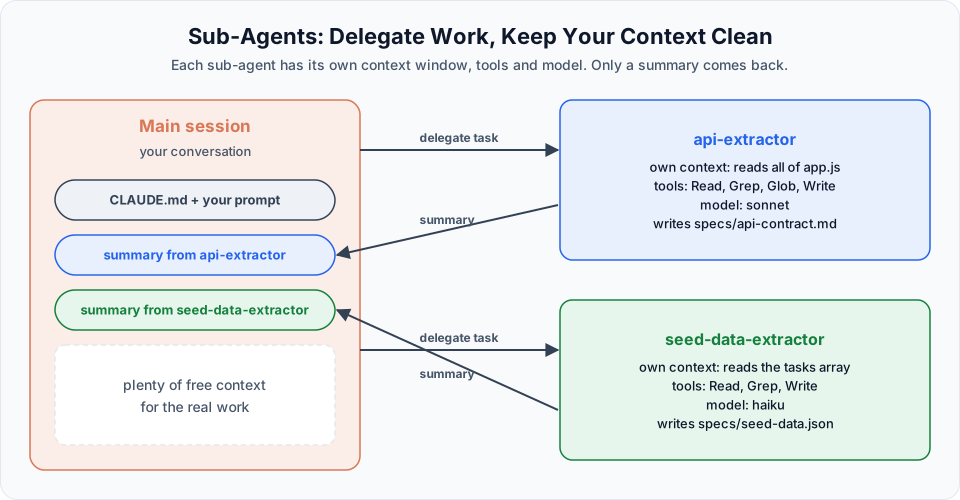
Use the api-extractor and seed-data-extractor agents to produce both spec files for the backend.Watch the terminal. Claude starts two sub-agents at the same time, each shown in its own colour: blue for api-extractor and green for seed-data-extractor. Because the two tasks do not depend on each other, they run in parallel.
seed-data-extractorfinishes quickly because it runs on Haiku and has a small, mechanical jobapi-extractortakes longer because it analyses all four API methods and the error handling
When something goes wrong
In our run, both agents first reported success, but the files were not there, and some fields were mixed up. This is exactly why we insisted on a fixed final message and a validation step.
Claude noticed the problem itself: it checked the specs/ folder, saw what was missing or wrong, and re-ran the work. After a short loop we had both files:
specs/
├── api-contract.md    # four endpoints, request/response shapes, error handling
└── seed-data.json     # five validated tasks with snake_case keys
Always verify the output
An agent saying "done" is not proof. Open both files and read them. The backend will be built on top of api-contract.md, so a mistake here becomes a mistake in every endpoint. You can also ask Claude to cross-check: "Verify specs/api-contract.md against frontend/app.js and list any differences."
What the specs contain
specs/seed-data.json holds the sample tasks, cleaned and validated:
[
  {
    "id": 1,
    "title": "Introduction to Spring Boot",
    "assigned_role": "Content",
    "state": "code_ready",
    "description": "Cover project setup, auto-configuration, and starter dependencies.",
    "created_at": "2026-05-01"
  }
]
specs/api-contract.md describes each endpoint. One detail it caught is worth highlighting: the frontend reads task.assignedRole and task.createdAt in camelCase, while our backend uses snake_case. The contract flags that the API must serialise these fields with camelCase aliases, otherwise the frontend breaks. That is the kind of detail that saves hours of debugging later.
| Endpoint | Purpose | Success status |
|---|---|---|
GET /api/tasks | List all tasks | 200 |
POST /api/tasks | Create a task | 201 |
PUT /api/tasks/{id} | Update a task | 200 |
DELETE /api/tasks/{id} | Delete a task | 204 |
Checking the context
Now run:
/contextAfter all that work, the main session's context is still almost empty. The 500 lines of app.js and all the analysis lived inside the sub-agents' own context windows. Only their short summaries came back.
That is the real benefit of sub-agents: your main session stays clean and focused for the work that follows.
Watch your model
In the recording, the session was accidentally on Opus, which made the api-extractor (set to inherit at that point) slower and more expensive than needed. Check /model before long runs, and set an explicit model in each agent file so you always know what it uses.
Recap: how a sub-agent run flows
- The main session receives your request
- It delegates each independent task to a matching sub-agent
- Each sub-agent works in its own context, with its own tools and model
- Each returns a short summary (and writes its files)
- The main session continues with a clean context
Official references
Written By: Shramik Masti
How is this guide?
Last updated on
Creating and Using Sub-Agents
Create custom sub-agents as markdown files, understand every important frontmatter field, and build the api-extractor and seed-data-extractor agents for our project.
Worktrees and Parallel Tasks
Use git worktrees to run separate Claude Code sessions in parallel, compare SQLite and Postgres for our backend, and clean up afterwards.