
Kubernetes Deployment Strategies: Blue-Green
Understand what a deployment strategy is, compare rolling update, recreate, blue-green, canary, shadow and A/B testing, and see how blue-green gives near-zero downtime and instant rollback.
Your application is live and thousands of people use it every day. The team has built a new version with new features. Now the hard question: how do you replace the running version without breaking things for the people using it right now? And if the new version has a bug that testing missed, how fast can you get back?
A deployment strategy defines how a new version of an application is released while keeping downtime low and risk under control. A good strategy helps you:
- Reduce or remove downtime
- Limit the damage a bad release can do
- Release new features safely, without affecting existing users
- Roll back quickly when something goes wrong
The common strategies
| Strategy | How it works | Downtime | Rollback | Extra cost |
|---|---|---|---|---|
| Recreate | Stop all old pods, then start new ones | Yes | Redeploy the old version | None |
| Rolling update | Replace pods a few at a time. The Kubernetes Deployment default | None, if readiness probes are set | kubectl rollout undo, also gradual | Small (a few surge pods) |
| Blue-green | Run the old (blue) and new (green) versions side by side, then switch all traffic at once | Near zero | Instant: switch traffic back | Double capacity during the release |
| Canary | Send a small share of traffic (say 5%) to the new version, increase step by step | None | Send the share back to 0% | Small |
| Shadow (mirroring) | Copy real traffic to the new version, but users only get answers from the old one | None | Nothing to roll back | Double capacity, and care with side effects |
| A/B testing | Route specific users (by header, cookie, region) to version B to compare business results | None | Change the routing rule | Small |
You already used two of these. Rolling Updates & Rollbacks showed RollingUpdate and mentioned Recreate. Canary, shadow and A/B testing usually need traffic-splitting tools such as a service mesh, an ingress controller or Argo Rollouts. This lesson focuses on blue-green, one of the most popular strategies and one you can build with plain Kubernetes objects.
Blue-green in plain words
Blue-green deployment uses two identical production environments:
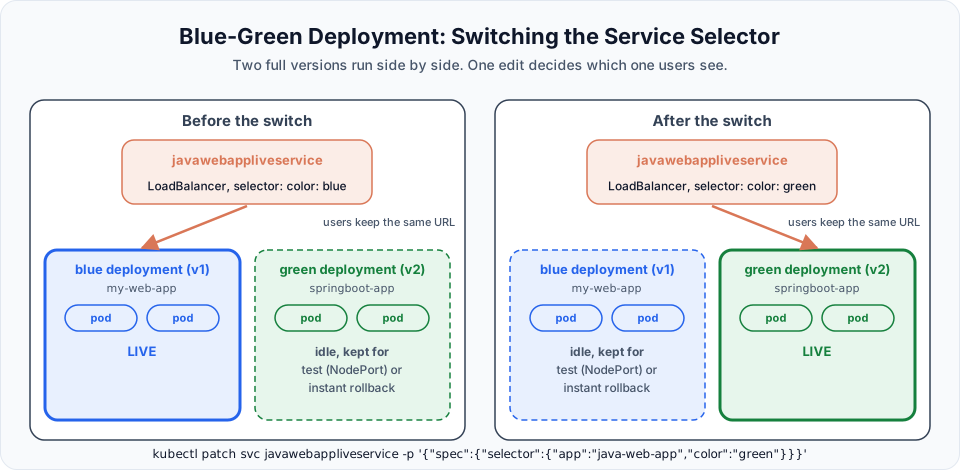
- Blue is the current version. All users go to blue.
- You deploy the new version as green, next to blue. Users still go to blue and do not notice anything.
- Your team tests green in production conditions, through a separate internal address.
- When green looks good, you switch the traffic from blue to green. Users keep using the same URL. They simply get the new version.
- Blue is not deleted. If green has a problem, you switch traffic back to blue in seconds.
- Once green has proven itself, you remove blue (or keep it as the base for the next release, where the colours swap roles).
The key idea: the switch is a single, small change, and the old version is still running, warm and ready, when you make it.
How Kubernetes makes it simple
In Kubernetes, the "switch" is the Service selector. You learned in Labels and Selectors that a Service sends traffic to every pod whose labels match its selector. So:
- The blue Deployment's pods carry
color: blue, the green Deployment's pods carrycolor: green. - The live LoadBalancer Service selects
app: java-web-app, color: blue. - To switch, change the Service's selector to
color: green. The load balancer URL does not change. Kubernetes updates the Service's endpoints within seconds. - To roll back, change it back to
color: blue.
We do exactly this in the hands-on lesson.
Benefits and trade-offs
| Benefits | Trade-offs |
|---|---|
| Almost zero downtime: the new version is already running before users reach it | During the release you run two full copies, so twice the pods (and node capacity, and cost) |
| Fast releases: the switch itself takes seconds | All users move at once. If a bug only shows under real load, everyone sees it (canary is gentler here) |
| Easy testing in production conditions before users see it | Database changes must work with both versions, because blue must still run if you roll back |
| Instant rollback: blue is still running | Long-running connections and sessions may need care at the moment of the switch |
| Lower deployment risk overall | Someone has to clean up the old colour afterwards |
The database is the hard part
Switching application pods is easy. Data is not. If green adds a new column and starts writing to it, blue must still work against the same database in case you roll back. Teams handle this with backward-compatible migrations: first add new things without removing old ones, release, and remove old columns only in a later release.
Try It Yourself
- For each of these, choose a strategy and explain why: an internal admin tool used by 5 people, a payment API with strict uptime targets, a recommendation algorithm you want to compare against the current one.
- List what you would check on the green environment before switching traffic.
- Your cluster has room for 10 more pods, and your app runs 8 replicas. Can you do a blue-green release? What about a rolling update with
maxSurge: 25%? - Read the "Strategy" section of the Kubernetes Deployment docs and write down which two strategy types a Deployment supports natively.
Official references
- Kubernetes: Deployments (strategy)
- Kubernetes: Service
- Kubernetes: Labels and Selectors
- Argo Rollouts: Blue Green strategy
Written By: Shramik Masti
How is this guide?
Last updated on
Visualizing Kubernetes Metrics with Grafana
Install Grafana with Helm, connect it to Prometheus as a data source, import ready-made Kubernetes dashboards by ID, and watch the cluster's numbers change as you deploy pods.
Blue-Green Deployment: Zero Downtime Release (Hands-On)
Run blue and green Deployments side by side on EKS, test green through a NodePort Service, switch the live LoadBalancer to green by changing one selector label, and roll back instantly.