
Memory Leaks
Introduction
Java provides automatic memory management through Garbage Collection (GC). However, automatic GC does not guarantee the absence of memory leaks.
A memory leak in Java occurs when objects that are no longer needed remain reachable from GC roots, preventing the garbage collector from reclaiming their memory.
Over time, memory leaks can lead to:
OutOfMemoryError- Increased GC frequency and pause times
- Performance degradation
- Application instability in long-running systems
What is a Memory Leak in Java?
A memory leak occurs when objects that are logically no longer required remain reachable from GC roots, preventing garbage collection.
Important distinction:
- Java memory leaks are logical leaks, not manual deallocation failures.
- GC only collects unreachable objects.
- If an object is still reachable-even accidentally-it will not be collected.
Example:
public class LeakyCache {
    private static Map<String, Object> cache = new HashMap<>();

    public void addToCache(String key, Object value) {
        cache.put(key, value);  // Never removed
    }
}
Why this leaks:
cacheis static → it is a GC root.- Objects inserted into the map remain reachable.
- The map grows indefinitely.
- Eventually causes
OutOfMemoryError.
How Memory Leaks Happen?
A memory leak typically follows this pattern:
- An object is stored in a container (collection, cache, listener list).
- The container is reachable from a GC root.
- The application no longer needs the object.
- The object is never removed.
- Memory usage increases over time.
Reachability chain:
GC Root → Container → Object → Not collected
GC cannot reclaim memory because the object is still reachable.
Common Causes of Memory Leaks
1. Static Collections Growing Unbounded
Static fields are GC roots. If a static collection grows indefinitely, objects remain in memory.
public class StaticCollectionLeak {
    private static List<User> users = new ArrayList<>();

    public void registerUser(String name) {
        users.add(new User(name));  // Never removed
    }
}
Prevention:
- Remove unused elements
- Periodically clean up
- Use bounded collections
2. Unclosed Resources
Failing to close resources like streams, database connections, or sockets can cause memory and resource leaks.
public void readFile(String path) throws IOException {
    InputStream input = new FileInputStream(path);
    // Forgot to close input
}
Correct approach:
public void readFile(String path) throws IOException {
    try (InputStream input = new FileInputStream(path)) {
        // Use input
    }  // Automatically closed
}
Always use try-with-resources for AutoCloseable resources.
3. Non-Static Inner Class References
Non-static inner classes hold an implicit reference to the outer class.
public class Outer {
    private byte[] largeData = new byte[1024 * 1024];

    public class Inner { }
}
If Inner instance survives, the outer object cannot be garbage collected.
Solution:
Use static inner classes when outer reference is not required.
public static class Inner { }4. Unregistered Listeners and Callbacks
Listeners stored in collections must be removed when no longer needed.
public class EventSource {
    private List<EventListener> listeners = new ArrayList<>();

    public void addListener(EventListener listener) {
        listeners.add(listener);
    }
}
If removeListener() is never called, listeners accumulate and leak.
Best practice:
- Always provide unregister methods.
- Clean up in shutdown or dispose logic.
5. ThreadLocal Misuse
ThreadLocal values must be removed when threads are reused (e.g., in thread pools).
private static ThreadLocal<User> userContext = new ThreadLocal<>();

public void process(User user) {
    userContext.set(user);
    // Missing remove()
}
In thread pools, threads persist and retain old ThreadLocal values.
Correct pattern:
try {
    userContext.set(user);
} finally {
    userContext.remove();
}
6. Unbounded Caches
Caches without size limits grow indefinitely.
private Map<String, Object> cache = new HashMap<>();Solutions:
- Use size-limited caches
- Use eviction policies
- Use
WeakHashMapwhen appropriate - Use caching libraries with expiration support
7. Excessive String Interning
Interning large numbers of unique strings fills the string pool.
String s = UUID.randomUUID().toString().intern();Avoid interning dynamic or unbounded strings.
8. Mutable Static Fields
Static mutable fields that accumulate objects and are never cleared cause long-lived memory retention.
Always provide cleanup mechanisms for static resources.
9. Symptoms of Memory Leaks
Application-level symptoms:
OutOfMemoryError: Java heap space- Increasing Full GC frequency
- Longer GC pause times
- Performance degradation over time
System-level symptoms:
- Heap usage continuously increasing
- Old generation never shrinking after GC
- Application crashes after long uptime
Detecting Memory Leaks
1. Heap Dumps
Generate heap dump:
jmap -dump:format=b,file=heap.hprof <pid>Or automatically:
-XX:+HeapDumpOnOutOfMemoryErrorAnalyze using:
- Eclipse MAT
- VisualVM
- JProfiler
- YourKit
Key analysis techniques:
- Leak Suspects Report
- Dominator Tree
- Path to GC Roots
2. Monitoring with jstat
jstat -gc <pid> 1000Watch for:
- Increasing Old Generation usage (OU column)
- Frequent Full GCs
- Heap not being reclaimed
3. Profilers
Profilers help identify:
- Object allocation rate
- Retained heap size
- Reference chains
- Long-lived objects
Useful for production-grade debugging.
Common OutOfMemoryError Types
Java Heap Space
Heap memory exhausted.
Fix:
- Increase
-Xmx - Fix memory leak
- Reduce object retention
Metaspace
Too many loaded classes or classloader leaks.
Fix:
- Increase
-XX:MaxMetaspaceSize - Fix custom classloader leaks
GC Overhead Limit Exceeded
GC running frequently but reclaiming little memory.
Indicates severe memory pressure or leak.
Unable to Create New Native Thread
Too many threads created.
Fix:
- Use thread pools
- Reduce thread count
Summary
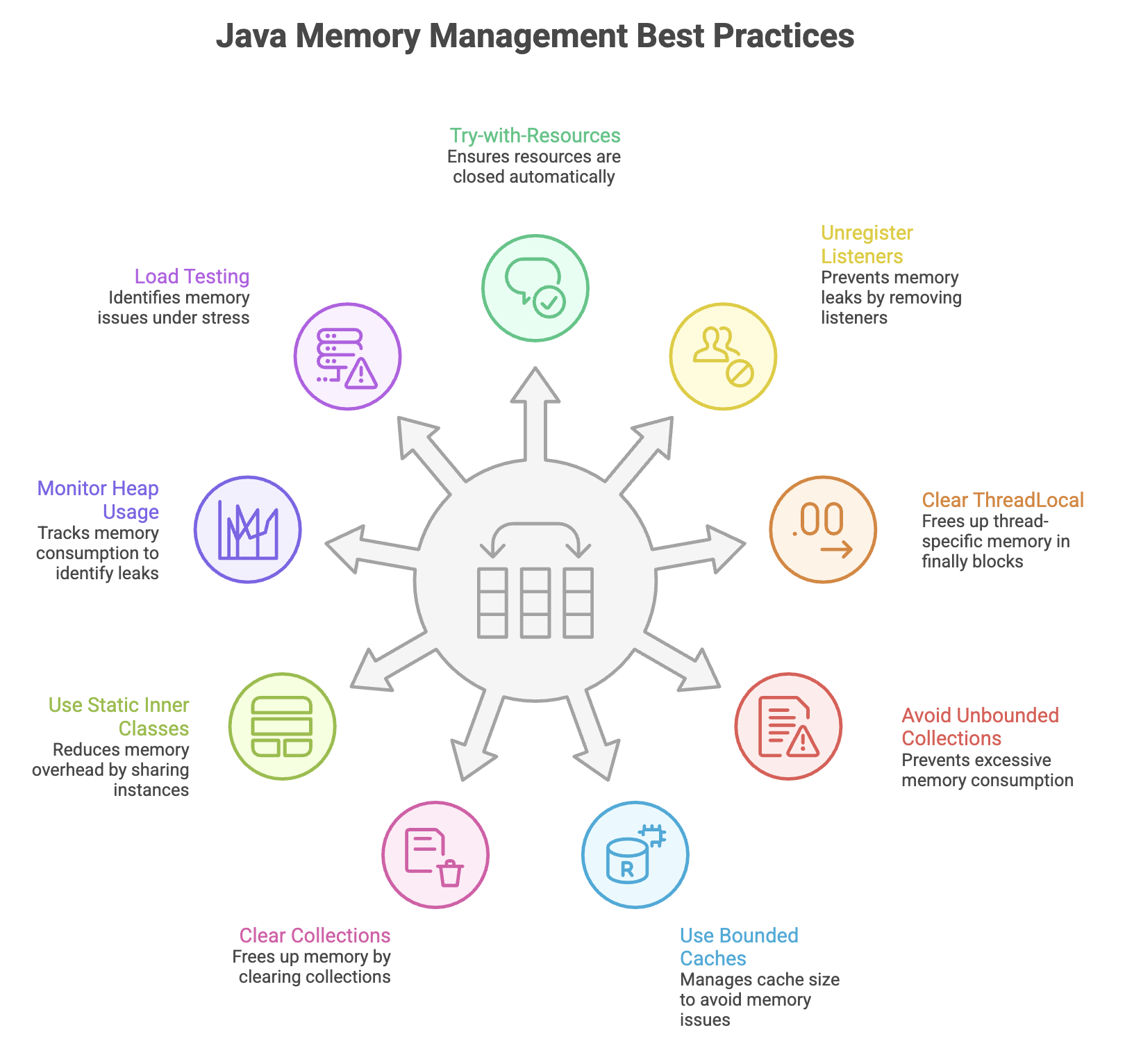
- Memory leaks in Java occur when objects remain unintentionally reachable, preventing the garbage collector from reclaiming memory.
- Even though Java provides automatic memory management, developers must carefully manage object lifecycles and references.
- Common causes include unbounded collections, static references, improperly managed listeners, ThreadLocal misuse, and unclosed resources.
- Preventing memory leaks requires disciplined design, proper cleanup practices, regular monitoring, and heap analysis.
- A strong understanding of reachability and GC behavior is essential for building scalable and long-running Java applications.
Written By: Muskan Garg
How is this guide?
Last updated on