
Jit Compiler
Introduction
The JIT (Just-In-Time) Compiler is a core part of the JVM Execution Engine responsible for improving Java application performance at runtime.
Java programs are compiled into bytecode, which is platform-independent. Initially, this bytecode is interpreted by the JVM. However, interpretation alone is slow. The JIT compiler identifies frequently executed code (called hot spots) and compiles it into optimized native machine code.
This hybrid approach provides:
- Platform independence (bytecode)
- Fast startup (interpretation)
- High peak performance (native compilation)
- Runtime-based optimizations
Why JIT is Needed?
The Interpretation Problem
When a Java program starts, bytecode is executed line by line by the interpreter:
Bytecode → Interpreter → ExecutionLimitations of pure interpretation:
- Slower execution compared to native code
- Repeated interpretation of frequently executed methods
- No advanced optimization
- Inefficient for loops and repeated method calls
Example:
public class Example {
    public static void main(String[] args) {
        for (int i = 0; i < 1_000_000; i++) {
            calculate(i);   // Interpreted repeatedly
        }
    }

    static int calculate(int n) {
        return n * n + 2 * n + 1;
    }
}
Without JIT, calculate() is interpreted one million times.
Native Compilation (Traditional Compilers)
Languages like C/C++ compile source code directly into machine code before execution:
Source Code → Compiler → Native Machine Code → ExecutionAdvantages:
- Very fast execution
- Aggressive compile-time optimization
Disadvantages:
- Platform-specific binaries
- No runtime behavior analysis
- Longer compile time
JIT: Hybrid Execution Model
JIT combines interpretation and compilation:
- JVM starts with interpretation.
- It monitors execution using profiling counters.
- Frequently executed methods (hot spots) are identified.
- Hot methods are compiled into native machine code.
- Compiled code is stored in the Code Cache.
- Future calls execute native code directly.
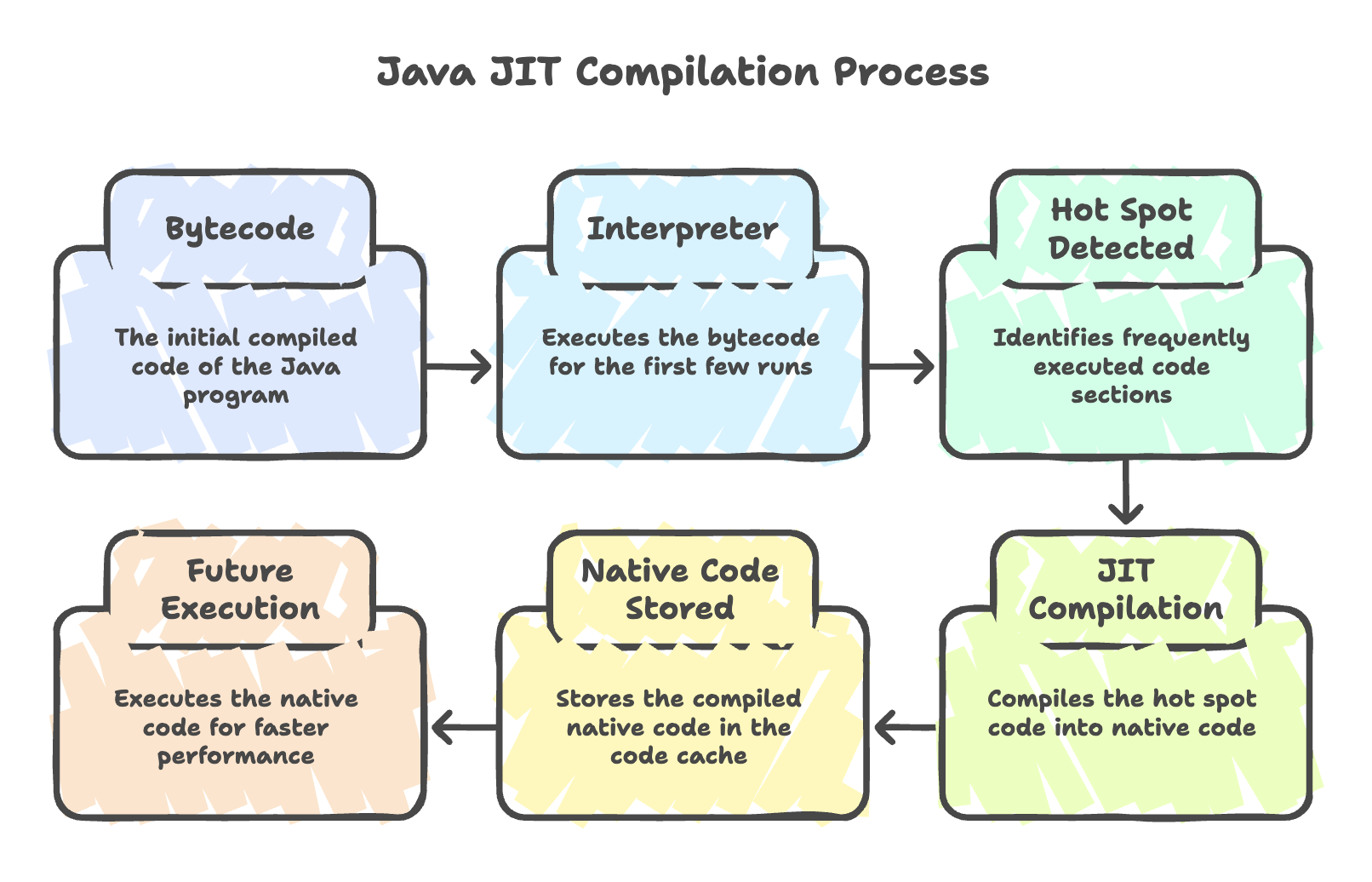
This approach ensures both fast startup and high peak performance.
How JIT Compilation Works
Step 1: Interpretation
-
JVM executes bytecode.
-
Invocation counters track:
- Method calls
- Loop back-edge iterations
Step 2: Profiling
JVM collects runtime information:
- Method call frequency
- Branch behavior
- Type information
- Loop execution counts
Step 3: Compilation Trigger
When a method exceeds a threshold (around 10,000 invocations by default), JIT compilation is triggered.
Step 4: Native Code Generation
- Bytecode is converted to optimized machine code.
- Various runtime optimizations are applied.
Step 5: Code Cache Storage
Compiled native code is stored in the Code Cache for reuse.
Step 6: Optimized Execution
Future invocations directly execute native code, skipping interpretation.
Types of JIT Compilers (HotSpot JVM)
1. C1 Compiler (Client Compiler)
- Faster compilation
- Basic optimizations
- Good for desktop or short-lived applications
- Optimized for quick startup
Typical optimizations:
- Basic inlining
- Dead code elimination
- Constant folding
2. C2 Compiler (Server Compiler)
- Slower compilation
- Aggressive optimizations
- Best for long-running server applications
- Optimized for peak performance
Advanced optimizations:
- Deep method inlining
- Loop unrolling
- Escape analysis
- Branch prediction
- CPU-specific optimizations
3. Tiered Compilation (Default in Java 8+)
Tiered compilation combines C1 and C2.
Execution Levels:
- Tier 0 – Interpreter
- Tier 1–3 – C1 compilation with profiling
- Tier 4 – C2 aggressive optimization
Benefits:
- Fast startup (C1)
- High peak performance (C2)
- Balanced optimization strategy
Major JIT Optimizations
1. Method Inlining
Replaces a method call with its body to remove call overhead.
int square(int n) {
    return n * n;
}
After inlining:
int result = x * x;Benefits:
- Faster execution
- Enables further optimizations
2. Dead Code Elimination
Removes unused or unreachable code.
int unused = 100; // Removed by JIT3. Loop Unrolling
Reduces loop overhead by executing multiple iterations per cycle.
Improves performance in tight loops.
4. Escape Analysis
Determines whether an object escapes a method.
If not:
- Object may be allocated on stack instead of heap
- Locks may be removed
- Object may be replaced with scalar variables
Reduces GC overhead and improves performance.
5. Constant Folding
Evaluates constant expressions at compile time.
int x = 10 * 5 + 3; // Optimized to 536. Branch Prediction
Optimizes frequently taken branches based on runtime profiling.
7. Lock Optimizations
- Lock coarsening (merge adjacent locks)
- Lock elision (remove unnecessary locks)
Improves multi-threaded performance.
Deoptimization
Sometimes the JVM must revert compiled code back to interpreted mode.
Reasons:
- Incorrect runtime assumptions
- New class loading changes method behavior
- Dynamic code replacement
- Better optimization opportunity discovered
Flow:
Native Code → Deoptimization → Interpreter → Re-profile → Re-compileThis ensures correctness and adaptability.
Code Cache
The Code Cache stores JIT-compiled native code.
If the cache becomes full:
- JIT compilation stops
- Performance may degrade
- Application falls back to interpretation
Tuning example:
java -XX:ReservedCodeCacheSize=512m MyAppMonitoring:
jcmd <pid> Compiler.codecacheSummary
- JIT compilation allows Java applications to achieve near-native performance by converting frequently executed bytecode into optimized machine code at runtime.
- It uses real-time profiling data to identify hot spots and apply intelligent optimizations such as inlining and escape analysis.
- Tiered compilation ensures a balance between fast startup and high peak performance.
- Continuous monitoring and recompilation enable adaptive optimization during execution.
- JIT is a key reason Java successfully combines platform independence with high-performance execution.
Written By: Muskan Garg
How is this guide?
Last updated on