
JVM Architecture
The Java Virtual Machine (JVM) is an abstract computing machine that enables Java's "Write Once, Run Anywhere" (WORA) capability. It acts as a runtime environment that executes Java bytecode on any platform, making Java platform-independent.
What is the JVM?
The JVM is a specification that provides a runtime environment in which Java bytecode can be executed. It performs three key functions:
- Loads Java bytecode (
.classfiles) - Verifies bytecode for security and correctness
- Executes bytecode using an interpreter or JIT compiler
Key Point: The JVM is platform-dependent (different implementations for Windows, Linux, macOS), but Java bytecode is platform-independent. This is how Java achieves portability.
Java Source (.java) → Compiler → Bytecode (.class) → JVM → Native Machine CodeJVM Architecture: High-Level Overview
The JVM architecture consists of three main components:
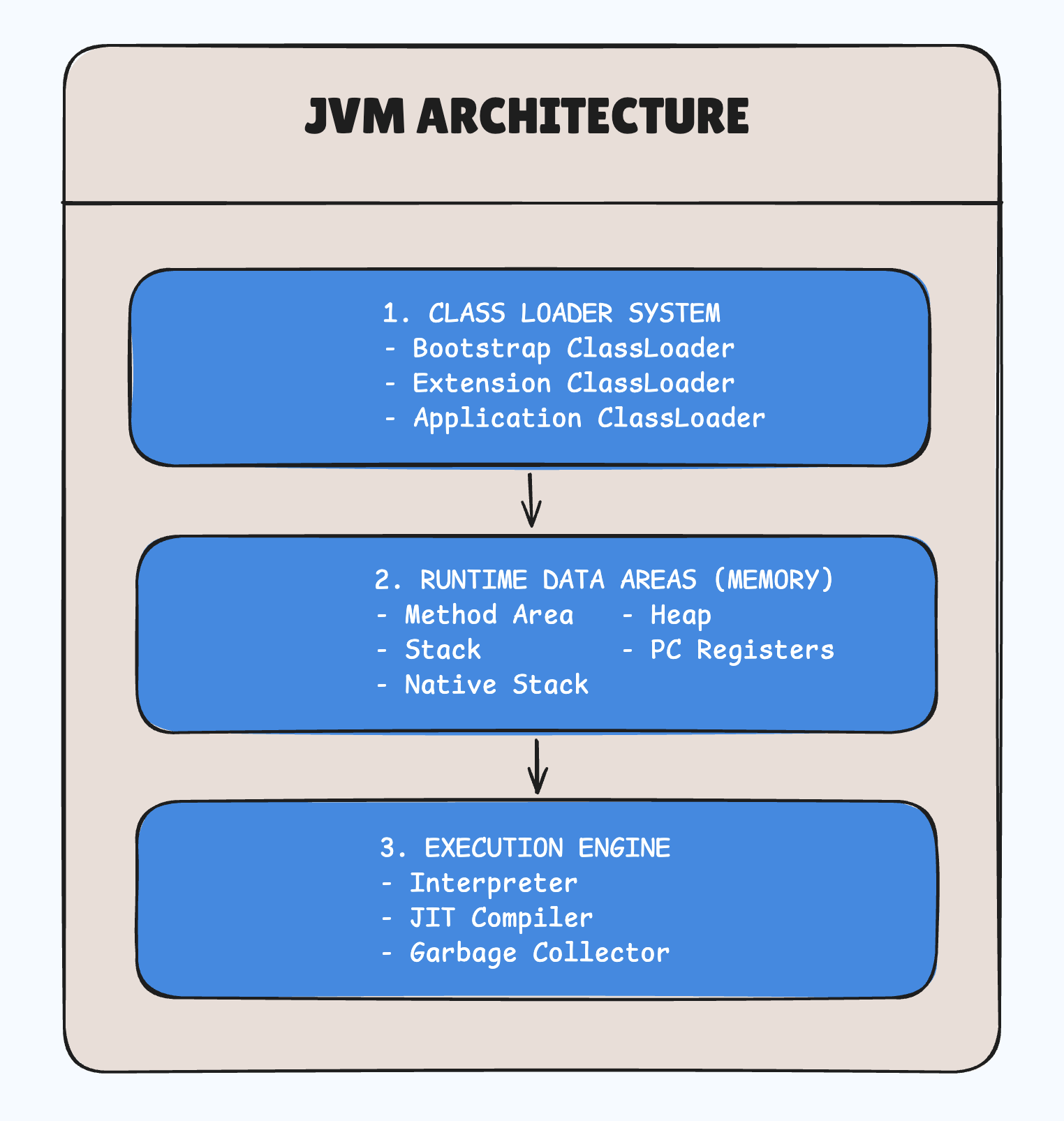
1. Class Loader Subsystem
The Class Loader is responsible for loading .class files into the JVM memory. It performs three main activities:
a) Loading
Reads .class files and loads bytecode into the Method Area.
Three Types of ClassLoaders:
-
Bootstrap ClassLoader
- Loads core Java classes from
rt.jar(Java runtime library) - Example:
java.lang.Object,java.lang.String - Written in native code (C/C++)
- Parent of all classloaders
- Loads core Java classes from
-
Extension ClassLoader
- Loads classes from extension directories (
jre/lib/ext) - Example: Security extensions, cryptography classes
- Child of Bootstrap ClassLoader
- Loads classes from extension directories (
-
Application ClassLoader (System ClassLoader)
- Loads classes from application classpath
- Loads your application classes and third-party libraries
- Child of Extension ClassLoader
Delegation Model:
Application ClassLoader → Extension ClassLoader → Bootstrap ClassLoaderWhen a class is requested, the application classloader delegates to its parent, which delegates to its parent, and so on. If the parent can't find the class, the child attempts to load it.
b) Linking
After loading, the class undergoes linking, which has three sub-phases:
-
Verification
- Ensures bytecode is valid and follows JVM specifications
- Checks for security violations
- Prevents malicious code execution
-
Preparation
- Allocates memory for static variables
- Assigns default values (0 for int, null for objects, false for boolean)
-
Resolution
- Converts symbolic references to direct references
- Example: Method calls are resolved to actual memory addresses
c) Initialization
- Static variables are assigned their actual values
- Static blocks are executed
- Happens only once per class
public class Example {
    static int count = 0;           // Preparation: count = 0
                                    // Initialization: count = 0 (explicit)

    static {
        count = 10;                 // Initialization: count = 10
        System.out.println("Static block executed");
    }
}
2. Runtime Data Areas (Memory Structure)
The JVM divides memory into different areas for efficient management:
a) Method Area (Metaspace in Java 8+)
Purpose: Stores class-level data shared across all instances.
Contents:
- Class metadata (class name, parent class, methods, fields)
- Static variables
- Constant pool (literals, symbolic references)
- Method bytecode
Key Points:
- Shared among all threads
- Created at JVM startup
- Garbage collected (unused classes can be unloaded)
- In Java 8+, moved from PermGen to native memory (Metaspace)
public class User {
    static int userCount = 0;     // Stored in Method Area

    public static void register() {  // Method code in Method Area
        userCount++;
    }
}
b) Heap
Purpose: Stores all objects and instance variables.
Characteristics:
- Shared among all threads
- Created at JVM startup
- Managed by Garbage Collector
- Primary area for memory allocation
Structure:
Heap Memory
├── Young Generation
│   ├── Eden Space (new objects)
│   ├── Survivor Space 0 (S0)
│   └── Survivor Space 1 (S1)
└── Old Generation (Tenured)
    └── Long-lived objects
Example:
public class Example {
    public static void main(String[] args) {
        User user = new User();  // 'user' reference on Stack
                                 // User object on Heap
        user.name = "Alice";     // 'name' instance variable on Heap
    }
}
c) Stack (Java Stack)
Purpose: Stores method execution context and local variables.
Characteristics:
- Each thread has its own stack (thread-safe)
- Follows LIFO (Last In, First Out) structure
- Stores frames for method calls
Stack Frame Contents:
- Local Variables: Method parameters and local variables
- Operand Stack: Intermediate computation results
- Frame Data: Method return address, exception handling
public class StackExample {
    public static void main(String[] args) {
        int x = 10;              // x stored in Stack
        calculate(x);
    }

    public static void calculate(int num) {
        int result = num * 2;    // num and result stored in Stack
        System.out.println(result);
    }  // Stack frame removed after method returns
}
Stack Memory Flow:
main() called
├── Stack Frame: main()
│   └── x = 10
│
calculate(10) called
├── Stack Frame: calculate()
│   ├── num = 10
│   └── result = 20
│
calculate() returns
└── Stack Frame: main()
    └── x = 10
d) Program Counter (PC) Register
Purpose: Keeps track of the current instruction being executed.
Characteristics:
- Each thread has its own PC register
- Stores the address of the current JVM instruction
- If the method is native, PC register value is undefined
e) Native Method Stack
Purpose: Stores information for native methods (written in C/C++).
Characteristics:
- Each thread has its own native method stack
- Used when Java code calls native libraries (JNI - Java Native Interface)
- Similar to Java Stack but for native methods
public class NativeExample {
    // Native method declaration
    public native void nativeMethod();

    static {
        System.loadLibrary("nativeLib");  // Load native library
    }
}
3. Execution Engine
The Execution Engine executes the bytecode loaded into memory. It has three main components:
a) Interpreter
Purpose: Reads and executes bytecode line by line.
Characteristics:
- Executes bytecode instructions sequentially
- Fast startup but slow execution
- Interprets the same code multiple times (inefficient for loops)
Process:
Bytecode → Interpreter → Machine Code → Executionb) JIT Compiler (Just-In-Time Compiler)
Purpose: Compiles frequently executed bytecode (hot spots) into native machine code for faster execution.
How it works:
- Profiler identifies "hot spots" (frequently executed code)
- JIT compiler compiles hot spots to native code
- Native code is cached and reused
- Subsequent executions are much faster
Types:
- C1 Compiler (Client Compiler): Fast compilation, less optimization
- C2 Compiler (Server Compiler): Slower compilation, aggressive optimization
- Tiered Compilation: Uses both C1 and C2 for optimal performance
Example:
public class JITExample {
    public static void main(String[] args) {
        for (int i = 0; i < 100000; i++) {
            calculate(i);  // After threshold, JIT compiles this
        }
    }

    public static int calculate(int n) {
        return n * n + 2 * n + 1;  // Hot spot → JIT compiled
    }
}
c) Garbage Collector (GC)
Purpose: Automatically reclaims memory by removing objects that are no longer referenced.
Key Concepts:
1. Reachability:
- Objects accessible from GC roots are "reachable" (alive)
- Objects not reachable are "garbage" (eligible for collection)
2. GC Roots:
- Local variables on Stack
- Static variables in Method Area
- Active Java threads
- JNI references
3. Generational Hypothesis:
- Most objects die young (short-lived)
- Objects that survive for a while tend to live longer
GC Process:
1. Mark Phase: Identify reachable objects
2. Sweep Phase: Remove unreachable objects
3. Compact Phase: Defragment memory (optional)
Example:
public class GCExample {
    public static void main(String[] args) {
        User user1 = new User("Alice");  // Object created
        User user2 = new User("Bob");    // Object created

        user1 = null;  // Alice object eligible for GC

        System.gc();   // Suggest GC (not guaranteed)
    }
}
Memory Areas: Thread-Shared vs Thread-Specific
Thread-Shared Areas
- Heap: All threads share heap memory
- Method Area: Class data shared across threads
Thread-Specific Areas
- Stack: Each thread has its own stack
- PC Register: Each thread has its own program counter
- Native Method Stack: Each thread has its own native stack
public class ThreadExample {
    static int sharedCounter = 0;  // Method Area (shared)

    public static void main(String[] args) {
        Thread t1 = new Thread(() -> {
            int localVar = 10;     // t1's Stack (not shared)
            sharedCounter++;        // Heap (shared)
        });

        Thread t2 = new Thread(() -> {
            int localVar = 20;     // t2's Stack (not shared)
            sharedCounter++;        // Heap (shared)
        });

        t1.start();
        t2.start();
    }
}
JVM Execution Complete Flow:
Step-by-Step Execution:
- Write Java Code:
Example.java - Compile:
javac Example.java→Example.class(bytecode) - Load Class: ClassLoader loads
Example.classinto Method Area - Verify: Bytecode verifier checks for security
- Allocate Memory: Static variables allocated in Method Area
- Execute main():
- Create Stack Frame for
main()method - Allocate local variables on Stack
- Create objects on Heap
- Create Stack Frame for
- Interpret/Compile: Execution Engine interprets or JIT-compiles bytecode
- Execute Instructions: CPU executes native machine code
- Garbage Collection: GC reclaims unused objects from Heap
- Terminate: JVM shuts down when
main()completes
public class ExecutionExample {
    static int count = 0;              // 1. Loaded to Method Area

    public static void main(String[] args) {  // 2. Stack Frame created
        int x = 10;                    // 3. x on Stack
        User user = new User("Alice"); // 4. user ref on Stack, User object on Heap

        for (int i = 0; i < 1000; i++) {
            process(i);                // 5. Hot spot → JIT compiles
        }

        user = null;                   // 6. User object eligible for GC
    }                                  // 7. Stack Frame removed

    static void process(int n) {
        int result = n * 2;            // Local variable on Stack
    }
}
JVM vs JRE vs JDK
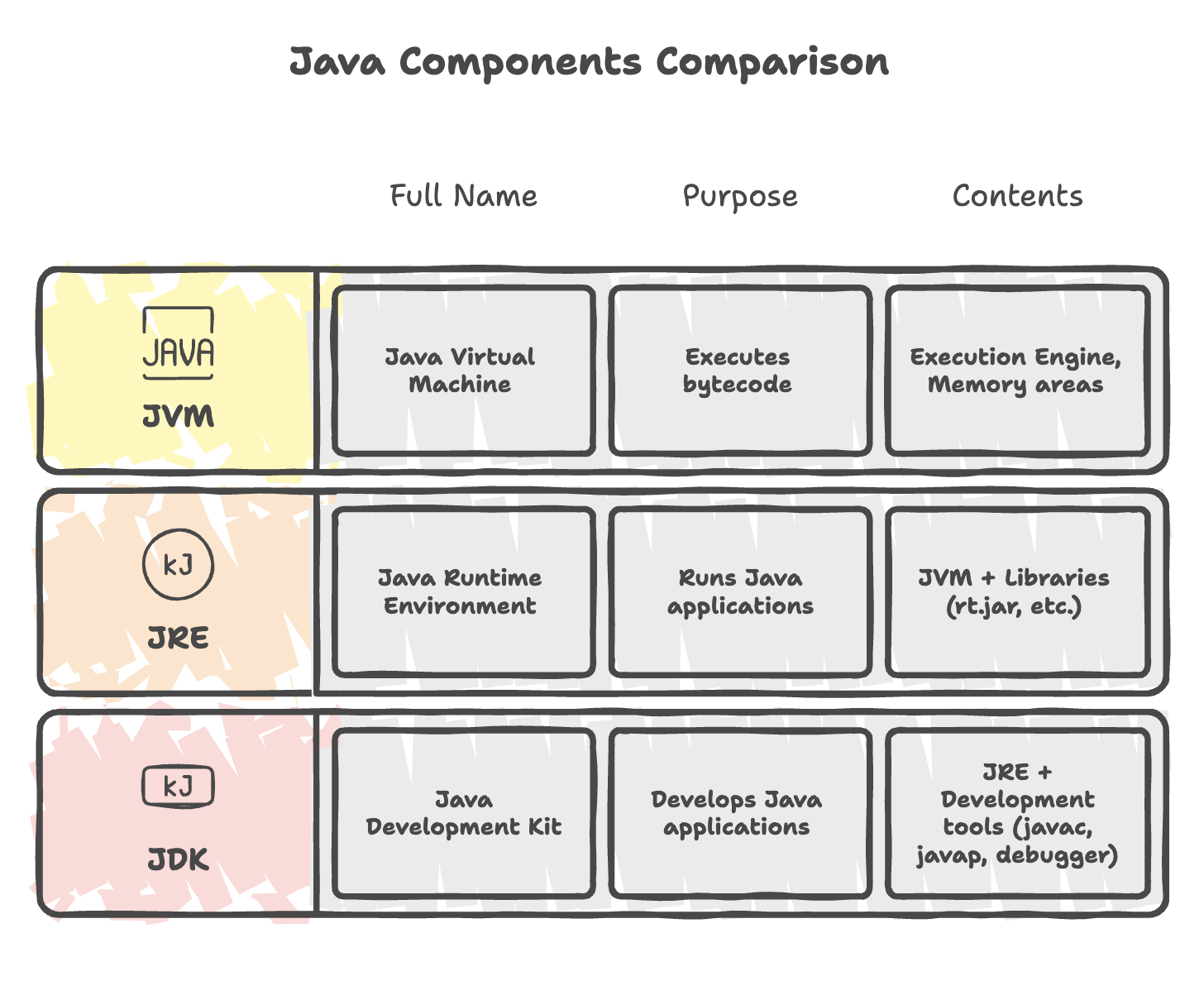
Relationship:
JDK (Development)
└── JRE (Runtime)
    └── JVM (Execution)
Key Characteristics of JVM
1. Platform Independence
How:
- Java source compiled to bytecode (platform-independent)
- JVM translates bytecode to native machine code (platform-specific)
Windows JVM ─┐
Linux JVM   ─┼─→ Same Bytecode (.class)
macOS JVM  ─┘
2. Memory Management
- Automatic memory allocation and deallocation
- Garbage Collector handles object lifecycle
- No manual memory management (unlike C/C++)
3. Security
- Bytecode verification prevents malicious code
- Classloader hierarchy enforces security boundaries
- SecurityManager controls access to system resources
4. Performance Optimization
- JIT compiler optimizes hot spots
- Adaptive optimization based on runtime profiling
- Multiple GC algorithms for different needs
Summary
- The JVM consists of three core components: the Class Loader Subsystem, Runtime Data Areas, and the Execution Engine.
- The Class Loader Subsystem follows a delegation model to securely load, link, and initialize classes.
- Runtime Data Areas separate shared memory (Heap, Method Area) and thread-specific memory (Stack, PC Register, Native Method Stack).
- The Execution Engine interprets bytecode, optimizes performance using JIT compilation, and manages memory through Garbage Collection.
- The JVM ensures platform independence by executing bytecode instead of native machine code.
- Understanding JVM architecture is essential for performance tuning, memory management, debugging, and writing efficient Java applications.
Written By: Muskan Garg
How is this guide?
Last updated on