
Github Models
Important: GitHub Models was retired on July 30, 2026. The service is no longer available. GitHub now directs developers toward Azure AI Foundry for AI model access and GitHub Copilot for AI-powered development workflows.
This lecture explains what GitHub Models was, how it worked, and why it was useful for developers.
What Was GitHub Models?
GitHub Models was a collection of tools that allowed developers to discover, experiment with, compare, and integrate AI models directly within the GitHub ecosystem.
It provided a simple environment for working with different AI models without requiring developers to set up separate platforms for every model provider.
The main capabilities included:
- Model Catalog - discover available AI models
- Playground - experiment with models interactively
- Prompt Management - create and refine prompts
- Model Evaluation - compare and evaluate model responses
- API Access - integrate models into applications
- Development Integration - move experiments toward application development
Simple Idea
Think of GitHub Models as an AI model testing laboratory for developers:
Discover a Model
      ↓
Experiment with Prompts
      ↓
Compare Results
      ↓
Build a Prototype
      ↓
Move Toward Production
How GitHub Models Worked
The overall workflow could be understood in three stages:
Explore → Experiment → Build1. Explore
Developers could browse the model catalog and learn about different AI models and their capabilities.
2. Experiment
The playground allowed developers to test prompts and adjust model parameters without immediately writing application code.
3. Build
Once a suitable model was identified, developers could use APIs, SDKs, or development tools to build an application around it.
Model Catalog
The Model Catalog provided a central place to discover AI models from different providers.
Developers could examine information such as:
- Model capabilities
- Documentation
- Usage information
- Supported scenarios
- Model-specific details
This made it easier to evaluate multiple models instead of manually searching for each provider's platform.
Why Was This Useful?
Suppose you want to build a chatbot but are unsure which model to use.
Instead of immediately committing to one provider:
Model A → Test
Model B → Test
Model C → Test
     ↓
Compare Results
     ↓
Choose the Best Fit
This approach helps developers select a model based on the requirements of their application.
Interactive Playground
The Playground was one of the most useful parts of GitHub Models.
It provided a browser-based environment where developers could experiment with AI models before integrating them into an application.
Developers could:
- Enter prompts
- Test responses
- Adjust model parameters
- Compare different models
- Experiment with conversations
- Save useful configurations
- View example code for API usage
For example:
Prompt
  ↓
AI Model
  ↓
Response
  ↓
Adjust Prompt / Parameters
  ↓
Test Again
This made prompt experimentation much faster than repeatedly modifying application code.
Model Parameters
AI models provide parameters that influence how they generate responses.
For example:
Temperature
Controls the randomness of generated responses.
Lower Temperature
      ↓
More predictable output

Higher Temperature
      ↓
More varied output
Maximum Tokens
Controls the maximum amount of generated output.
Other parameters may also be available depending on the selected model.
The exact parameters and supported values depend on the model.
Comparing AI Models
One important capability was model comparison.
Developers could test multiple models using the same prompt and compare their responses.
For example:
                 Same Prompt
                     ↓
          ┌──────────┴──────────┐
          ↓                     ↓
       Model A                Model B
          ↓                     ↓
      Response A            Response B
          └──────────┬──────────┘
                     ↓
                Compare
This is useful because there is no single AI model that is best for every task.
A model might be preferred because it provides:
- Better accuracy
- Faster responses
- Better reasoning
- Lower cost
- Better support for a particular task
Model Evaluation
GitHub Models also provided tools for evaluating model responses.
Evaluation helps answer a more important question than:
"Which response looks better?"
Instead, developers can ask:
"Which model consistently performs better for my application's requirements?"
Examples of evaluation criteria included:
| Evaluation | Purpose |
|---|---|
| Similarity | Measures similarity to an expected result |
| Relevance | Measures how relevant the response is |
| Groundedness | Measures whether the response is supported by provided context |
| Custom Evaluation | Allows developers to define their own criteria |
This is especially useful when developing production AI applications where responses need to be evaluated systematically.
Development Integration
GitHub Models was designed to reduce the gap between AI experimentation and application development.
A typical workflow could look like:
GitHub Models Playground
          ↓
       Experiment
          ↓
       Evaluate
          ↓
      Prototype
          ↓
      Application
Development tools such as GitHub Codespaces and the VS Code AI Toolkit could be used as part of this workflow.
The goal was to let developers move from:
"I want to test this AI model."
to:
"I want to build an application using this model."
API Access
Developers could also access supported models programmatically.
This allowed AI functionality to be integrated into applications rather than being used only through the browser.
Common approaches included:
- Azure AI Inference SDK
- Model-specific SDKs
- REST APIs
A simplified application flow looks like:
Application
     ↓
AI API
     ↓
Selected Model
     ↓
AI Response
     ↓
Application
For example, an application could send:
"Summarize this customer feedback."to an AI model and receive the generated summary.
Available AI Models
GitHub Models provided access to models from multiple AI providers.
Examples from its active period included:
| Provider | Example Models |
|---|---|
| OpenAI | GPT models |
| Meta | Llama models |
| Mistral AI | Mistral models |
| Microsoft | Phi models |
| DeepSeek | DeepSeek models |
| xAI | Grok models |
| Others | Additional language and embedding models |
The available models changed over time as new models were added.
GitHub Models and AI Application Development
GitHub Models was particularly useful during the early stages of AI application development.
Consider a developer building a customer-support application.
The developer might need to decide:
Which model should we use?
        ↓
Which prompt works best?
        ↓
How accurate are the responses?
        ↓
Which model performs better?
        ↓
Can we integrate it into our application?
GitHub Models provided tools to experiment with these questions before committing to a production implementation.
Common Use Cases
| Use Case | How It Helped |
|---|---|
| Learning AI Models | Experiment with different models |
| Prompt Engineering | Test and refine prompts |
| Model Comparison | Compare responses from different models |
| AI Prototyping | Quickly build proof-of-concept applications |
| RAG Applications | Experiment with language and embedding models |
| Multimodal Applications | Explore models supporting different input types |
| Model Evaluation | Measure response quality |
| Application Development | Access models through APIs |
GitHub Models vs GitHub Copilot
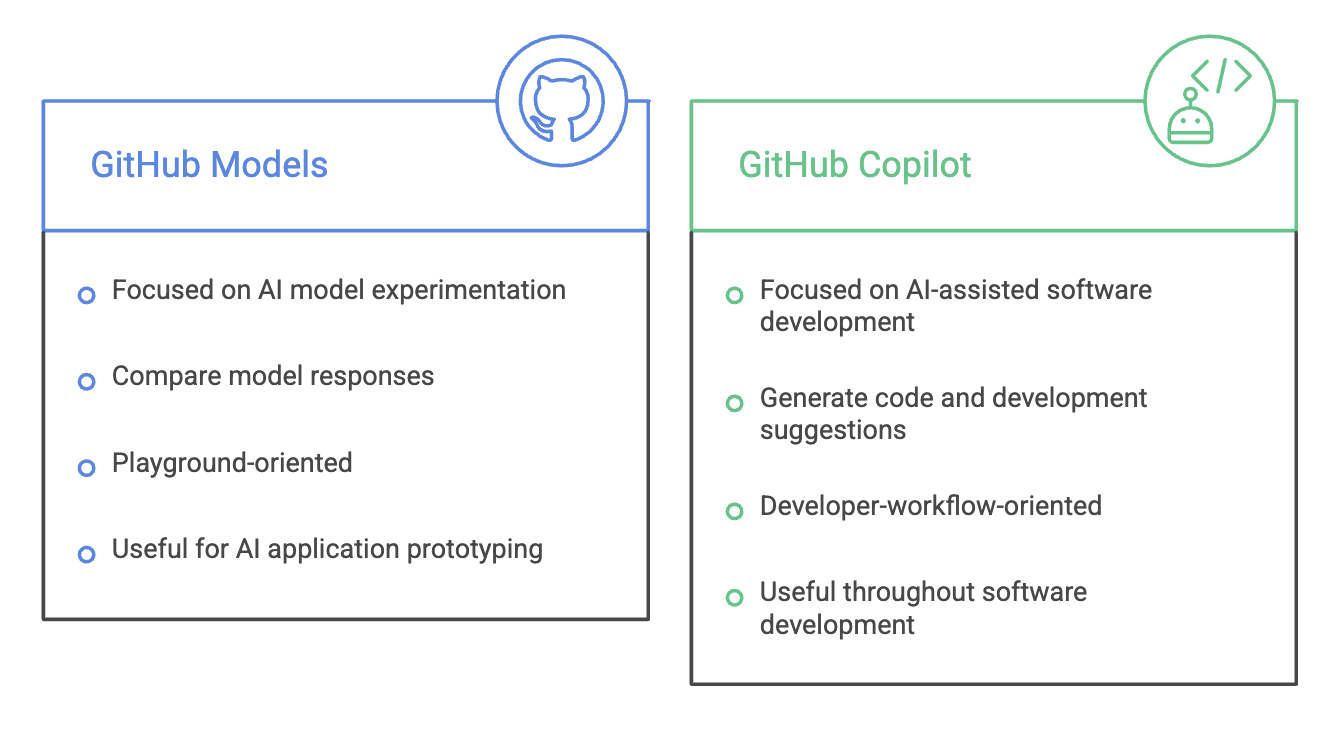
Simple Difference
GitHub Models
     ↓
"Which AI model should I use?"

GitHub Copilot
     ↓
"Help me build and work with my software."
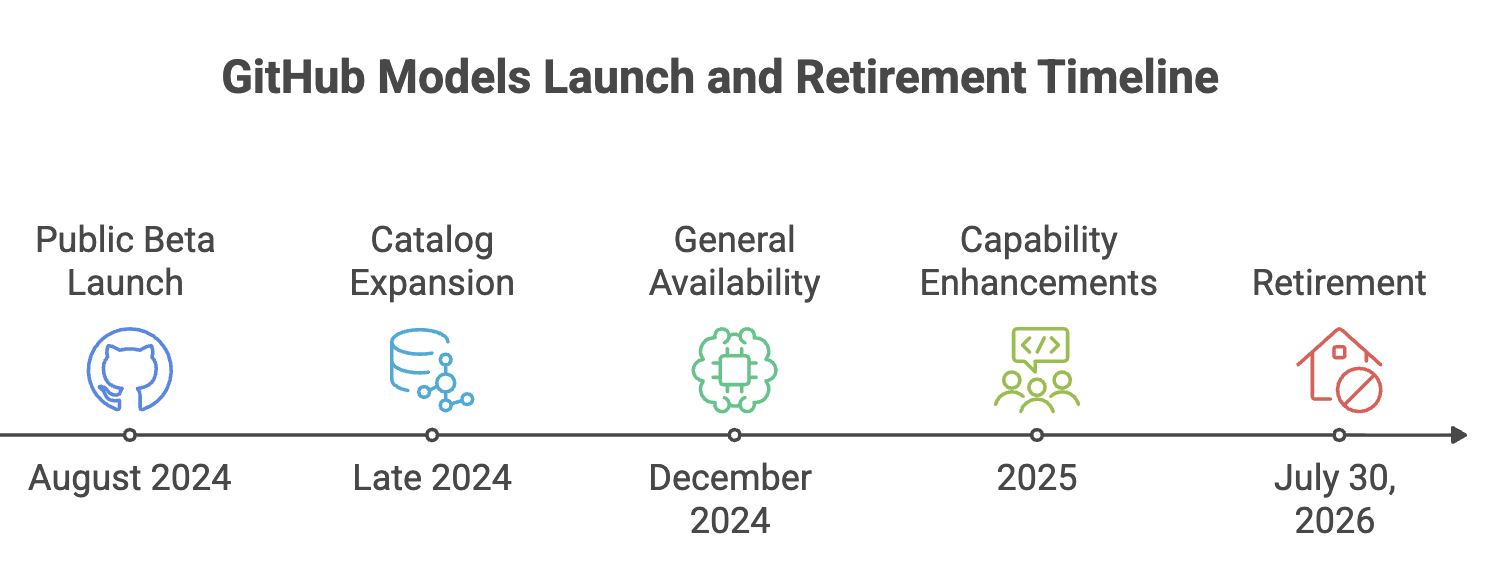
Why GitHub Models Was Retired
GitHub Models was a standalone service for exploring and using AI models, but it was retired on July 30, 2026.
Therefore, it should no longer be presented as a currently available GitHub service.
For current AI development, the responsibilities are broadly split between:
| Requirement | Current Direction |
|---|---|
| AI model access and development platform | Azure AI Foundry |
| AI-assisted software development | GitHub Copilot |
The important lesson is that the underlying idea-making AI models easier for developers to experiment with and integrate-continues through other Microsoft/GitHub AI offerings.
Summary
- GitHub Models was a GitHub-based platform for discovering and experimenting with AI models. It provided a model catalog and an interactive playground.
- Developers could test prompts and adjust model parameters.
- Multiple AI models could be compared using the same prompts.
- Evaluation tools helped measure response quality.
- Developers could move from experimentation toward application development using APIs and development tools.
- It supported models from multiple AI providers.
- GitHub Models was retired on July 30, 2026.
- Azure AI Foundry is the recommended direction for AI model access and development.
- GitHub Copilot focuses on AI-assisted software development.
Written By: Muskan Garg
How is this guide?
Last updated on