
Working with Forks and Pull Requests
When working on a team or contributing to open-source projects, you often need to work on code that you don't directly control. GitHub provides three important concepts for this workflow:
- Fork - Create your own copy of a repository on GitHub.
- Pull Request (PR) - Propose your changes for integration into another repository.
- Code Review - Allow developers to examine and discuss those changes before they are merged.
What is a Fork?
A fork is a copy of another user's or organization's repository created under your own GitHub account.
For example:
Original Repository
github.com/company/project
          │
          │ Fork
          ▼
Your Repository
github.com/your-name/project
Your fork is a separate repository. Changes made to it do not automatically affect the original repository.
Why Use a Fork?
Forks are especially useful when:
- You want to contribute to an open-source project.
- You don't have permission to push directly to the original repository.
- You want to experiment with the project independently.
- You want to propose changes to the original maintainers.
Creating a Fork
On GitHub:
- Open the repository you want to contribute to.
- Click Fork.
- Select your GitHub account.
- GitHub creates a copy under your account.
You can then clone your fork:
git clone git@github.com:your-username/project.gitFork happens on GitHub. Clone happens on your local machine.
What is a Pull Request?
A Pull Request (PR) is a request to merge your changes into another repository or branch.
Despite its name, a pull request does not mean you are directly executing git pull. It is a collaboration and review mechanism provided by GitHub.
For example:
Your Fork
    │
    │ Pull Request
    ▼
Original Repository
The maintainers can review your changes before deciding whether they should become part of the project.
Pull Request Workflow
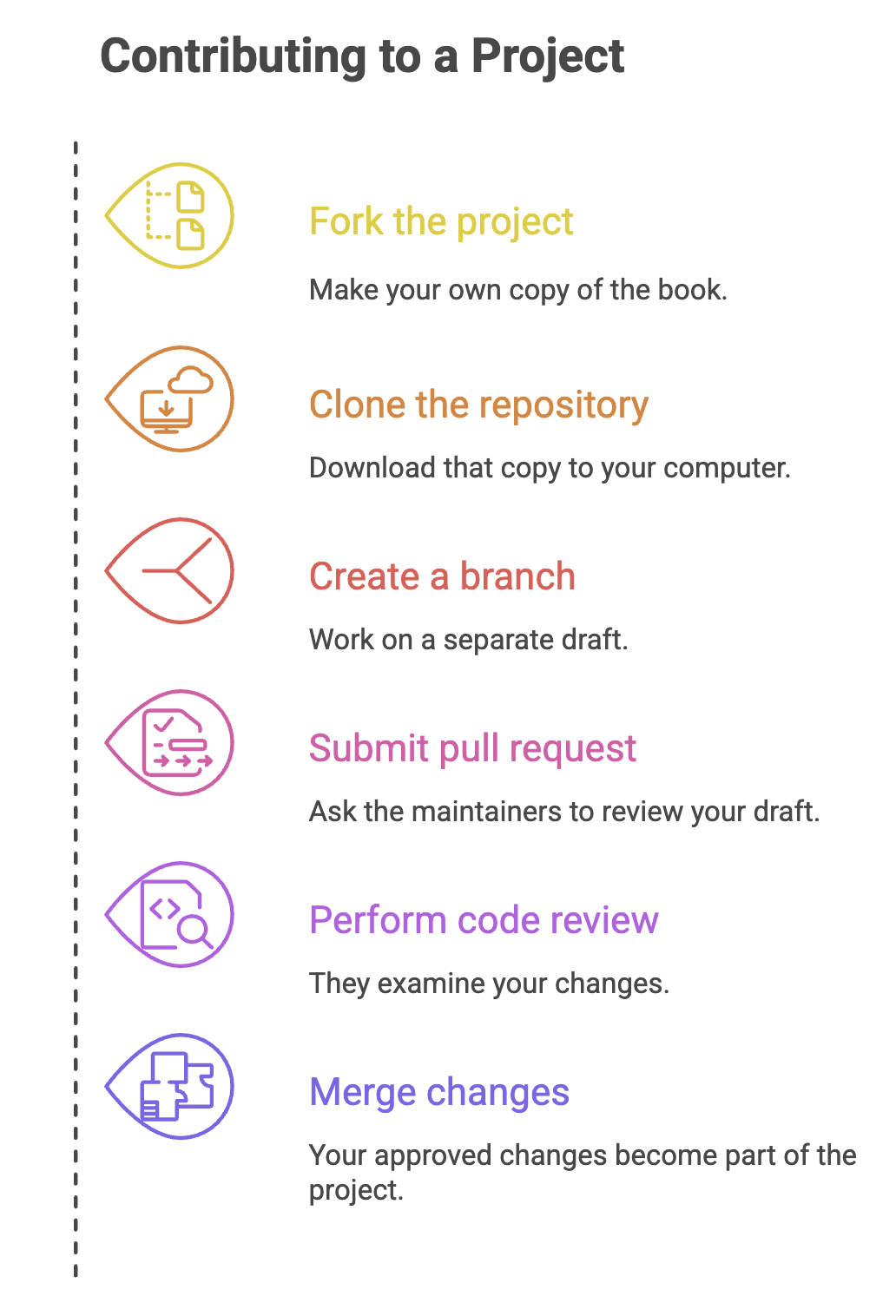
A common open-source contribution looks like this:
Fork
  ↓
Clone
  ↓
Create Branch
  ↓
Make Changes
  ↓
Commit
  ↓
Push
  ↓
Create Pull Request
  ↓
Code Review
  ↓
Merge
Step 1: Fork the Repository
Create your own copy on GitHub.
Step 2: Clone Your Fork
git clone git@github.com:your-username/project.gitStep 3: Create a Feature Branch
git switch -c fix-loginKeeping your work on a separate branch makes it easier to manage and review.
Step 4: Make and Commit Changes
git add .
git commit -m "Fix login validation"
Step 5: Push the Branch
git push -u origin fix-loginStep 6: Create the Pull Request
Open the original repository on GitHub and create a PR from your branch.
A good PR normally includes:
- Clear title - briefly explains the change.
- Description - explains what was changed and why.
- Related issue - if the project uses GitHub Issues.
- Testing information - explains how the change was verified.
What Happens After a Pull Request?
Creating a PR starts a discussion and review process.
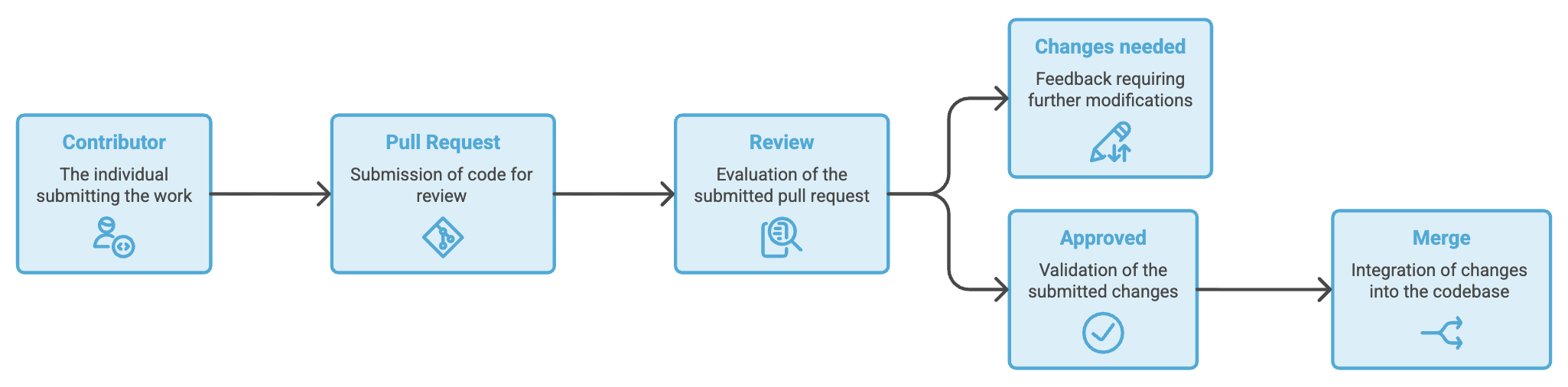
A maintainer may:
- Approve the changes.
- Request modifications.
- Leave comments or questions.
- Reject or close the PR.
- Merge the PR if everything is satisfactory.
If changes are requested, you normally make them on the same branch and push again. GitHub automatically updates the existing PR.
What is a Code Review?
A code review is the process of examining proposed code changes before they are merged.
The goal isn't simply to find mistakes. A good review helps the team maintain quality, readability, security, and consistency.
What Reviewers Check?
| Area | What They Look For |
|---|---|
| Correctness | Does the code solve the intended problem? |
| Readability | Is the code easy to understand? |
| Design | Does the solution fit the application's architecture? |
| Maintainability | Will the code be easy to modify later? |
| Testing | Are important scenarios covered? |
| Security | Does the change introduce security risks? |
| Performance | Could the change cause unnecessary overhead? |
Code Review on GitHub
GitHub allows reviewers to comment directly on specific lines of a PR.
A typical review looks like:
Developer creates PR
        ↓
Reviewer examines changes
        ↓
Comments / suggestions
        ↓
Developer updates code
        ↓
Reviewer checks again
        ↓
Approve
        ↓
Merge
Example
A reviewer might notice:
User user = userRepository.findById(id).get();Instead of simply saying "This is wrong," a useful review comment might explain that .get() can fail when the user doesn't exist and suggest handling the Optional safely.
This makes code review a learning and collaboration process, not just an approval step.
Summary
- A fork creates your own GitHub copy of another repository.
- A clone downloads a repository to your local machine.
- A branch provides an isolated workspace for your changes.
- A pull request proposes those changes for integration.
- Code review allows developers to examine and discuss the changes before merging.
- A PR can go through multiple rounds of feedback before it is merged.
- Forks are common in open-source contribution, while teams often work directly with shared repositories.
- Good PRs are focused, clearly described, tested, and easy to review.
Written By: Muskan Garg
How is this guide?
Last updated on