
Gen AI with Spring AI
Spring AI is a framework that simplifies the integration of generative AI models into Java and Python applications. It provides an abstraction layer that enables developers to work with multiple AI providers through a consistent API, eliminating the need to rewrite code when switching between different AI models.
Key Concept: Abstraction Layer
What is it?
Spring AI acts as an abstraction layer between your application and various AI providers, allowing you to interact with different AI services using the same codebase.
Supported AI Providers
- OpenAI (GPT models)
- Anthropic (Claude)
- Google (Gemini)
- Microsoft Azure AI
- Amazon Bedrock
Benefits
- Code Consistency: Write once, use with any provider
- Easy Migration: Switch between AI models without code changes
- Simplified Integration: Only dependency and configuration changes required
- Reduced Complexity: No need to build custom abstraction layers
Why Use Spring AI?
1. Enhanced Application Capabilities
AI features can significantly improve your applications:
- Chatbot Integration: Intelligent conversational interfaces
- Content Generation: Automated text, image, and description creation
- Productivity Tools: AI-assisted suggestions and automation
- Improved User Experience: Smart features without extensive development
2. Leverage Pre-built Models
- Use powerful AI models as a service
- No need for high-configuration local machines
- Eliminate the complexity of building and training models
- Access cutting-edge AI capabilities immediately
3. Simplified Development Workflow
Traditional approach without Spring AI:
- Obtain API key from provider
- Implement provider-specific SDK
- Write custom integration code
- Problem: Switching models requires code and dependency changes
With Spring AI:
- Add Spring AI dependency
- Configure API key in properties
- Use consistent
ChatClientinterface - Advantage: Switch models by changing only the configuration
Architecture and Inspiration
Spring AI 2.0.0 architecture draws inspiration from established AI frameworks:
- LangChain: Pattern-based AI application development
- LlamaIndex: Data framework for LLM applications
This ensures Spring AI incorporates proven patterns and best practices from the AI development community.
Core Features
Spring AI 2.0.0 Capabilities
- Chat Completion: Conversational AI interactions
- Embeddings: Text vectorization for semantic search
- Text-to-Image: Image generation from descriptions
- Audio Transcription: Speech-to-text conversion
- Text-to-Speech: Voice synthesis
- Moderation: Content safety and filtering
- Vector Databases: Efficient similarity search
- Tool Calling: Agentic AI capabilities
Getting Started
Step 1: Project Setup
Create a new Spring Boot project using Spring Initializer:
- Build Tool: Maven or Gradle
- Language: Java
- Spring Boot Version: 2.4 or higher (Spring AI 2.0.0 currently in M2 milestone)
- Dependencies:
- Spring Web
- Spring AI (provider-specific, e.g.,
spring-ai-anthropic)
Step 2: Obtain API Key
- Create an account with your chosen AI provider
- Set up billing information (if required)
- Navigate to the provider's dashboard
- Generate an API key
- Store the key securely
Step 3: Configuration
Add configuration to application.properties:
# For Anthropic Claude
spring.ai.anthropic.api-key=YOUR_API_KEY_HERE
spring.ai.anthropic.chat.options.model=claude-sonnet-4-6Important: Replace YOUR_API_KEY_HERE with your actual API key. Without proper configuration, you will encounter null pointer errors.
Step 4: Implementation
Basic Console Application Example
package com.telusko.SpringAIDemo;

import org.springframework.boot.SpringApplication;
import org.springframework.boot.autoconfigure.SpringBootApplication;
import org.springframework.ai.anthropic.AnthropicChatModel;
import org.springframework.context.ApplicationContext;

@SpringBootApplication
public class SpringAIDemoApplication {

    public static void main(String[] args) {
        ApplicationContext context = SpringApplication.run(SpringAIDemoApplication.class, args);

        // Define your prompt
        String prompt = "What is the capital of France?";

        // Get the ChatModel bean
        AnthropicChatModel chatModel = context.getBean(AnthropicChatModel.class);

        // Call the AI model
        String response = chatModel.call(prompt);

        // Display the response
        System.out.println(response);
    }
}
Web Application Example with Controller
@RestController
public class AIController {

    private final ChatModel chatModel;

    public AIController(ChatModel chatModel) {
        this.chatModel = chatModel;
    }

    @GetMapping("/ask")
    public String ask(@RequestParam String prompt) {
        return chatModel.call(prompt);
    }
}Note: The controller uses the generic ChatModel interface, not provider-specific classes. This demonstrates the abstraction principle.
Key Implementation Points
1. Model-Agnostic Code
Your code doesn't specify which AI provider you're using:
// Generic ChatModel interface - works with any provider
private final ChatModel chatModel;
2. Configuration-Based Provider Selection
Switch providers by changing:
- Dependency: Update Maven/Gradle dependency (e.g.,
spring-ai-openaivsspring-ai-anthropic) - Properties: Update API key and model name in
application.properties
3. Prompt-Based Interaction
All AI interactions follow the same pattern:
String response = chatModel.call(prompt);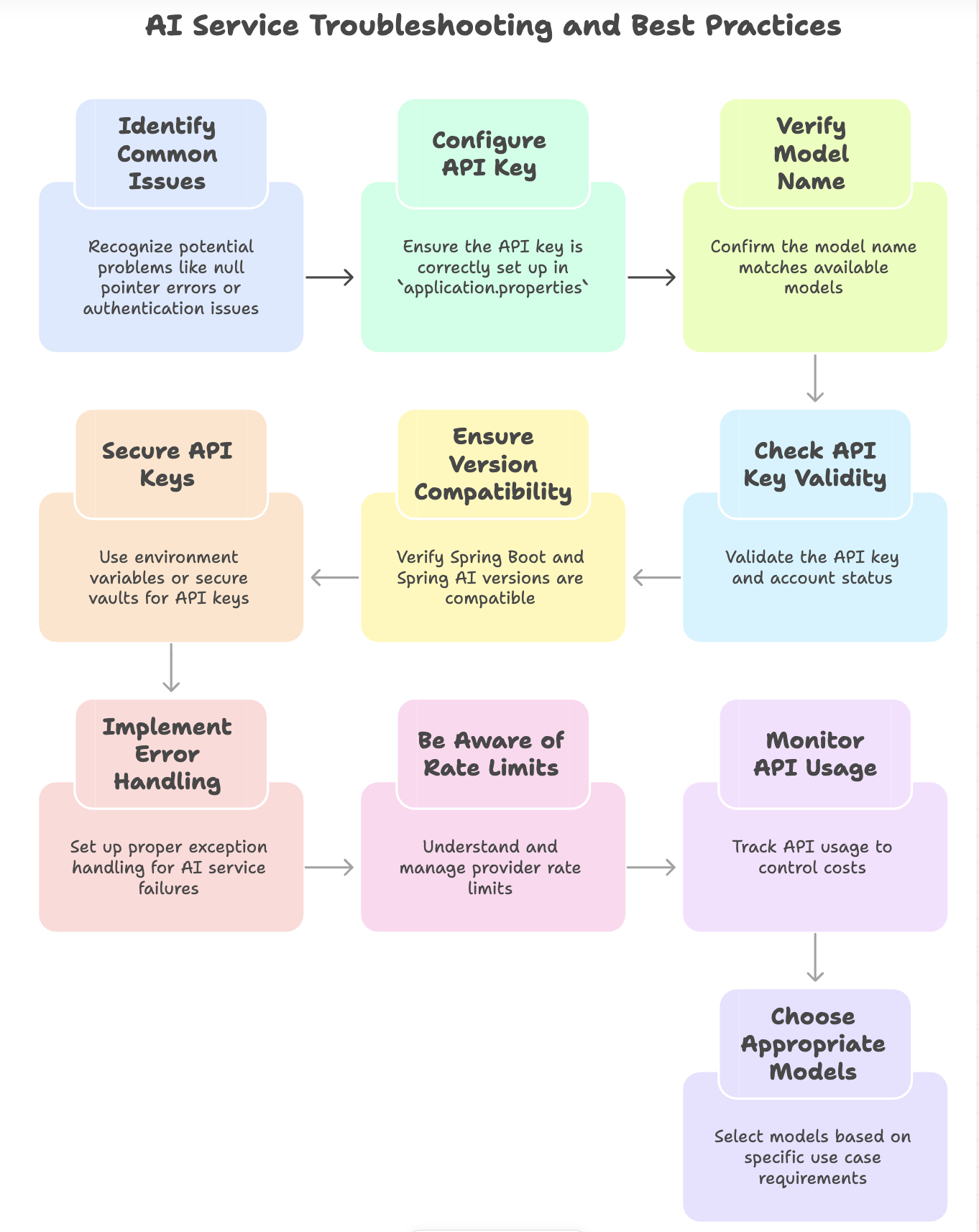
Switching Between Providers
Example: From Anthropic to OpenAI
Step 1: Update dependency in pom.xml
<!-- Before -->
<dependency>
    <groupId>org.springframework.ai</groupId>
    <artifactId>spring-ai-anthropic</artifactId>
</dependency>

<!-- After -->
<dependency>
    <groupId>org.springframework.ai</groupId>
    <artifactId>spring-ai-openai</artifactId>
</dependency>
Step 2: Update application.properties
# Before
spring.ai.anthropic.api-key=YOUR_KEY
spring.ai.anthropic.chat.options.model=claude-sonnet-4-6

# After
spring.ai.openai.api-key=YOUR_KEY
spring.ai.openai.chat.options.model=gpt-4
Step 3: No code changes required! Your application code remains identical.
Summary
Spring AI provides a powerful, flexible framework for integrating generative AI into Spring Boot applications. By offering a consistent abstraction layer across multiple AI providers, it enables developers to:
- Build AI-powered applications quickly
- Switch between providers without code rewrites
- Leverage enterprise-grade AI models as a service
- Focus on business logic rather than integration complexity
Whether you're building chatbots, content generators, or intelligent automation tools, Spring AI simplifies the development process while maintaining code quality and flexibility.
Written By: Muskan Garg
How is this guide?
Last updated on