
Working with Ollama and MetaData
This guide demonstrates how to integrate Ollama local models with Spring AI and explores working with ChatResponse objects to access metadata. Unlike simple string responses, ChatResponse provides detailed information about the model, usage statistics, and enhanced customization options.
What is Metadata?
Metadata refers to "data about data" - in the context of AI responses, it includes:
| Metadata Type | Description | Example |
|---|---|---|
| Model Information | Which specific model generated the response | mistral:latest, deepseek-r1:7b |
| Token Usage | Number of tokens consumed | Input: 50, Output: 150, Total: 200 |
| Response Timing | Time taken to generate response | 2.5 seconds |
| Model Version | Specific version of the model used | deepseek-r1:7b-q4_0 |
| Finish Reason | Why the model stopped generating | stop, length, content_filter |
| Rate Limits | API usage limits and remaining quota | Remaining: 45 requests/minute |
Why Metadata Matters
- Monitoring: Track which model is actually being used
- Debugging: Identify issues with model selection or configuration
- Cost Analysis: Monitor token usage for billing purposes
- Performance Optimization: Analyze response times and patterns
- Quality Control: Verify correct model is responding
- Logging: Maintain detailed audit trails
Implementation Guide
Step 1: Create Ollama Controller
File: OllamaController.java
package com.telusko.SpringAIDemo;

import org.springframework.ai.chat.client.ChatClient;
import org.springframework.ai.chat.model.ChatResponse;
import org.springframework.ai.ollama.OllamaChatModel;
import org.springframework.http.ResponseEntity;
import org.springframework.web.bind.annotation.*;

@RestController
@RequestMapping("/api/ollama")
@CrossOrigin("*")
public class OllamaController {

    private ChatClient chatClient;

    // Constructor Injection with OllamaChatModel
    public OllamaController(OllamaChatModel chatModel){
        this.chatClient = ChatClient.create(chatModel);
    }

    @GetMapping("/{message}")
    public ResponseEntity<String> getAnswer(@PathVariable String message){

        // Get ChatResponse instead of simple String
        ChatResponse chatResponse = chatClient
                .prompt(message)
                .call()
                .chatResponse();

        // Access metadata - print model name to console
        System.out.println(chatResponse.getMetadata().getModel());

        // Extract the actual text response
        String response = chatResponse.getResult().getOutput().getText();

        return ResponseEntity.ok(response);
    }
}
Code Breakdown
1. Model Injection
private ChatClient chatClient;

public OllamaController(OllamaChatModel chatModel){
    this.chatClient = ChatClient.create(chatModel);
}Process:
- Spring injects
OllamaChatModel(configured with model from properties) - ChatClient created from the OllamaChatModel
- Ready to handle local model requests
2. ChatResponse vs Simple String
Previous Approach (Simple String)
// Returns just the text
String response = chatClient
        .prompt(message)
        .call()
.content();Limitations:
- Only gets the generated text
- No access to metadata
- Cannot inspect model details
- No usage statistics
New Approach (ChatResponse Object)
// Returns full ChatResponse with metadata
ChatResponse chatResponse = chatClient
        .prompt(message)
        .call()
.chatResponse();Advantages:
- Access to complete response object
- Metadata available
- Model information accessible
- Usage statistics included
- Enhanced debugging capabilities
3. Accessing Metadata
// Print model name to console
System.out.println(chatResponse.getMetadata().getModel());
What this does:
chatResponse.getMetadata()- Retrieves metadata object.getModel()- Extracts the specific model name- Outputs to console:
deepseek-r1:7bormistral:latest
Use Cases:
- Verify correct model is being used
- Debug model selection issues
- Log model usage for analytics
- Monitor model performance
4. Extracting Response Text
String response = chatResponse.getResult().getOutput().getText();Method Chain Breakdown:
| Method | Returns | Purpose |
|---|---|---|
.getResult() | Generation | Gets the generation result object |
.getOutput() | AssistantMessage | Extracts the output message |
.getText() | String | Gets the actual text content |
Visual Representation:
ChatResponse
    ├── Metadata (model info, usage stats)
    └── Result (Generation)
            └── Output (AssistantMessage)
                    └── Text (String) ← What we return to user
Configuration
application.properties
# Ollama Model Configuration
spring.ai.ollama.chat.options.model=deepseek-r1:7b

# Alternative models:
# spring.ai.ollama.chat.options.model=mistral:latest
# spring.ai.ollama.chat.options.model=llama3.2:latest
# spring.ai.ollama.chat.options.model=gemma:7b

# Optional: Ollama base URL (default: http://localhost:11434)
spring.ai.ollama.base-url=http://localhost:11434
Default Model Behavior
Important: If you do not specify a model in application.properties, Ollama will use Mistral as the default model.
# No model specified
# (empty or commented out)

# Result: Ollama automatically uses mistral:latest
Metadata Access Example
Comprehensive Metadata Extraction
@GetMapping("/{message}")
public ResponseEntity<String> getAnswer(@PathVariable String message){

    ChatResponse chatResponse = chatClient
            .prompt(message)
            .call()
            .chatResponse();

    // 1. Access Model Information
    String modelName = chatResponse.getMetadata().getModel();
    System.out.println("Model used: " + modelName);

    // 2. Access Usage Metadata (if available)
    var metadata = chatResponse.getMetadata();
    System.out.println("Metadata: " + metadata);

    // 3. Access Generation Result
    var result = chatResponse.getResult();
    System.out.println("Finish Reason: " + result.getMetadata().getFinishReason());

    // 4. Extract the actual response text
    String response = result.getOutput().getText();

    return ResponseEntity.ok(response);
}
Sample Console Output
Model used: deepseek-r1:7b
Metadata: {model=deepseek-r1:7b, usage={promptTokens=45, generationTokens=123, totalTokens=168}}
Finish Reason: STOP
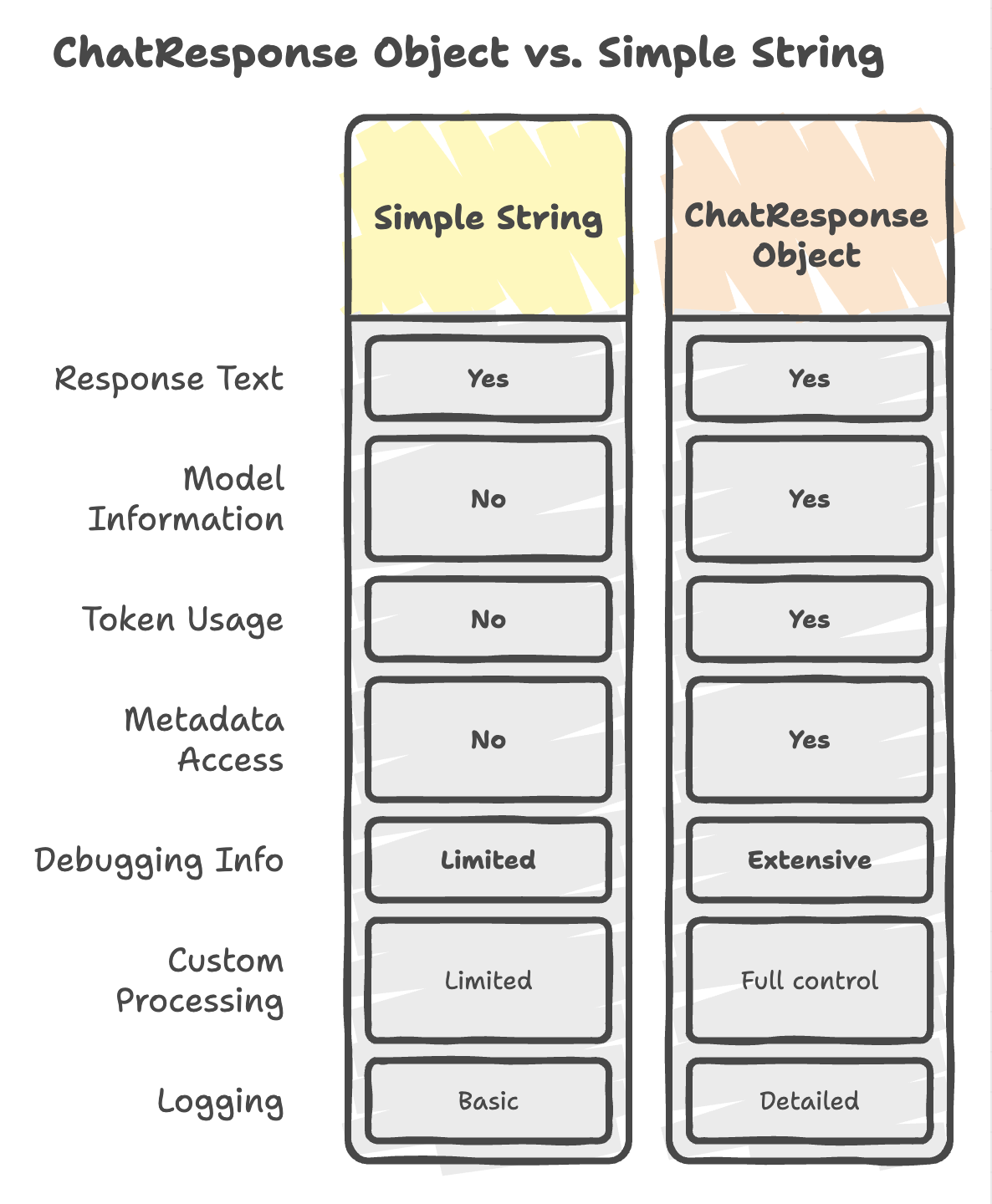
Why Use ChatResponse Object?
1. Access to Metadata
// Get model name
String model = chatResponse.getMetadata().getModel();

// Get usage statistics (if available)
var usage = chatResponse.getMetadata().get("usage");
Use Case: Track which model is actually responding, monitor usage patterns.
2. Enhanced Customization
// Access internal structure
var result = chatResponse.getResult();
var output = result.getOutput();
var text = output.getText();

// Can add custom processing before returning
String enhancedResponse = customProcessing(text);
Use Case: Add formatting, filtering, or transformation before sending to client.
3. Advanced Monitoring
// Log detailed information
logger.info("Model: {}, Tokens: {}, Time: {}",
    chatResponse.getMetadata().getModel(),
    chatResponse.getMetadata().get("usage"),
    System.currentTimeMillis() - startTime);
Use Case: Maintain detailed logs for debugging, auditing, and performance analysis.
Managing Multiple AI Models
Multi-Controller Architecture
The Spring AI project demonstrates how to handle multiple AI providers in one application:
src/main/java/com/example/
├── OpenAIController.java      → /api/openai    → OpenAI models
├── AnthropicController.java   → /api/anthropic → Claude models
└── OllamaController.java      → /api/ollama    → Local models
Benefits of Multiple Controllers
| Benefit | Description |
|---|---|
| Separation of Concerns | Each controller handles one provider |
| Independent Configuration | Different settings per provider |
| Easy Model Switching | Route requests to most appropriate model |
| Provider Flexibility | Mix cloud and local models |
| Scalability | Add new providers without affecting existing ones |
Example: Routing to Different Models
Client can choose which model to use:
// Frontend code - choose model endpoint
const openAIResponse = await fetch('/api/openai/explain Spring Boot');
const claudeResponse = await fetch('/api/anthropic/explain Spring Boot');
const localResponse = await fetch('/api/ollama/explain Spring Boot');
Backend automatically routes to correct model:
/api/openai→ GPT-4/api/anthropic→ Claude 3/api/ollama→ DeepSeek or Mistral
Summary
-
ChatResponseprovides a complete response object, allowing access to both generated content and metadata such as model details, enabling advanced handling beyond simple text output. -
Developers can choose between
.content()and.chatResponse(), depending on whether only the response text is needed or detailed metadata and internal response structure are required. -
Metadata enhances monitoring and debugging, providing insights like model name, execution details, and enabling better logging and performance tracking.
-
Ollama integrates local AI models seamlessly with Spring AI, using a default model (Mistral) if none is specified, and supporting flexible model configuration.
-
A multi-controller architecture enables clean handling of multiple AI providers, allowing scalable, modular design while leveraging Spring AI’s abstraction layer for consistent interaction.
Written By: Muskan Garg
How is this guide?
Last updated on