
Vector Embeddings
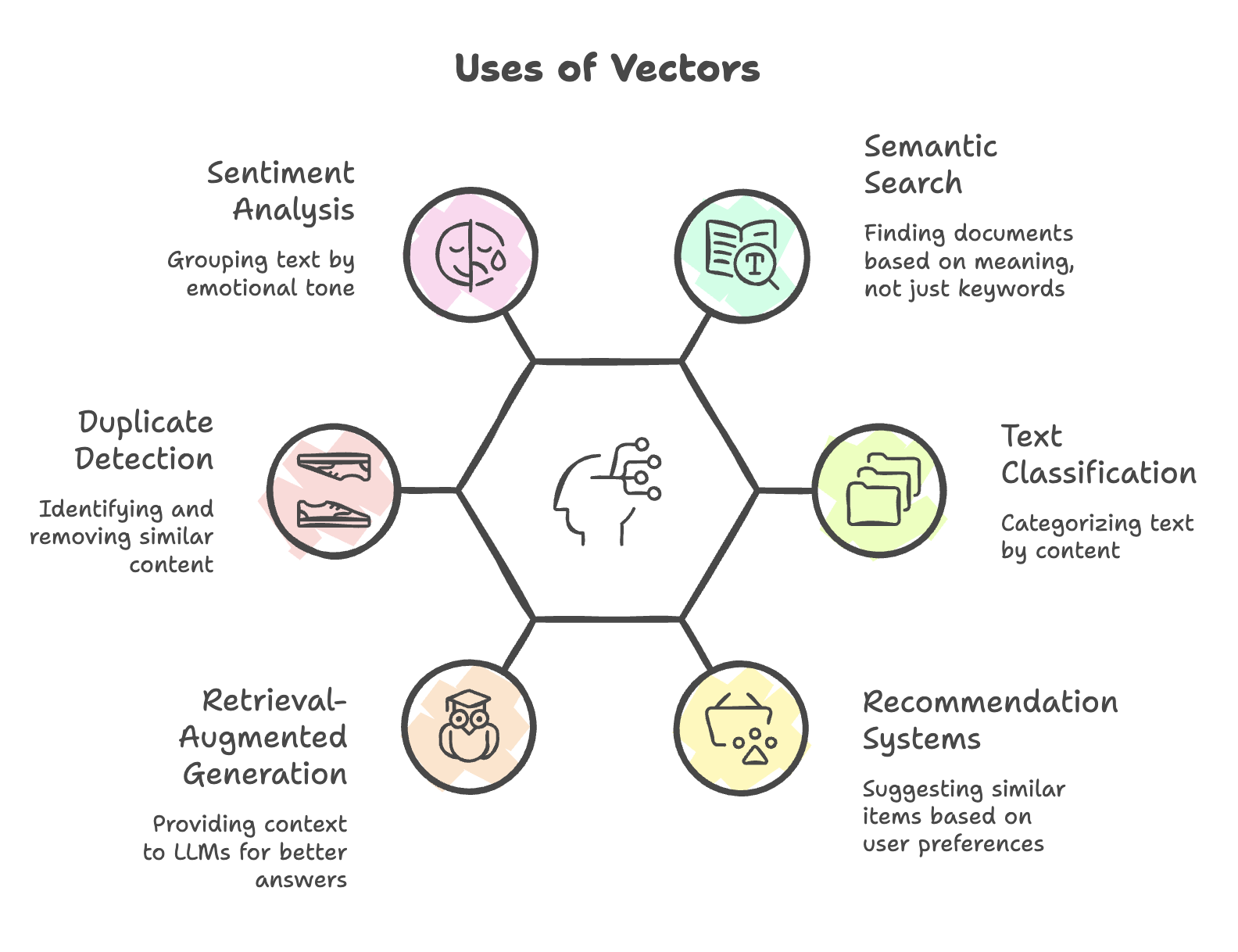
Vector embeddings are numerical representations of text, images, or videos that capture semantic relationships and meaning. They transform human-readable content into multi-dimensional vectors that AI models can process, enabling powerful features like semantic search, text classification, and recommendation systems.
What Are Vector Embeddings?
Vector embeddings map words, sentences, or any input data into points in a multi-dimensional space where:
- Similar meanings = Close proximity in space
- Different meanings = Distant points in space
Visual Example
Imagine plotting words in 2D space:
Dimension 1 (Technology) →
        |
        |  Computer (0.8, 0.1)
        |  Smartphone (0.75, 0.15)
        |
        |
        |                    Dog (0.1, 0.85)
        |                    Cat (0.15, 0.82)
        |                    Animal (0.12, 0.88)
        ↓
Dimension 2 (Living Things)
Observation:
- "Computer" and "Smartphone" are close to each other (similar concepts)
- "Dog" and "Cat" are close to each other (similar concepts)
- Technology words are far from animal words (different concepts)
Why Vector Embeddings Matter
Traditional Keyword Search Problem
Query: "Find documents about automobiles"
Traditional System:
- Searches for exact word "automobiles"
- Misses documents containing "car", "vehicle", "truck"
- No understanding of semantic similarity
Embedding-Based Semantic Search Solution
Query Embedding: "automobiles" → [0.82, 0.15, 0.43, ...]
Document Embeddings:
- "car" →
[0.81, 0.16, 0.42, ...]✅ Similar vector = Matched - "vehicle" →
[0.80, 0.17, 0.44, ...]✅ Similar vector = Matched - "banana" →
[0.10, 0.92, 0.05, ...]❌ Different vector = Not matched
Result: AI understands meaning beyond exact keyword matching.
How Vector Embeddings Work
Step 1: Tokenization
Break input text into tokens (words or sub-word units)
Example:
Input: "I love Java programming"

Tokenization:
["I", "love", "Java", "programming"]

Sub-word Tokenization (more common):
["I", "love", "Ja", "va", "program", "ming"]
Step 2: Token ID Mapping
Map tokens to predefined numerical IDs from the model's vocabulary
Example:
Token      → Token ID
"I"        → 234
"love"     → 1892
"Java"     → 5671
"programming" → 8234
Token IDs depend on the model’s tokenizer and vocabulary, and may vary across different models.
Step 3: Vector Conversion
Convert token IDs into high-dimensional vectors (embeddings)
Example:
"Java" → Token ID: 5671 → Vector: [0.23, -0.45, 0.78, ..., 0.12]
                                    ↑
                            1,024 to 3,072 dimensions
Step 4: Semantic Representation
The resulting vector captures the meaning and context of the input
Embedding Dimensions
What Are Dimensions?
Dimensions represent the number of numerical values in the embedding vector.
Common Dimension Sizes
| Provider | Type | Dimensions | Use Case |
|---|---|---|---|
| Mistral | Text | 1,024 (fixed) | General text embeddings |
| Mistral | Code | 1,536-3,072 (configurable) | Code embeddings |
| OpenAI | Text | 1,536 | ada-002 model |
| OpenAI | Text | 3,072 | text-embedding-3-large |
Dimension Impact
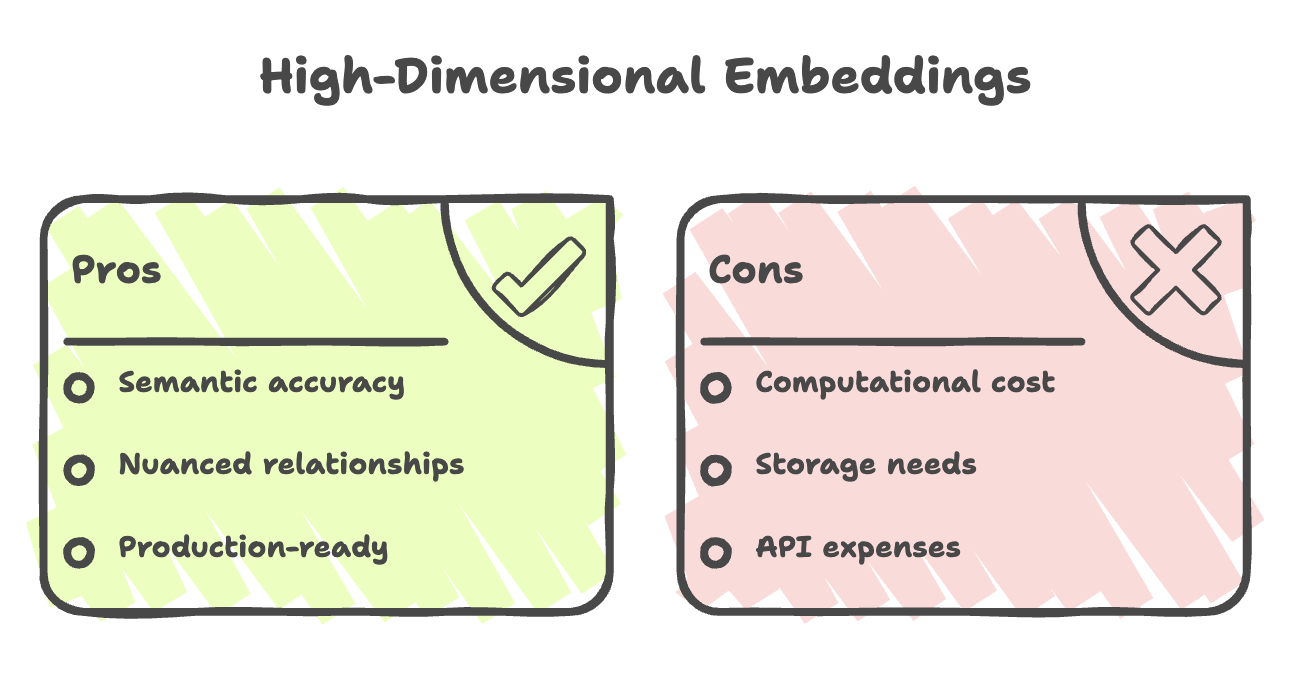
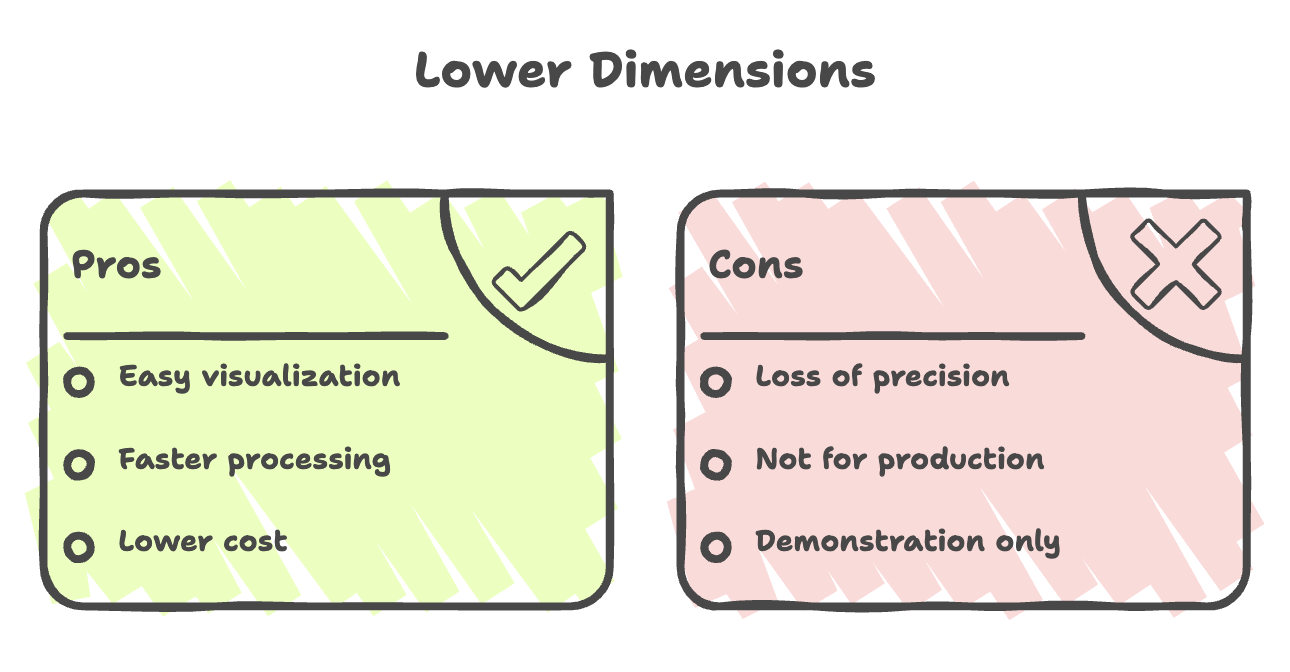
Example: Dimension Effect
Input: "dog"
1,024-dimensional embedding:
[0.23, -0.45, 0.78, 0.12, ..., 0.56] // 1,024 valuesResult: Captures rich semantic meaning
2-dimensional embedding:
[-0.97, -0.12] // 2 valuesResult: Simplified, loses nuance but can be plotted on X-Y axis
Embedding Models vs LLMs
Key Differences
| Aspect | Embedding Model | LLM (Language Model) |
|---|---|---|
| Purpose | Convert text to vectors | Generate text responses |
| Output | Numerical array | Human-readable text |
| Use Case | Semantic search, similarity | Chatbots, content generation |
| Example | Mistral Embed | Claude, GPT-4 |
| API Cost | Lower | Higher |
Not All Providers Offer Both
- OpenAI: Provides both embedding models and LLMs (GPT-4)
- Mistral AI: Provides both embedding models and LLMs
- Anthropic: Provides LLMs (Claude) but recommends third-party embedding models
Mistral AI Embedding Models
Two Specialized Models
1. Mistral Embed (Text)
Purpose: General text embeddings
Specifications:
- Dimensions: 1,024 (fixed)
- Use Case: Documents, articles, general text
- API Endpoint:
https://api.mistral.ai/v1/embeddings
Example Usage:
{
  "model": "mistral-embed",
  "input": "I love Java programming"
}
2. Codestral Embed (Code)
Purpose: Source code embeddings
Specifications:
- Dimensions: 1,536 to 3,072 (configurable)
- Use Case: Code search, code similarity
- Special Handling: Understands programming syntax (brackets, semicolons, etc.)
Example Usage:
{
  "model": "codestral-embed",
  "input": "public class Main { }",
  "encoding_format": "float"
}
Measuring Similarity: Cosine Similarity
How AI Determines "Closeness"?
Vector embeddings use cosine similarity to measure how similar two vectors are.
Formula
Cosine Similarity = (A · B) / (||A|| × ||B||)Where:
A · B= Dot product of vectors A and B||A||= Magnitude of vector A||B||= Magnitude of vector B
Similarity Score Range
1.0   = Identical vectors (perfect match)
0.5   = Moderately similar
0.0   = Completely unrelated
-1.0  = Opposite meanings
Example Calculation
Vector("dog")  = [0.8, 0.2, 0.1]
Vector("cat")  = [0.75, 0.25, 0.15]
Vector("car")  = [0.1, 0.85, 0.05]

Cosine Similarity:
- dog vs cat = 0.92  (very similar) ✅
- dog vs car = 0.31  (not similar) ❌
Setting Up Mistral AI in Spring Boot
Step 1: Obtain API Key
- Visit: https://console.mistral.ai/home
- Create an account or log in
- Navigate to API Keys section
- Click Generate API Key
- Copy and store the key securely
Step 2: Add Dependency
Add Spring AI Mistral starter to pom.xml:
<dependency>
    <groupId>org.springframework.ai</groupId>
    <artifactId>spring-ai-mistral-spring-boot-starter</artifactId>
    <version>2.0.0</version>
</dependency>
Step 3: Configure Application Properties
Add to application.properties:
# Anthropic for chat (if using)
spring.ai.anthropic.api-key=YOUR_ANTHROPIC_KEY
spring.ai.anthropic.chat.options.model=claude-sonnet-4-6

# Mistral for embeddings
spring.ai.mistral.api-key=YOUR_MISTRAL_API_KEY
spring.ai.mistral.embedding.options.model=mistral-embed
You can use different providers for chat and embeddings!
Implementation in Spring Boot
Controller Example
package com.telusko.springaidemo;

import org.springframework.ai.anthropic.AnthropicChatModel;
import org.springframework.ai.chat.client.ChatClient;
import org.springframework.ai.embedding.EmbeddingModel;
import org.springframework.beans.factory.annotation.Autowired;
import org.springframework.web.bind.annotation.GetMapping;
import org.springframework.web.bind.annotation.RequestParam;
import org.springframework.web.bind.annotation.RestController;
import org.springframework.ai.chat.model.ChatResponse;
import org.springframework.web.bind.annotation.PathVariable;

@RestController
public class AIController {

    @Autowired
    private EmbeddingModel embeddingModel;

    private ChatClient chatClient;

    public AIController(AnthropicChatModel chatModel) {
        this.chatClient = ChatClient.builder(chatModel).build();
    }

    // Chat endpoint
    @GetMapping("/api/question/{message}")
    public String getResponse(@PathVariable String message) {
        ChatResponse response = chatClient
                .prompt(message)
                .call()
                .chatResponse();

        int metadata = response.getMetadata().getUsage().getTotalTokens();
        System.out.println("Total tokens used: " + metadata);

        return response.getResult().getOutput().getText();
    }

    // Embedding endpoint
    @GetMapping("/api/embedding")
    public float[] getEmbedding(@RequestParam String text) {
        return embeddingModel.embed(text);
    }
}
Understanding the Code
1. Dependency Injection
@Autowired
private EmbeddingModel embeddingModel;
What Happens:
- Spring Boot auto-configures
EmbeddingModelbean - Uses Mistral AI based on
application.properties - Ready to use without manual configuration
2. Embedding Generation
@GetMapping("/api/embedding")
public float[] getEmbedding(@RequestParam String text) {
    return embeddingModel.embed(text);
}
What It Does:
- Accepts text as query parameter
- Calls Mistral API internally
- Returns float array (embedding vector)
3. Using Multiple Providers
// Anthropic for chat
public AIController(AnthropicChatModel chatModel) {
    this.chatClient = ChatClient.builder(chatModel).build();
}

// Mistral for embeddings
@Autowired
private EmbeddingModel embeddingModel;
Key Insight: You can mix and match providers in the same application!
Testing Your Embedding API
Using Browser
http://localhost:8080/api/embedding?text=I love Java programmingUsing Postman/Insomnia
Method: GET
URL: http://localhost:8080/api/embedding
Query Parameter:
- Key:
text - Value:
dog
Expected Response
[
  0.23486328,
  -0.45117188,
  0.78515625,
  0.12304688,
  ...
  0.56640625
]
Note: Array length = 1,024 for Mistral Embed
Using cURL
curl "http://localhost:8080/api/embedding?text=dog"Comparing Different Inputs
Example 1: Similar Words
Request 1:
GET /api/embedding?text=dogResponse:
[0.82, -0.15, 0.43, 0.21, ...]Request 2:
GET /api/embedding?text=puppyResponse:
[0.80, -0.14, 0.45, 0.20, ...]Observation: Similar vectors indicate semantic similarity
Example 2: Different Words
Request 1:
GET /api/embedding?text=dogResponse:
[0.82, -0.15, 0.43, ...]Request 2:
GET /api/embedding?text=computerResponse:
[-0.12, 0.92, -0.67, ...]Observation: Very different vectors indicate different meanings
Important Considerations
1. Case Sensitivity
Different models handle case differently:
Mistral:
"dog"  → [-0.97, -0.12, ...]
"Dog"  → [-0.95, -0.10, ...]  // Slightly different
"DOG"  → [-0.93, -0.09, ...]  // Different again
Best Practice: Normalize text (lowercase) before generating embeddings
2. Tokenizer Compatibility
Critical Rule: Always use the same provider's embedding model and tokenizer together.
Why?
- Each model has its own vocabulary and tokenization rules
- Mismatched tokenizers produce incorrect embeddings
Example:
// ❌ WRONG: OpenAI tokenizer with Mistral embeddings
String tokens = openAiTokenizer.tokenize(text);
float[] embedding = mistralEmbedding.embed(tokens);  // Incorrect results!

// ✅ CORRECT: Mistral handles tokenization internally
float[] embedding = mistralEmbedding.embed(text);  // Correct!
3. Model-Specific Outputs
Different providers produce different embedding values for the same input:
Input: "Java programming"
Mistral Embed:
[0.23, -0.45, 0.78, ...] // 1,024 dimensionsOpenAI ada-002:
[0.15, -0.32, 0.91, ...] // 1,536 dimensionsImportant: Never compare embeddings from different models directly!
Real-World Application: Semantic Search
Use Case: Document Search System
Scenario: Find relevant documentation for user queries
Implementation Steps
Step 1: Generate Embeddings for Documents
// Store document embeddings in database
List<String> documents = List.of(
    "Java is an object-oriented programming language",
    "Python is great for data science",
    "Spring Boot simplifies Java development"
);

for (String doc : documents) {
    float[] embedding = embeddingModel.embed(doc);
    // Save to database: [doc_id, embedding]
}
Step 2: Generate Embedding for Query
String userQuery = "How do I develop Java applications?";
float[] queryEmbedding = embeddingModel.embed(userQuery);
Step 3: Calculate Similarity
// Pseudo-code
List<Document> results = database
    .findAll()
    .stream()
    .map(doc -> {
        double similarity = cosineSimilarity(queryEmbedding, doc.getEmbedding());
        return new SearchResult(doc, similarity);
    })
    .sorted(Comparator.reverseOrder())
    .limit(5)
    .collect(Collectors.toList());
Step 4: Return Most Similar Documents
Result:
1. "Spring Boot simplifies Java development" (similarity: 0.89)
2. "Java is an object-oriented programming language" (similarity: 0.76)
3. "Python is great for data science" (similarity: 0.23)
Common Issues and Solutions
Issue 1: Bean Conflict Error
Problem:
Multiple beans of type EmbeddingModel foundSolution:
Specify the provider explicitly in application.properties:
spring.ai.mistral.embedding.enabled=true
spring.ai.openai.embedding.enabled=false
Issue 2: API Key Not Found
Error:
401 Unauthorized: API key is missingSolution:
Verify application.properties:
spring.ai.mistral.api-key=YOUR_ACTUAL_KEY_HEREIssue 3: Different Results for Same Input
Observation: Running the same query twice gives slightly different embeddings
Explanation: This is normal! Some models introduce minor randomness. The vectors should be very close but not identical.
Solution: Use cosine similarity to compare-small differences won't affect similarity scores significantly.
Best Practices
1. Normalize Input Text
String normalized = text.toLowerCase().trim();
float[] embedding = embeddingModel.embed(normalized);
2. Handle Long Text
Most models have token limits (e.g., 512 tokens):
if (text.length() > MAX_LENGTH) {
    text = text.substring(0, MAX_LENGTH);
}
float[] embedding = embeddingModel.embed(text);
3. Store Embeddings Efficiently
Use specialized vector databases:
- Pinecone
- Weaviate
- Milvus
- PostgreSQL with pgvector extension
4. Monitor API Usage
Track embedding generation for cost control:
int totalEmbeddings = 0;

public float[] getEmbedding(String text) {
    totalEmbeddings++;
    System.out.println("Total embeddings generated: " + totalEmbeddings);
    return embeddingModel.embed(text);
}
Summary
-
Vector embeddings represent text as numerical vectors, capturing semantic meaning and enabling machines to understand relationships between words and phrases.
-
They are generated through a process of tokenization and vector transformation, converting input text into high-dimensional representations.
-
Embeddings are essential for semantic search and similarity detection, where closer vectors indicate more similar meanings.
-
They differ from LLMs in purpose, as embeddings focus on representation and comparison rather than generating text.
-
Model and dimension choices impact performance and cost, with higher dimensions offering better accuracy but increased computational expense.
-
Consistency in provider usage is critical, as embeddings from different models are not compatible, and Spring AI simplifies integration using
EmbeddingModel.
Written By: Muskan Garg
How is this guide?
Last updated on