
Jenkins Master Agent Architecture Introduction
Understand why running every build on the Jenkins server becomes a problem, how the controller and agent architecture (formerly master and slave) spreads the work, and the vocabulary behind it.
Up to now, everything has happened on one machine. We created a Linux server, installed Jenkins on it, and every job we ran (the shell job, the Maven build, the parameterized job) created its workspace on that same server. Open any console output and you see it: Building in workspace /var/lib/jenkins/workspace/..., on the Jenkins machine itself.
With three small jobs, that is fine. With thirty jobs, several pipelines and Docker image builds, it is not.
Problems with a single node
| Problem | What you notice |
|---|---|
| Slow builds | Builds compete for the same few CPUs |
| High CPU usage | The Jenkins web UI becomes sluggish or stops responding during builds |
| Memory issues | Maven, Gradle and Docker all want memory. The Linux OOM killer may kill a build, or Jenkins itself |
| Long build queue | Only two executors, so builds wait in the queue |
| One operating system | You cannot build a Windows or macOS application on a Linux-only Jenkins |
| Security | Builds on the Jenkins server can read Jenkins' own files, including stored credentials |
That last point is why Jenkins shows the warning "Building on the built-in node can be a security issue" on the Manage Jenkins page.
The idea: one coordinator, many workers
Keep Jenkins on its current server, but stop running builds there. Instead, connect other machines, and send the builds to them.
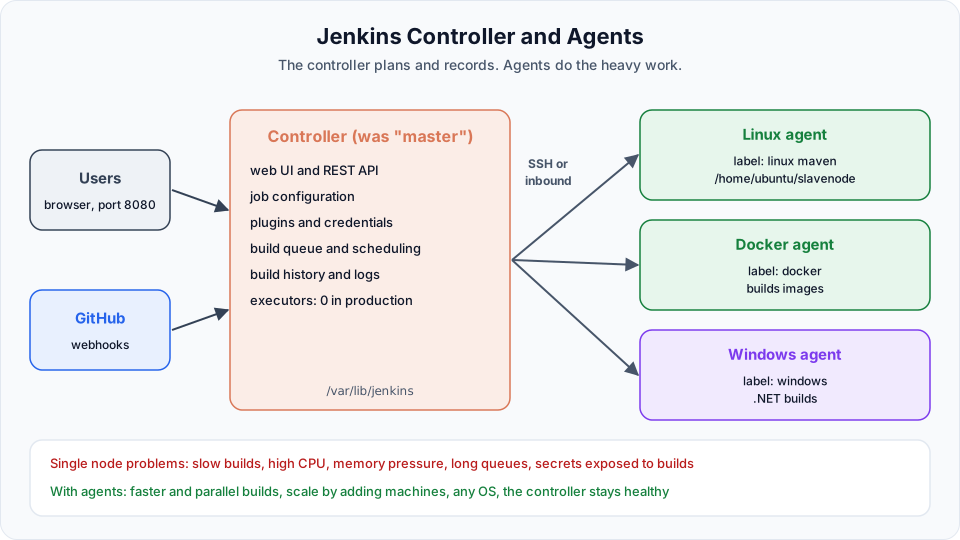
- The machine where Jenkins is installed becomes the controller. It serves the web UI, stores job configuration, plugins and credentials, keeps the build queue, decides which build runs where, and stores logs and results.
- The other machines are agents. They run the actual build steps: clone the code, run Maven, build Docker images. The workspace and the generated WAR file live on the agent.
Agents do not need to match the controller. The controller can be Ubuntu, while one agent is Linux, another is Windows, and another is a Mac for iOS builds.
"Master" and "slave" are the old names
The video and the lecture title use master and slave, and you will still find these words in older blogs, Stack Overflow answers and plugin names (the SSH agents plugin was called "SSH Slaves" until version 1.31.0). The Jenkins project replaced them years ago:
| Old term | Current Jenkins term |
|---|---|
| Master | Controller |
| Slave | Agent |
| Master node (the node inside the controller) | Built-in node |
| SSH Slaves plugin | SSH Build Agents plugin |
The ideas are exactly the same. In these notes we use controller and agent, because that is what the current Jenkins UI and documentation show. For example, the launch method on the agent page is called "Launch agent by connecting it to the controller".
Benefits
| Benefit | Why |
|---|---|
| Faster builds | Each agent brings its own CPU and memory |
| Parallel execution | Every agent adds executors, so more builds run at the same time |
| Better resource use | The controller stays light. Heavy agents can be stopped when idle |
| Scalability | Need more capacity? Add another agent. No need to touch the controller |
| Multiple operating systems | Build Linux, Windows and macOS software from one Jenkins |
| Isolation and security | Builds cannot read the controller's files and secrets |
Vocabulary you need for the next lesson
| Term | Meaning |
|---|---|
| Node | Any machine that can run builds. The controller's built-in node and every agent are nodes |
| Executor | A slot for one build at a time on a node. Two executors means two builds in parallel on that node |
| Label | A tag on an agent, such as linux, maven or docker. Jobs ask for a label, and Jenkins picks any agent that has it |
| Remote root directory | The folder on the agent where Jenkins keeps its files and the job workspaces |
| Launch method | How the agent connects. Either the controller starts it over SSH, or the agent connects to the controller itself (inbound) |
| Permanent agent | A machine you add and manage yourself. The opposite is a cloud agent, created on demand (EC2, Docker, Kubernetes) and removed afterwards |
How agents connect
| Method | How it works | When to use |
|---|---|---|
| Launch agents via SSH | The controller SSHes into the agent, copies remoting.jar and starts it with Java | Linux agents the controller can reach. This is what we do next |
| Launch agent by connecting it to the controller (inbound) | You run a small Java command on the agent and it connects out to the controller | Agents behind a firewall, Windows machines |
| Cloud agents (plugins) | Jenkins creates a VM or container per build and deletes it after | Large or spiky workloads, Kubernetes |
Whichever method you use, the agent runs a small Java process, so every agent needs Java installed, a version the controller supports (Java 21 for current Jenkins).
In production, the controller does not build
The usual recommendation is to set the built-in node to 0 executors once agents exist, so that no build ever runs on the controller. In this course we keep it simple and still run some demos on the built-in node to save money, but the real-world pattern is agents only.
Next, we create an agent, connect it over SSH, and move the Maven build onto it: Configure a Jenkins Agent Using SSH & Run Jobs on an Agent.
Try It Yourself
- Open the console output of any build you have run and find the workspace path. Confirm it is on the Jenkins server.
- Open Manage Jenkins > Nodes. How many nodes and executors do you have right now?
- On the Jenkins server, run
du -sh /var/lib/jenkins/workspace /var/lib/jenkins/.m2to see how much disk the builds already use. - Explain to a colleague, in two sentences, what the controller does and what an agent does.
Official references
- Jenkins: Using Jenkins agents
- Jenkins Glossary: controller, agent, node, executor
- SSH Build Agents plugin
Written By: Shramik Masti
How is this guide?
Last updated on
Jenkins Users, Authentication & Authorization
Create separate Jenkins users, understand the difference between authentication and authorization, and limit what each user can do with matrix-based and role-based security.
Configure a Jenkins Agent Using SSH & Run Jobs on an Agent
Launch a second EC2 instance, install Java 21, connect it to Jenkins as a permanent SSH agent with a stored private key, fix the Java version error, and run the Maven job on the agent.