
File Reading and Writing
File handling is a fundamental aspect of Java programming that enables applications to persist data, read configuration files, and interact with the file system. Java provides comprehensive support for file operations through the Java I/O (Input/Output) package (java.io), which offers robust classes and methods for managing files efficiently.
Understanding Streams in Java
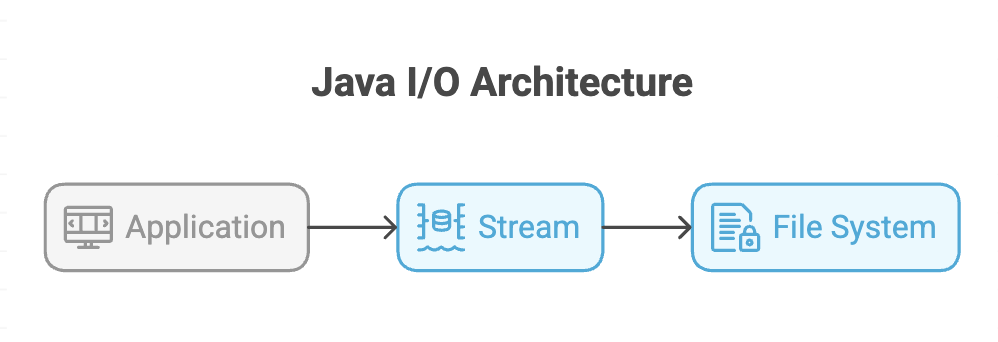
A stream in Java is a sequence of data that flows from a source to a destination. It serves as a channel through which data is read from or written to various sources like files, memory, or network connections.
Types of Streams
Java provides two fundamental types of streams:
-
Byte Streams: Handle binary data (images, videos, executables)
- Used for raw data processing
- Work with 8-bit bytes
- Example classes:
FileInputStream,FileOutputStream
-
Character Streams: Handle text data with character encoding
- Used for text file operations
- Work with 16-bit Unicode characters
- Example classes:
FileReader,FileWriter
The File Class
The File class from java.io package represents file and directory pathnames. It provides methods to interact with the file system without actually reading or writing file contents.
Key Methods of File Class
| Method | Return Type | Description |
|---|---|---|
getName() | String | Returns the name of the file |
getAbsolutePath() | String | Returns the complete file path |
canRead() | boolean | Checks if file is readable |
canWrite() | boolean | Checks if file is writable |
exists() | boolean | Checks if file exists |
length() | long | Returns file size in bytes |
mkdir() | boolean | Creates a directory |
delete() | boolean | Deletes the file |
createNewFile() | boolean | Creates a new empty file |
Creating Files in Java
To create a file, you must handle potential errors using try-catch blocks since file operations can throw IOException.
import java.io.File;
import java.io.IOException;

public class FileCreationExample {
    public static void main(String[] args) {
            // Create File object with filename
            File myFile = new File("example.txt");

            // Create the file
            if (myFile.createNewFile()) {
                System.out.println("File created: " + myFile.getName());
            } else {
                System.out.println("File already exists.");
            }
    }
}
Retrieving File Information
import java.io.File;

public class FileInformationExample {
    public static void main(String[] args) {
        File myFile = new File("example.txt");

        if (myFile.exists()) {
            // File name
            System.out.println("File Name: " + myFile.getName());

            // Absolute path
            System.out.println("Absolute Path: " + myFile.getAbsolutePath());

            // Check permissions
            System.out.println("Readable: " + myFile.canRead());
            System.out.println("Writable: " + myFile.canWrite());

            // File size in bytes
            System.out.println("File Size: " + myFile.length() + " bytes");
        } else {
            System.out.println("File does not exist.");
        }
    }
}
Output Example:
File Name: example.txt
Absolute Path: /Users/username/project/example.txt
Readable: true
Writable: true
File Size: 47 bytes
Writing Data to Files
Using FileWriter Class
The FileWriter class is used to write character-oriented data to files.
import java.io.FileWriter;
import java.io.IOException;

public class FileWriteExample {
    public static void main(String[] args) {
        // Create FileWriter object
        FileWriter writer = new FileWriter("output.txt");

        // Write text to file
        writer.write("Hello, this is file handling in Java.\n");
        writer.write("Writing data to a file is simple!");

        // MUST close the writer
        writer.close();

        System.out.println("Successfully wrote to the file.");
    }
}
Critical Points for Writing Files
-
Always Close the FileWriter: Failing to call
close()results in data not being written to the file, even though the file is created. -
Exception Handling: Wrap file operations in try-catch blocks to handle
IOException. -
Overwrite vs Append:
new FileWriter("file.txt")- Overwrites existing contentnew FileWriter("file.txt", true)- Appends to existing content
Writing Array Data
import java.io.FileWriter;
import java.io.IOException;

public class ArrayWriteExample {
    public static void main(String[] args) {
        String[] content = {
            "First line\n",
            "Second line\n",
            "Third line\n"
        };

        FileWriter writer = new FileWriter("arrayData.txt");

        for (String line : content) {
            writer.write(line);
        }

        writer.close();
        System.out.println("Array data written successfully.");
    }
}
Reading Data from Files
Using Scanner Class
The Scanner class provides a simple way to read text files line by line.
import java.io.File;
import java.io.FileNotFoundException;
import java.util.Scanner;

public class FileReadExample {
    public static void main(String[] args) {
            // Create File object
            File myFile = new File("output.txt");

            // Create Scanner to read the file
            Scanner reader = new Scanner(myFile);

            // Read each line
            while (reader.hasNextLine()) {
                String data = reader.nextLine();
                System.out.println(data);
            }

            // Close the scanner
            reader.close();
    }
}
Scanner Methods for Reading
| Method | Description |
|---|---|
hasNextLine() | Returns true if there is another line to read |
nextLine() | Reads and returns the next line |
hasNext() | Checks if there is any token available |
next() | Reads the next token (word) |
hasNextInt() | Checks if next token is an integer |
nextInt() | Reads an integer |
The Four Primary File Operations
Java file handling encompasses four essential operations:
- Creating Files: Using
createNewFile()method to generate new files - Retrieving Metadata: Using methods like
getName(),getAbsolutePath(),length(), etc. - Writing Data: Using
FileWriterto persist data to files - Reading Data: Using
ScannerorFileReaderto retrieve file contents
Complete Example: File Operations
import java.io.*;
import java.util.Scanner;

public class CompleteFileDemo {
    public static void main(String[] args) {
        String filename = "demo.txt";

        // 1. Create file
        createFile(filename);

        // 2. Write to file
        writeToFile(filename, "Java File Handling\nLine 2\nLine 3");

        // 3. Get file info
        getFileInfo(filename);

        // 4. Read from file
        readFromFile(filename);
    }

    public static void createFile(String filename) {
        try {
            File file = new File(filename);
            if (file.createNewFile()) {
                System.out.println("Created: " + filename);
            }
        } catch (IOException e) {
            e.printStackTrace();
        }
    }

    public static void writeToFile(String filename, String content) {
        try {
            FileWriter writer = new FileWriter(filename);
            writer.write(content);
            writer.close();
            System.out.println("Data written successfully.");
        } catch (IOException e) {
            e.printStackTrace();
        }
    }

    public static void getFileInfo(String filename) {
        File file = new File(filename);
        System.out.println("Name: " + file.getName());
        System.out.println("Size: " + file.length() + " bytes");
        System.out.println("Can Read: " + file.canRead());
        System.out.println("Can Write: " + file.canWrite());
    }

    public static void readFromFile(String filename) {
        try {
            Scanner scanner = new Scanner(new File(filename));
            System.out.println("File Contents:");
            while (scanner.hasNextLine()) {
                System.out.println(scanner.nextLine());
            }
            scanner.close();
        } catch (FileNotFoundException e) {
            e.printStackTrace();
        }
    }
}
Summary
-
Java file handling is primarily performed using the
java.iopackage, which includes byte streams for binary data and character streams for text processing. -
The
Fileclass allows developers to create, delete, and retrieve information about files and directories using relative or absolute paths. -
Classes like
FileWriterandScannersimplify writing to and reading from text files, but resources must always be properly closed. -
All file operations should be handled within try-catch blocks to manage potential
IOExceptionssafely. -
Proper stream management and structured error handling ensure reliable and flexible file operations in Java.
Written By: Muskan Garg
How is this guide?
Last updated on