
Serialization
What Is Serialization?
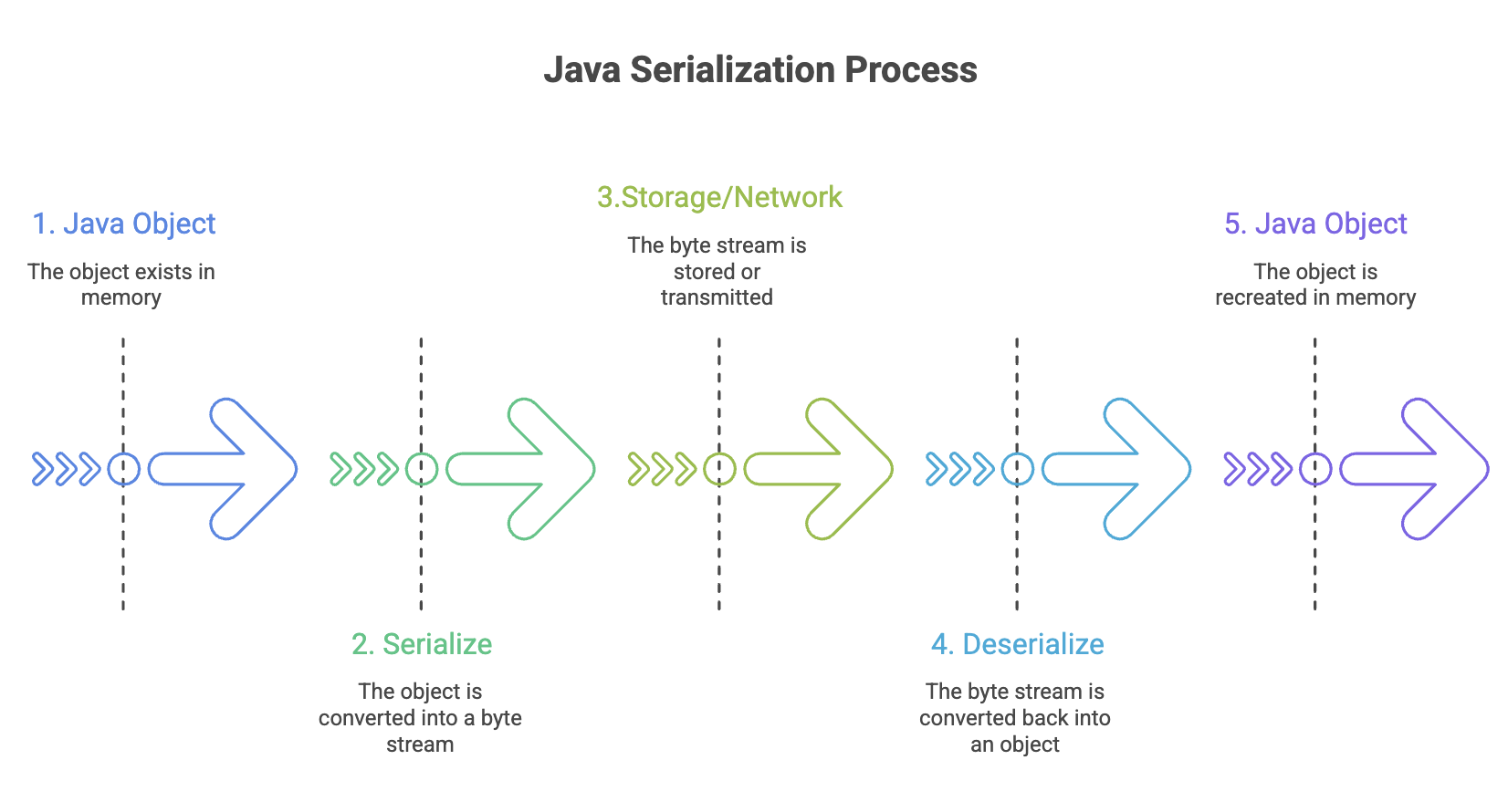
Serialization is the process of converting an object's state (its data and code) into a byte stream, allowing it to be:
- Saved to a file or database
- Transmitted over a network
- Transferred between different Java Virtual Machines (JVMs)
- Reconstructed later into its original object form (deserialization)
Think of serialization as "freezing" an object into a portable format that can travel anywhere and be "unfrozen" back into a live object.
Why Serialization Is Needed?
Serialization solves several critical problems in software development:
1. Communication Between Systems
Enables multiple computer systems to share and execute objects across different JVMs, even on different architectures or operating systems.
JVM on Windows → Serialized Object → Network → JVM on Linux2. Persistence
Allows saving an object's complete state to a database or file system for later retrieval, enabling data to survive beyond program execution.
// Save game state
GameState gameState = new GameState(level, score, inventory);
// Serialize to file
// Later: restore exact game state from file
3. Deep Copy Cloning
Simplifies creating exact replicas of complex objects by serializing and immediately deserializing them.
// Deep copy by serialization
Object copy = deserialize(serialize(originalObject));
4. Caching
Minimizes computation time by serializing large or expensive-to-create objects, storing them, and retrieving them when needed.
// Cache expensive calculation results
ComplexResult result = performExpensiveCalculation();
cache.put(key, serialize(result)); // Store for quick retrieval
5. Cross-Platform Compatibility
Works across different JVMs on various architectures or operating systems, making it platform-independent.
How to Make Objects Serializable
Implementing Serializable Interface
To enable serialization, a class must implement the java.io.Serializable interface:
import java.io.Serializable;

public class Student implements Serializable {
    private String name;
    private int age;
    private String studentId;

    public Student(String name, int age, String studentId) {
        this.name = name;
        this.age = age;
        this.studentId = studentId;
    }

    // Getters and setters
    public String getName() { return name; }
    public int getAge() { return age; }
    public String getStudentId() { return studentId; }
}
Key Points:
Serializableis a marker interface (has no methods)- Tells Java that objects of this class can be serialized
- All instance variables must be serializable or marked as transient
- No additional implementation required for basic serialization
Serializing an Object
Use ObjectOutputStream to serialize objects to a file:
import java.io.*;

public class SerializationExample {
    public static void main(String[] args) {
        Student student = new Student("Alice Johnson", 20, "STU001");

            // Create FileOutputStream
            FileOutputStream fileOut = new FileOutputStream("student.ser");

            // Wrap with ObjectOutputStream
            ObjectOutputStream objectOut = new ObjectOutputStream(fileOut);

            // Serialize the object
            objectOut.writeObject(student);

            // Close streams
            objectOut.close();
            fileOut.close();

            System.out.println("Student object serialized successfully.");
            System.out.println("Data saved to student.ser");
    }
}
Process Explanation:
- Create a
FileOutputStreampointing to destination file - Wrap it with
ObjectOutputStreamfor object serialization capability - Call
writeObject()method with the object to serialize - Close streams to ensure data is written
File Extension Convention
- Use
.serextension for serialized object files - This is a convention, not a requirement
- Makes it clear the file contains serialized Java objects
Serial Version UID
The serialVersionUID is a unique identification number that the JVM associates with each serializable class. It's used during deserialization to verify that the sender and receiver of a serialized object have loaded classes that are compatible.
import java.io.Serializable;

public class Employee implements Serializable {
    // Explicitly declare serialVersionUID
    private static final long serialVersionUID = 1L;

    private String name;
    private int employeeId;
    private double salary;

    // Constructor, getters, setters...
}
Why serialVersionUID Matters?
Without Explicit serialVersionUID:
- JVM automatically generates one based on class structure
- If class structure changes (add/remove field), the generated UID changes
- Deserialization of old objects fails with
InvalidClassException
With Explicit serialVersionUID:
- You control version compatibility
- Can modify class while maintaining backward compatibility
- Only increment when breaking compatibility intentionally
Example of Version Mismatch
// Version 1 of class (serialized objects created)
public class Product implements Serializable {
    private String name;
    private double price;
}

// Version 2 of class (trying to deserialize old objects)
public class Product implements Serializable {
    private String name;
    private double price;
    private String category; // New field added

    // Without explicit serialVersionUID, deserialization will fail!
}
Best Practice:
Always declare serialVersionUID explicitly:
private static final long serialVersionUID = 1L;Increment it when making incompatible changes:
private static final long serialVersionUID = 2L; // Breaking changeThe transient Keyword
The transient keyword prevents a variable from being serialized. When an object is deserialized, transient fields are initialized to their default values (null for objects, 0 for numbers, false for boolean).
import java.io.Serializable;

public class UserAccount implements Serializable {
    private static final long serialVersionUID = 1L;

    private String username;
    private transient String password; // Won't be serialized
    private String email;
    private transient String sessionToken; // Won't be serialized

    // Constructor, getters, setters...
}
When to Use transient
- Security: Sensitive data like passwords, credit card numbers
- Derived Fields: Calculated values that can be recomputed
- Temporary State: Session tokens, cache data
- Non-serializable References: Objects that can't or shouldn't be serialized
- Performance: Large objects that aren't essential to restore
Example: Security Use Case
import java.io.Serializable;

public class BankAccount implements Serializable {
    private static final long serialVersionUID = 1L;

    private String accountNumber;
    private double balance;
    private transient String pin; // Security: don't serialize PIN
    private transient String cvv; // Security: don't serialize CVV

    public BankAccount(String accountNumber, double balance, String pin, String cvv) {
        this.accountNumber = accountNumber;
        this.balance = balance;
        this.pin = pin;
        this.cvv = cvv;
    }

    // After deserialization, pin and cvv will be null
    // They must be re-authenticated, not restored from file
}
Example: Derived Fields
import java.io.Serializable;

public class Rectangle implements Serializable {
    private static final long serialVersionUID = 1L;

    private double width;
    private double height;
    private transient double area; // Can be recalculated

    public Rectangle(double width, double height) {
        this.width = width;
        this.height = height;
        this.area = width * height;
    }

    // After deserialization, recalculate area
    private void readObject(java.io.ObjectInputStream in)
            throws IOException, ClassNotFoundException {
        in.defaultReadObject();
        this.area = width * height; // Recalculate
    }
}
Static Fields and Serialization
Serialization ignores static member fields because serialization is about saving the state of a specific instance, not class-level data.
import java.io.Serializable;

public class Counter implements Serializable {
    private static final long serialVersionUID = 1L;

    private int instanceCount;
    private static int totalCount = 0; // Won't be serialized

    public Counter() {
        this.instanceCount = ++totalCount;
    }
}
Key Points:
- Static fields belong to the class, not individual objects
- Serialization saves object state, not class state
- Static fields retain their current JVM values, not serialized values
- If you need to persist static data, handle it separately
Serialization with Inheritance
Case 1: Superclass Implements Serializable
When a superclass implements Serializable, all subclasses automatically become serializable:
import java.io.Serializable;

// Superclass is serializable
class Animal implements Serializable {
    private static final long serialVersionUID = 1L;
    protected String species;

    public Animal(String species) {
        this.species = species;
    }
}

// Subclass is automatically serializable
class Dog extends Animal {
    private String breed;

    public Dog(String species, String breed) {
        super(species);
        this.breed = breed;
    }
}
Case 2: Superclass Is Not Serializable
When a superclass doesn't implement Serializable, subclasses can manually implement it:
// Superclass is NOT serializable
class Vehicle {
    protected String manufacturer;

    public Vehicle(String manufacturer) {
        this.manufacturer = manufacturer;
    }

    // MUST have no-argument constructor for serialization to work
    public Vehicle() {
        this.manufacturer = "Unknown";
    }
}

// Subclass manually implements Serializable
class Car extends Vehicle implements Serializable {
    private static final long serialVersionUID = 1L;
    private String model;

    public Car(String manufacturer, String model) {
        super(manufacturer);
        this.model = model;
    }
}
Critical Requirement:
- Non-serializable superclass must have a no-argument constructor
- This constructor is called during deserialization to initialize superclass fields
- Without it, deserialization throws
InvalidClassException
Case 3: Preventing Subclass Serialization
You can prevent a subclass from being serialized even if the superclass is serializable:
import java.io.*;

class SerializableParent implements Serializable {
    private static final long serialVersionUID = 1L;
    protected String data;
}

class NonSerializableChild extends SerializableParent {
    // Prevent serialization by throwing exception
    private void writeObject(ObjectOutputStream out) throws IOException {
        throw new NotSerializableException("This class cannot be serialized");
    }

    private void readObject(ObjectInputStream in) throws IOException {
        throw new NotSerializableException("This class cannot be deserialized");
    }
}
Advantages and Disadvantages of Serialization
Advantages of Serialization
| # | Advantage | Details |
|---|---|---|
| 1 | Built-in Java Feature | - No external libraries needed - Part of core Java API - Widely supported across Java ecosystem |
| 2 | Simple to Implement | - Just implement Serializable interface - No methods to implement for basic serialization - Automatic handling of object graphs |
| 3 | Customizable | - Override writeObject() and readObject() for custom behavior - Control serialization using transient - Manage versioning with serialVersionUID |
| 4 | Universal Support | - Works across different JVM implementations - Cross-platform compatibility - Standard mechanism understood by all Java developers |
| 5 | Supports Encryption and Compression | - Can wrap streams with encryption/compression - CipherOutputStream for encryption - GZIPOutputStream for compression |
| 6 | Foundation for Critical Technologies | - RMI (Remote Method Invocation) - JPA (Java Persistence API) - EJB (Enterprise JavaBeans) - Many caching frameworks |
Disadvantages of Serialization
| # | Disadvantage | Details |
|---|---|---|
| 1 | Brittle Objects | - Class structure changes can break deserialization - Field type modifications may cause failures |
| 2 | Transient Variable Issues | - transient variables become null after deserialization - Must override readObject() to reinitialize |
| 3 | Inefficient Memory Utilization | - Includes class metadata in serialized form - Larger than raw data - Large object graphs increase size significantly |
| 4 | No Concurrent Access Control | - No built-in thread safety - Requires external synchronization - Race conditions possible |
| 5 | Security Vulnerabilities | - Deserialization can execute arbitrary code - Source of many security exploits - Untrusted data can compromise systems |
| 6 | Performance Overhead | - Slower than formats like Protocol Buffers - More CPU intensive than simple formats - Reflection-based overhead |
Best Practices for Serialization
1. Use @serial Javadoc Tag
Document serializable fields:
/**
 * User account information.
 * @serial Include the user's unique identifier
 */
private String userId;
2. Use .ser File Extension
Convention for serialized object files:
objectOut.writeObject(user); // Save as "user.ser"3. Avoid Default Serialization for Static/Transient Fields
Be explicit about what gets serialized:
private transient Cache cache; // Explicitly transient
private static final String VERSION = "1.0"; // Static, not serialized
4. Don't Serialize Extendable Classes
If a class is meant to be extended, reconsider serialization:
// Avoid this pattern
public class ExtendableBase implements Serializable {
    // Makes all subclasses serializable, which may not be desired
}
5. Avoid Serializing Inner Classes
Inner classes capture references to outer class, causing issues:
public class Outer implements Serializable {
    // Avoid serializing this
    private class Inner implements Serializable {
        // Contains implicit reference to Outer
    }
}
6. Always Declare serialVersionUID
private static final long serialVersionUID = 1L;7. Implement Custom Serialization When Needed
Override writeObject() and readObject() for complex cases:
private void writeObject(ObjectOutputStream out) throws IOException {
    out.defaultWriteObject();
    // Custom serialization logic
}

private void readObject(ObjectInputStream in)
        throws IOException, ClassNotFoundException {
    in.defaultReadObject();
    // Custom deserialization logic (e.g., re-initialize transient fields)
}
Summary
-
Serialization converts Java objects into byte streams for storage, transmission, and cross-JVM communication.
-
It requires implementing the
Serializablemarker interface and properly managingserialVersionUIDfor version control. -
Fields marked as
transientand all static fields are not serialized, ensuring better security and control over object state. -
Proper handling of inheritance, documentation, and best practices is essential for stable and maintainable serialization.
Written By: Muskan Garg
How is this guide?
Last updated on