
Deserialization
What Is Deserialization?
Deserialization is the reverse process of serialization-it reconstructs a Java object from its byte stream representation. Where serialization "freezes" an object into a portable format, deserialization "unfreezes" it back into a live, usable object in memory.
The Complete Cycle
The complete cycle enables:
- Restoring saved application state
- Receiving objects over a network
- Loading cached data
- Sharing objects between different JVMs
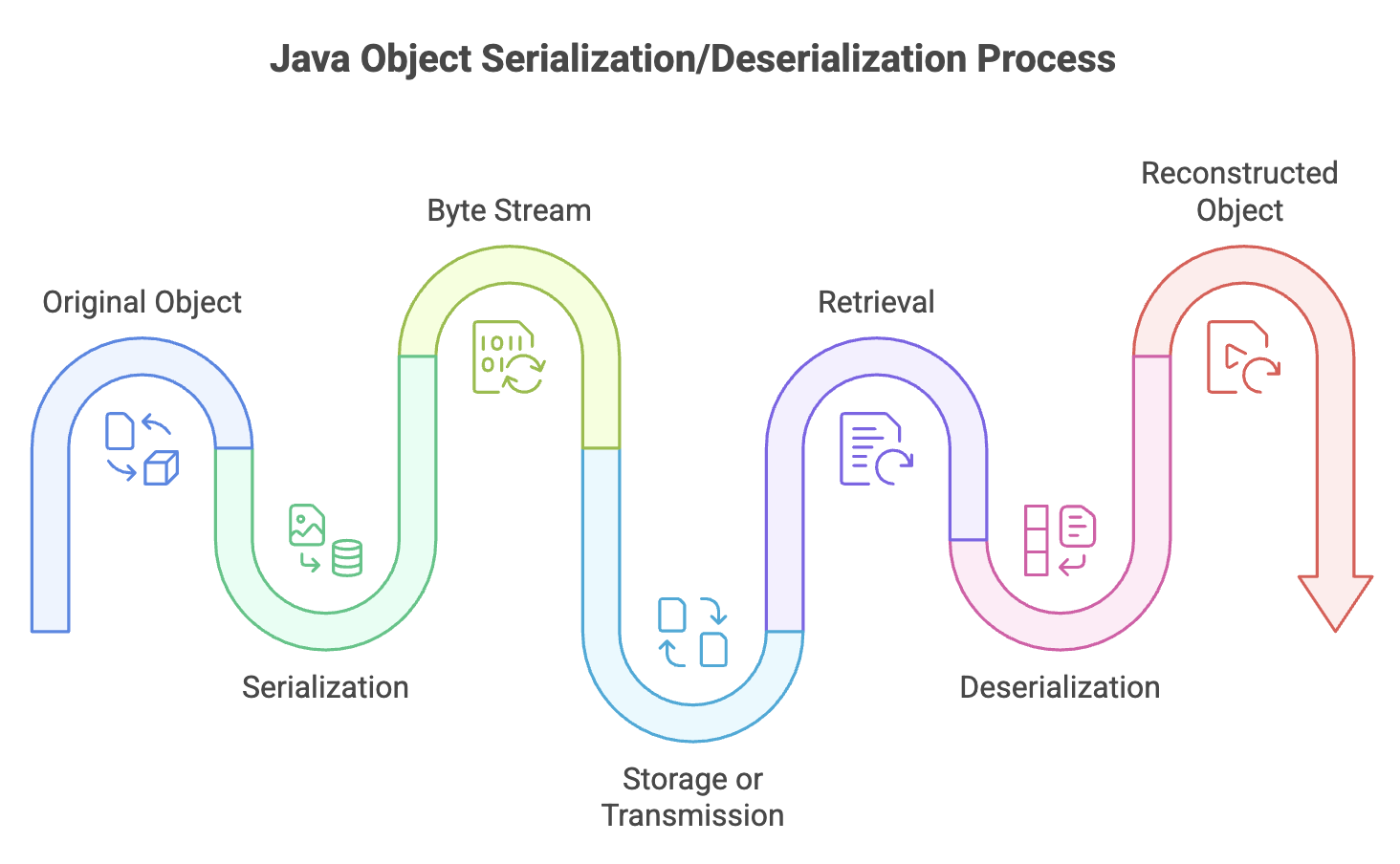
How Deserialization Works
Basic Deserialization
Use ObjectInputStream to deserialize objects from a file or stream:
import java.io.*;

public class DeserializationExample {
    public static void main(String[] args) {
        try {
            // Create FileInputStream to read from file
            FileInputStream fileIn = new FileInputStream("student.ser");

            // Wrap with ObjectInputStream for object deserialization
            ObjectInputStream objectIn = new ObjectInputStream(fileIn);

            // Deserialize the object
            Student student = (Student) objectIn.readObject();

            // Close streams
            objectIn.close();
            fileIn.close();

            // Use the deserialized object
            System.out.println("Student deserialized successfully:");
            System.out.println("Name: " + student.getName());
            System.out.println("Age: " + student.getAge());
            System.out.println("ID: " + student.getStudentId());

        } catch (IOException e) {
            System.out.println("I/O error during deserialization");
            e.printStackTrace();
        } catch (ClassNotFoundException e) {
            System.out.println("Student class not found");
            e.printStackTrace();
        }
    }
}
Key Points:
- Create
FileInputStreampointing to the serialized file - Wrap it with
ObjectInputStreamfor object reconstruction - Call
readObject()method (returnsObjecttype) - Cast the result to the expected type
- Handle both
IOExceptionandClassNotFoundException
Understanding readObject()
The readObject() method:
- Returns type
Object(must be cast to actual type) - Throws
ClassNotFoundExceptionif the class isn't available in classpath - Throws
IOExceptionfor file/stream errors - Can throw
InvalidClassExceptionif serialVersionUID mismatches
// Type casting is required
Student student = (Student) objectIn.readObject();
Handling Transient Fields During Deserialization
The Problem
Transient fields are initialized to default values during deserialization:
- Objects:
null - Integers:
0 - Booleans:
false - Doubles:
0.0
This can cause problems if these fields need specific initialization.
Solution: Custom readObject()
Override readObject() to manually initialize transient fields:
import java.io.*;

class DatabaseConnection implements Serializable {
    private static final long serialVersionUID = 1L;

    private String username;
    private String serverUrl;
    private transient Connection connection; // Can't serialize database connections

    public DatabaseConnection(String username, String serverUrl) {
        this.username = username;
        this.serverUrl = serverUrl;
        this.connection = establishConnection();
    }

    private Connection establishConnection() {
        // Simulate creating database connection
        System.out.println("Establishing connection to " + serverUrl);
        return new Connection(serverUrl);
    }

    // Custom deserialization
    private void readObject(ObjectInputStream in)
            throws IOException, ClassNotFoundException {

        // First, perform default deserialization
        in.defaultReadObject();

        // Then, manually initialize transient fields
        this.connection = establishConnection();
        System.out.println("Transient connection re-established after deserialization");
    }

    @Override
    public String toString() {
        return "DatabaseConnection{username='" + username +
               "', serverUrl='" + serverUrl +
               "', connection=" + (connection != null ? "active" : "null") + "}";
    }
}

// Mock Connection class
class Connection {
    private String url;

    public Connection(String url) {
        this.url = url;
    }
}
Version Compatibility and Evolution
Understanding serialVersionUID
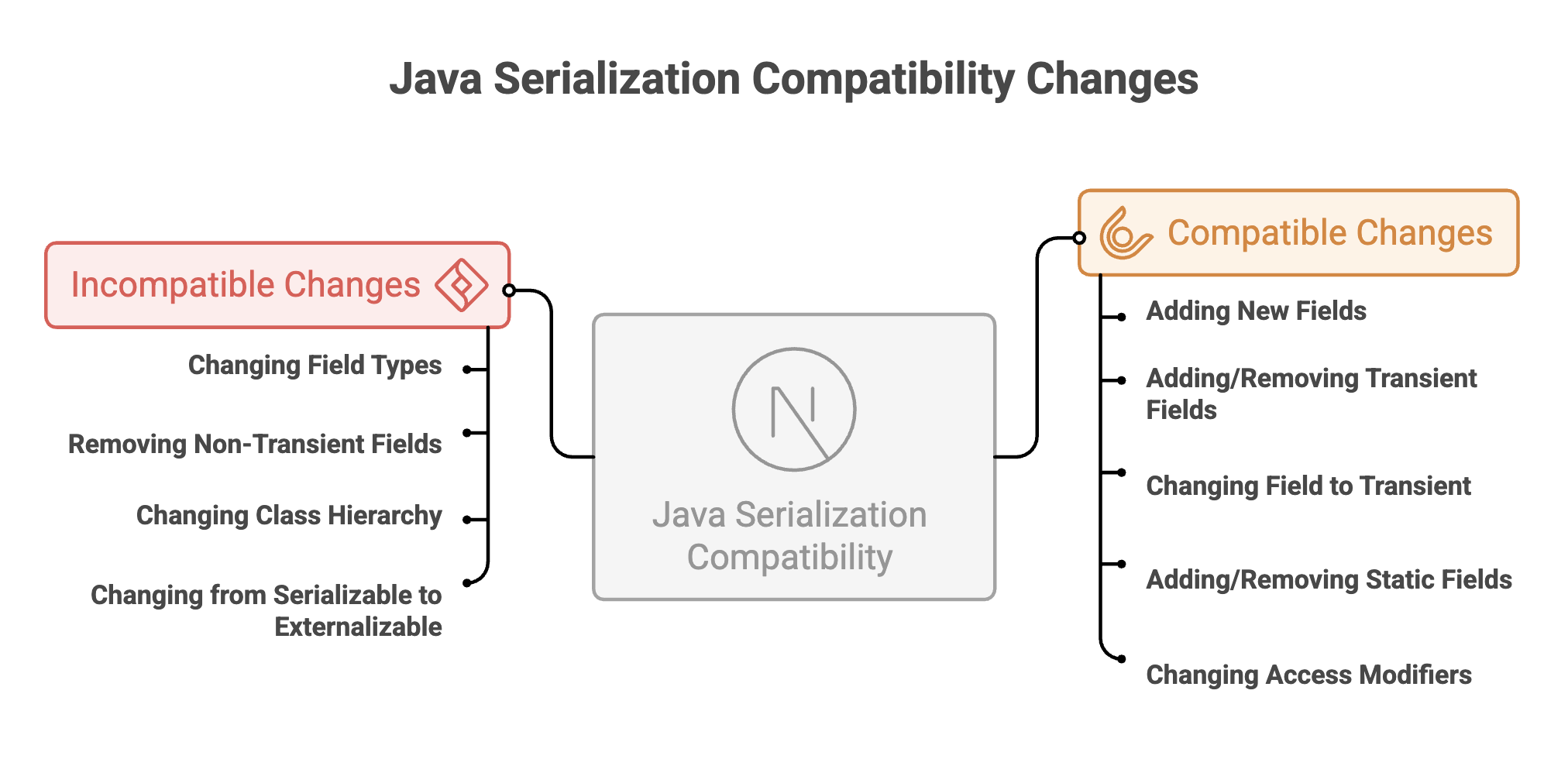
The serialVersionUID is critical for maintaining compatibility between different versions of a class:
// Version 1
class Product implements Serializable {
    private static final long serialVersionUID = 1L;

    private String name;
    private double price;
}

// Version 2 - Compatible change
class Product implements Serializable {
    private static final long serialVersionUID = 1L; // Same UID

    private String name;
    private double price;
    private String category = "General"; // New field with default value
}
Java Serialization Compatibility Changes
Handling Version Evolution
import java.io.*;

class Employee implements Serializable {
    private static final long serialVersionUID = 2L; // Incremented version

    private String name;
    private double salary;
    private String department; // New field in version 2

    // Custom deserialization to handle old version
    private void readObject(ObjectInputStream in)
            throws IOException, ClassNotFoundException {

        in.defaultReadObject();

        // If department is null (from old version), set default
        if (this.department == null) {
            this.department = "Unassigned";
        }
    }
}
Best Practices for Deserialization
1. Validate Input
Never deserialize untrusted data without validation:
public Object safeDeserialize(String filename) {
    try (ObjectInputStream in = new ObjectInputStream(
            new FileInputStream(filename))) {

        // Validate before deserializing
        if (!isValidSource(filename)) {
            throw new SecurityException("Untrusted source");
        }

        return in.readObject();

    } catch (Exception e) {
        e.printStackTrace();
        return null;
    }
}
2. Use Try-with-Resources
Ensure streams are properly closed:
try (ObjectInputStream in = new ObjectInputStream(
        new FileInputStream("data.ser"))) {
    return in.readObject();
} // Automatically closes
3. Handle All Exceptions
Account for various failure scenarios:
try {
    // Deserialization
} catch (InvalidClassException e) {
    // Version mismatch
} catch (ClassNotFoundException e) {
    // Missing class
} catch (IOException e) {
    // I/O problems
}
4. Initialize Transient Fields
Override readObject() when needed:
private void readObject(ObjectInputStream in)
        throws IOException, ClassNotFoundException {
    in.defaultReadObject();
    // Initialize transient fields
    this.cache = new HashMap<>();
}
5. Consider JSON for New Projects
For new applications, prefer JSON:
- Better cross-platform support
- Easier debugging
- More secure
- Industry standard for web services
Summary
-
Deserialization reconstructs Java objects from byte streams, reversing the serialization process using
readObject() -
Proper exception handling (
IOException,ClassNotFoundException,InvalidClassException) and type casting are required during deserialization. -
serialVersionUIDensures version compatibility, and transient fields are restored with default values unless manually reinitialized. -
Streams must be managed carefully using try-with-resources to prevent resource leaks.
-
Deserializing untrusted data poses serious security risks and should always be validated.
-
For cross-platform communication, JSON is the modern standard, while native Java serialization is best suited for JVM-to-JVM communication.
Written By: Muskan Garg
How is this guide?
Last updated on