
Installation and Plans
Install Claude Code on Windows, macOS or Linux, understand subscription plans vs API billing, and run your first command.
Setting up Claude Code takes a few minutes. The installation itself is simple. The part worth understanding properly is how you pay for it, because that decides how much you can use it and how fast you spend money.
System requirements
| Requirement | Minimum |
|---|---|
| Operating system | macOS 13+, Windows 10 (1809+) or Windows Server 2019+, Ubuntu 20.04+, Debian 10+, Alpine 3.19+ |
| Hardware | 4 GB RAM or more, x64 or ARM64 processor |
| Network | Internet connection (unless you use a local model, see Section 3) |
| Shell | Bash, Zsh, PowerShell or CMD |
Install Claude Code
Go to code.claude.com or the official setup guide and copy the command for your operating system. The native installer is the recommended option because it updates itself automatically in the background.
irm https://claude.ai/install.ps1 | iexirm is short for Invoke-RestMethod. It downloads the install script, and iex (Invoke-Expression) runs it.
curl -fsSL https://claude.ai/install.sh | bashcurl -fsSL https://claude.ai/install.cmd -o install.cmd && install.cmd && del install.cmdYou can also install through a package manager. These do not auto-update, so you must upgrade them yourself.
| Package manager | Install | Upgrade |
|---|---|---|
| Homebrew (macOS) | brew install --cask claude-code | brew upgrade claude-code |
| WinGet (Windows) | winget install Anthropic.ClaudeCode | winget upgrade Anthropic.ClaudeCode |
PowerShell or CMD?
If you see The token '&&' is not a valid statement separator, you ran the CMD command in PowerShell. If you see 'irm' is not recognized, you ran the PowerShell command in CMD. Your prompt starts with PS when you are in PowerShell.
Verify the installation
Open a new terminal window and run:
claude --versionIf you see a version number, you are ready. If the terminal says claude is not recognized, the install folder is not on your PATH yet. The native installer places Claude Code under .local in your home directory (for example ~/.local/bin on macOS and Linux) and prints the exact folder to add. Add it to your PATH, open a new terminal and try again.
For a full health check of your install and settings, run:
claude doctorOn native Windows, installing Git for Windows is recommended so Claude Code can use its Bash tool. Without it, Claude Code falls back to PowerShell. WSL users do not need it.
Plans: subscription vs API
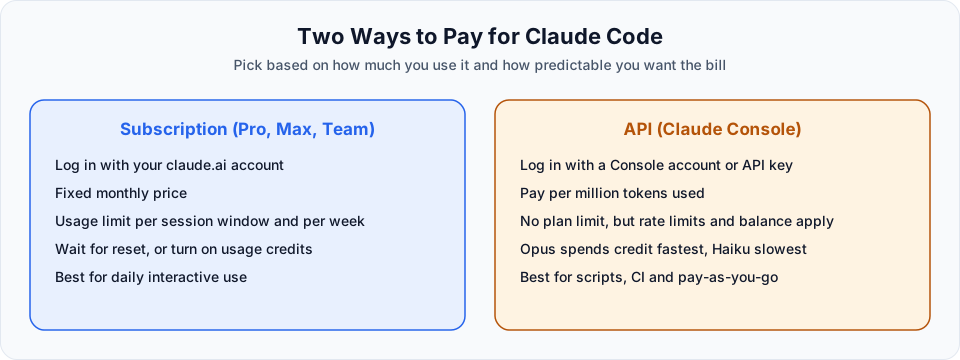
Claude Code itself is free to install. Running it uses Claude models, and that is what you pay for. There are two ways.
Option 1: A Claude subscription
| Plan | Claude Code | Good for |
|---|---|---|
| Free | Not included | Chatting on claude.ai only |
| Pro | Included | Learning, side projects, moderate daily use. You will hit the session limit on heavy days |
| Max | Included, with much higher limits | Daily professional use, larger projects, heavier models |
| Team / Enterprise | Included | Organisations that need admin controls and shared billing |
With a subscription you do not pay per token. Instead, you get a usage limit per session window and per week. When you hit it, you either wait for the reset or turn on usage credits to keep working (more on that in the next lessons).
Option 2: The Anthropic API (pay as you go)
You create an account on the Claude Console, add credits, and pay for exactly the tokens you use. Prices are per million tokens (MTok), and output tokens cost more than input tokens.
| Model family | Use it for | Approx. price per MTok (input / output) |
|---|---|---|
| Haiku | Fast, simple tasks | $1 / $5 |
| Sonnet | Everyday coding | $2 / $10 |
| Opus | Planning, architecture, hard problems | $4 / $20 |
Anthropic also offers Fable, its most capable and most expensive tier (around $10 / $50 per MTok), for the hardest long-running tasks. You will not need it for anything in these docs.
Prices change
These are the latest-generation prices at the time of writing (October 2026). In the videos you will see slightly older numbers, such as $5 for Opus and $3 for Sonnet, because older model versions were current at recording time. Always check the official pricing page before you plan a budget.
Which one should you choose?
| Situation | Recommendation |
|---|---|
| You are learning and want predictable cost | Pro plan, or a small API top-up (around $5) if you stick to Sonnet or Haiku |
| You use Claude Code every day for work | Max plan |
| You run Claude Code in scripts or CI | API key |
| You want zero cost and have a strong GPU | Local model (Section 3), with lower speed and quality |
A subscription is usually better value because you are not watching every token. The API is fine for learning as long as you avoid running Opus for everything.
First launch
Move to a project folder and start Claude Code:
cd my-project
claude
The first time you open a folder, Claude Code asks whether you trust it. This matters: once trusted, Claude can read and, with your approval, change files in that folder.
Choose the folder carefully
Do not run claude from your home directory or your entire C:\ drive. Create a dedicated project folder and start Claude Code there, so its reach is limited to what you actually want it to work on.
After you trust the folder, you get the Claude Code prompt. Try a simple question:
How can you help me?Claude explains that it is built for software engineering tasks: writing and editing code, debugging, refactoring, writing tests, working with APIs, running commands and more.
Why the terminal?
A fair question: why use a terminal when we have nice graphical tools?
As a professional developer, a lot of real work already happens in the terminal: git, package managers, build tools, Docker, cloud CLIs. Even in the VS Code extension's graphical panel, some features (like configuring hooks) send you back to the terminal. So it makes sense to get comfortable there from day one. We will run the CLI inside VS Code's integrated terminal, which gives us the best of both.
Claude Code also has extensions for VS Code (and Cursor), a plugin for JetBrains IDEs like IntelliJ IDEA and PyCharm, a desktop app, and a web version.
Keeping Claude Code updated
Native installs update automatically. To update immediately:
claude updateOfficial references
- Advanced setup and system requirements
- Troubleshoot installation and login
- Claude pricing
- Claude Console
Written By: Shramik Masti
How is this guide?
Last updated on
Claude Code Workflow Overview
A tour of the Content Tracker application we build, the "done vs verified" mindset, and the roadmap from setup to deployment.
First Launch and Login
Walk through the first-run setup, log in with a subscription or a Console account, and see how model choice affects what you spend.