
Claude Code with a Local Model
Run Claude Code against an open-source model on your own machine using Ollama, with no Anthropic billing, and understand the trade-offs.
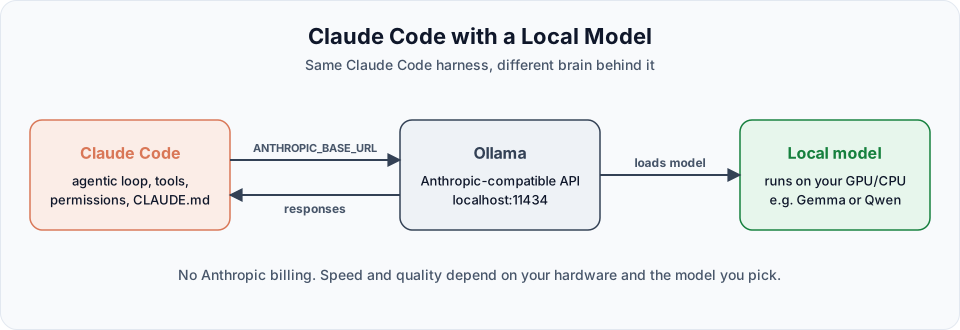
So far we have used Claude models like Sonnet and Opus, which means paying through a plan or the API. But Claude Code itself is just the harness: the agentic loop, the tools, the permissions. What if we put a different brain behind it, one that runs on your own machine?
That is possible. With a local model you do not pay Anthropic anything. The trade-off is speed and quality, and both depend heavily on your hardware.
How it works
Claude Code talks to a model through the Anthropic Messages API. Ollama, a popular tool for running open models locally, exposes an Anthropic-compatible API on your machine. So we simply point Claude Code at Ollama instead of Anthropic's servers.
| Piece | Role |
|---|---|
| Claude Code | The same agent you already know: tools, permissions, CLAUDE.md |
| Ollama | Runs the model and serves an Anthropic-compatible API at http://localhost:11434 |
| Local model | An open-weight model (for example Gemma or Qwen) running on your GPU or CPU |
Can your machine handle it?
Be honest about this first. Local models need memory, ideally GPU memory (VRAM).
| Your hardware | What to expect |
|---|---|
| Dedicated GPU with 12 GB VRAM or more | Small and medium coding models run at a usable speed |
| GPU with 6 to 8 GB VRAM | Smaller models (around 4B parameters) work. Larger ones spill into system RAM and slow down a lot |
| Apple Silicon Mac with 16 GB+ unified memory | Good experience with models built for Mac (MLX versions) |
| CPU only | Possible with very small models, but slow |
If a model is bigger than your VRAM (for example a 28 GB model on a 12 GB GPU), it falls back to the CPU and becomes painfully slow. Always check the model size on its Ollama page before downloading.
Not every model can drive Claude Code
Claude Code depends on tool calling: the model must request actions like "read this file" or "run this command" in the right format. Many small models chat well but struggle with tools. Pick models that Ollama lists as tool-capable or that are fine-tuned for agentic coding, and test them on a small task first.
Step-by-step setup
Install Ollama
Download it from ollama.com for Windows, macOS or Linux. Verify the install:
ollama --versionPick and download a model
Browse ollama.com/search. For coding with Claude Code, look for models with tools support and a large enough context window (Ollama recommends 64K tokens or more for real codebases).
Download and test a model:
ollama run gemma4:e4bSee what is already on your machine:
ollama listIn the video, a Gemma 4 E4B model fine-tuned for Claude Code (64K context) gave the best balance on a 12 GB laptop GPU. Ollama itself also suggests Qwen models. Try a few and keep the one that works on your hardware.
Launch Claude Code through Ollama
The easiest way is Ollama's built-in launcher:
ollama launch claudeIt asks which local model to use, sets everything up and starts Claude Code. You can also pass the model directly:
ollama launch claude --model gemma4:e4bManual setup (environment variables)
If you prefer to configure it yourself, or want the VS Code extension to use the local model, set these variables and start Claude Code normally:
export ANTHROPIC_BASE_URL=http://localhost:11434
export ANTHROPIC_AUTH_TOKEN=ollama
export ANTHROPIC_API_KEY=""
claude --model gemma4:e4b$env:ANTHROPIC_BASE_URL = "http://localhost:11434"
$env:ANTHROPIC_AUTH_TOKEN = "ollama"
$env:ANTHROPIC_API_KEY = ""
claude --model gemma4:e4b| Variable | Purpose |
|---|---|
ANTHROPIC_BASE_URL | Sends API requests to Ollama instead of Anthropic |
ANTHROPIC_AUTH_TOKEN | Ollama ignores the value, but Claude Code needs one set |
ANTHROPIC_API_KEY | Set to empty so an existing Anthropic key is not used by mistake |
These variables apply only to the current terminal session. Close the terminal, and Claude Code goes back to your normal login.
Trying it out
Open a project folder in VS Code (in the video we used the project's frontend folder), launch Claude Code through Ollama, and try:
Explain the project.Open Task Manager (or Activity Monitor) while it runs. You will see GPU usage jump as the model generates tokens.
Then try something that writes a file:
Create a JS file for a calculator in the current folder.You may notice:
- The first attempt sometimes "thinks" and produces no output. Simply ask again.
- It is slower than Claude models, especially on large prompts.
- On a big project it can lose track, because small models have small context windows.
Making small models work better
- Keep each task small: one function, one file, one fix at a time
- Start fresh sessions often, or use
/clearbetween unrelated tasks - Write clear specs and a short
CLAUDE.mdso the model does not have to guess - Lower the thinking or effort setting if responses are slow
Cloud models vs local models
| Claude models | Local models via Ollama | |
|---|---|---|
| Cost | Plan or per-token billing | Free after hardware |
| Speed | Fast | Depends on your GPU |
| Quality on large projects | Excellent | Limited by model size and context |
| Privacy | Code is sent to Anthropic's API | Code never leaves your machine |
| Setup | Log in and go | Install Ollama, pick a model, configure |
For the rest of these docs we use Claude models, because the project is large enough that quality matters. But local models are a great way to practise, to work offline, or to keep sensitive code on your own machine.
Try It Yourself
Before moving to the next section, practise what you learned:
- Check your GPU memory (Task Manager on Windows, Activity Monitor on macOS) and pick a model that fits.
- Pull a tool-capable model with
ollama run, then start Claude Code withollama launch claude. - Ask it to explain your practice folder, then to create a small file. Compare the speed and result with a Claude model.
Official references
- Ollama: Claude Code integration
- Ollama model library
- Claude Code environment variables
- Connect Claude Code to an LLM gateway
Written By: Shramik Masti
How is this guide?
Last updated on
Models, Settings and VS Code
Track your usage, understand effort levels, explore the settings panel, and run Claude Code inside VS Code the way professionals do.
Agentic Workflow Basics
Get the starter Content Tracker frontend, open it in VS Code, and let Claude Code run it for you while you approve each step.