
Custom Commands and Skills Explained
Understand skills, the feature that turns repeated prompts into your own slash commands, how they relate to custom commands, and when to use one.
Type / in Claude Code and you see commands like /init, /clear and /compact. You have also seen bundled skills like /code-review. Now we create our own.
The problem: the same long prompt, again and again
Remember the prompt we used to build the CRUD endpoints?
Read @specs/api-contract.md.
Build the four FastAPI endpoints in backend/app/api/v1/tasks.py ...
Business logic goes in backend/app/services/task_service.py.
Routes know nothing about SQLAlchemy. Service knows nothing about HTTP.
Response shapes must match exactly what is in the spec.
Handle errors with HTTPException using the status codes from the spec.
...
It works well because it carries all our rules. But the project will keep growing: a login endpoint, filtering, pagination. Each time, we would need to type (or paste) the same rules again, and hope we did not forget a line.
What if we could just type:
/scaffold-endpoint GET /api/tasks/by-role/{role}and have all those rules applied automatically? That is exactly what a skill gives you.
What is a skill?
A skill is a folder with a SKILL.md file inside. The file has two parts:
- YAML frontmatter: metadata such as a description and which tools it may use
- Markdown instructions: what Claude should do when the skill runs
The folder name becomes the command. A skill at .claude/skills/scaffold-endpoint/SKILL.md becomes /scaffold-endpoint.
.claude/
└── skills/
    ├── telusko-status/
    │   └── SKILL.md
    ├── scaffold-endpoint/
    │   └── SKILL.md
    └── implement-spec/
        └── SKILL.md
Custom commands vs skills
Earlier versions of Claude Code had two separate features: custom commands (a markdown file in .claude/commands/) and skills. They have now been merged:
.claude/commands/deploy.md | .claude/skills/deploy/SKILL.md | |
|---|---|---|
| Creates the command | /deploy | /deploy |
| Still supported | Yes | Yes, and recommended |
| Can include extra files (scripts, templates) | No | Yes, inside the skill folder |
So when you want a custom command today, you create a skill.
Two ways a skill gets used
| Who triggers it | How |
|---|---|
| You | Type /skill-name, optionally with arguments |
| Claude | Claude reads every skill's description at the start of a session. When your request matches, it loads the skill on its own |
If a skill should only run when you ask for it (for example, anything that changes code or deploys), add disable-model-invocation: true to its frontmatter.
Skills are cheap on context
Unlike CLAUDE.md, which loads in full every session, only the short description of each skill is loaded upfront. The full instructions load only when the skill is used. So you can have many skills without filling your context window.
CLAUDE.md | Skill | |
|---|---|---|
| Loads | Every session, in full | Description always, body only when used |
| Best for | Facts Claude should always know | Procedures, checklists, repeatable workflows |
| Example | "Use uv, not pip" | "How to add a new endpoint" |
A good rule from the official docs: when a section of CLAUDE.md turns from a fact into a procedure, move it into a skill.
Bundled skills worth knowing
Claude Code ships with prompt-based skills you can use right away:
| Skill | What it does |
|---|---|
/run | Launches your app so you can see a change working |
/verify | Builds and runs your app to confirm a change does what it should |
/run-skill-generator | Records how to start your project as a project skill, so /run follows it every time |
/code-review | Reviews the current diff for bugs |
/debug | Turns on debug logging and helps troubleshoot Claude Code itself |
/simplify | Reviews recent changes for cleanup opportunities and applies fixes |
A skill for running the project
In the video, we repeatedly typed "run the frontend and the backend". /run and /run-skill-generator solve exactly that: record once how the project starts (environment variables, ports, order), and every later run follows the same steps. It is like the "How to run" section of a README, except Claude actually executes it.
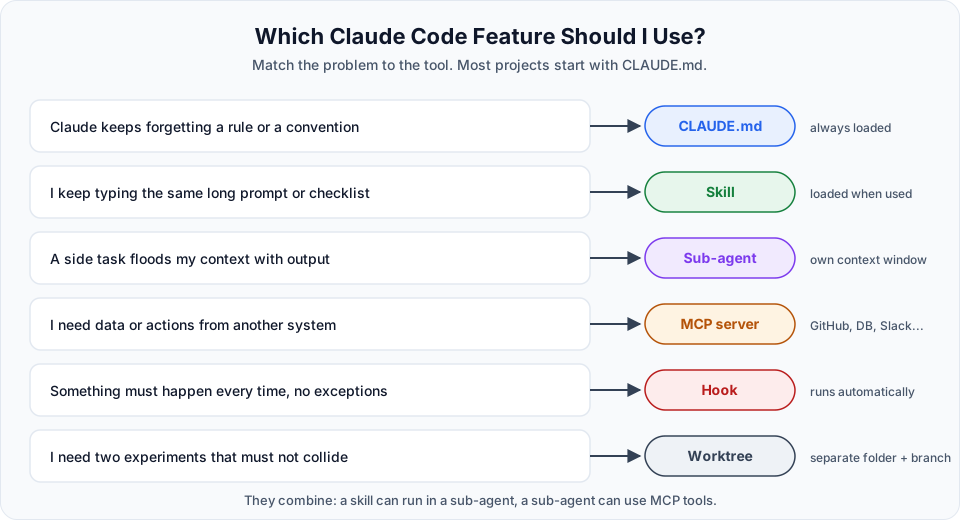
Skill, CLAUDE.md, sub-agent or something else?
By now you have seen several ways to shape what Claude does. This picture helps you pick the right one:
When to create a skill
- You keep pasting the same instructions or checklist into chat
- A task has several steps that must always happen in the same order
- You want the whole team to do something the same way
- A section of
CLAUDE.mdhas grown into a procedure
In the next lessons we build three skills: a simple status report, an endpoint scaffolder, and a spec implementer.
Official references
Written By: Shramik Masti
How is this guide?
Last updated on
Frontend Wiring
Replace the failing mockFetch with a real fetch to the FastAPI backend, run both servers, debug the stale-board bug with Claude, and merge the working full-stack app.
Creating a Custom Status Skill
Build your first skill, /telusko-status, that injects live git and backend data into the prompt, and fix the permission error that injected commands can cause.