
Creating a Custom Status Skill
Build your first skill, /telusko-status, that injects live git and backend data into the prompt, and fix the permission error that injected commands can cause.
Our first skill is simple but useful: a quick status report for the project. Current branch, recent commits, what is in specs/, and whether the backend is running, summarised in a few lines. Perfect before starting any work.
Step 1: Create the folder and file
Create a skills folder inside .claude
.claude/skills/Create a folder for the skill
The folder name becomes the command name:
.claude/skills/telusko-status/It must be a folder, not a file.
Create SKILL.md inside it
The file name is exactly SKILL.md: uppercase SKILL, singular, with a .md extension.
.claude/skills/telusko-status/SKILL.mdStep 2: Write the skill
---
description: Shows the current state of the Telusko Workflow Engine, including git branch, recent commits, contents of specs/, and whether the backend is responding. Use when you need quick situational awareness before starting work.
allowed-tools: Bash(git branch *) Bash(git log *) Bash(ls *) Bash(curl -sf http://localhost:8000/*)
---

## Current branch
!`git branch --show-current`

## Recent commits
!`git log --oneline -5`

## Specs in this repo
!`ls -la specs/ 2>/dev/null || echo "no specs/ directory"`

## Backend health
!`curl -sf http://localhost:8000/api/tasks > /dev/null && echo "backend up" || echo "backend not responding"`

## Instructions
Summarize the above into a single-paragraph status report.
Flag anything unusual: uncommitted work, missing spec files, backend down.
Keep it under 5 lines.
The opening --- must be on line 1
Claude Code only reads the frontmatter when --- is the very first line of the file. In the project repository, most SKILL.md files start with an empty line before ---. In that case Claude Code treats the whole file, including the frontmatter, as plain instructions, and silently ignores the description, allowed-tools and other settings. If an editor keeps inserting a blank line, delete it before saving.
The frontmatter
| Field | Required | Purpose |
|---|---|---|
description | Recommended | Tells both humans and Claude what the skill does and when to use it. If omitted, the first line of the body is used |
name | No | Defaults to the folder name (telusko-status) |
allowed-tools | No | Tools the skill may use without asking for permission while it runs |
For sub-agents, name and description were both required. For skills, name is optional because the folder name already provides it. The description is what really matters.
The !`command` lines
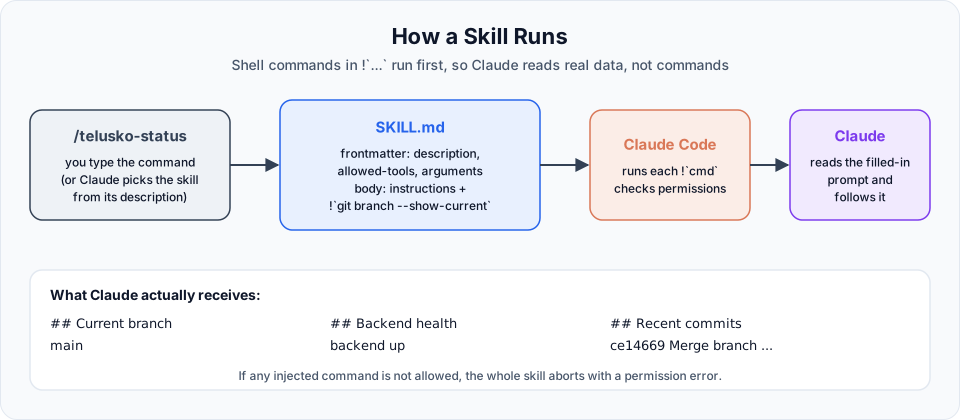
This is what makes skills powerful. You already know ! from shell mode. Inside a skill, a line like !`git branch --show-current` means:
Before Claude even sees this skill, run this command and put its output here.
So Claude never reads the text git branch --show-current. It reads the actual branch name, for example main. By the time Claude reads the skill, all the live data is already filled in. That is called dynamic context injection.
Step 3: Use it
Type / and look for telusko-status, or list all skills:
/skillsThen run it:
/telusko-statusClaude replies with a short report: branch, last commits, which spec files exist, and whether the backend is up.
Skill not showing up?
Claude Code watches skill folders and picks up new skills within a few seconds. The exception: if the .claude/skills/ folder itself did not exist when the session started, run /reload-skills (or restart Claude Code) once.
Troubleshooting: "Shell command permission check failed"
In the video, the first run failed with:
Shell command permission check failed for pattern "..."Here is why. Injected !`...` commands run before Claude is involved, so they never show a permission prompt. Claude Code checks each one against your permission rules, and if a command is not explicitly allowed, the whole skill aborts.
There are two fixes:
| Fix | Where | Scope |
|---|---|---|
allowed-tools in the skill's frontmatter (shown above) | SKILL.md | Only while this skill runs. Recommended |
An allow rule in your settings, for example "Bash(curl -sf http://localhost:8000/*)" | .claude/settings.json | Always |
Two more gotchas we hit along the way:
- When copying a command into a permission rule, do not include the leading
!. The rule isBash(git log *), notBash(!git log *). - Make sure the settings file is actually saved and correctly named (
.claude/settings.json).
Once the commands are allowed, the skill runs and returns the five-line summary.
Let Claude update settings for you
Claude Code has a bundled /update-config skill. Describe the permission you need, for example "allow curl to localhost:8000 for this project", and it edits the right settings file for you. Review the change before accepting it.
Official references
- Extend Claude with skills
- Inject dynamic context
- Pre-approve tools for a skill
- Frontmatter reference
Written By: Shramik Masti
How is this guide?
Last updated on
Custom Commands and Skills Explained
Understand skills, the feature that turns repeated prompts into your own slash commands, how they relate to custom commands, and when to use one.
Endpoint Scaffolding Skill and Writing Specs
Build a /scaffold-endpoint skill with arguments, tool restrictions and hard rules, use it to add a new endpoint, and see why the next step is writing specs.