
Ansible Architecture
See how Ansible replaces the manual admin with a playbook and a host inventory, and how inventory groups decide which servers get which configuration.
In the previous lesson one admin walked from server to server installing software. Ansible takes the place of that admin. But Ansible still needs two answers before it can do anything: what should be done, and where should it be done. Each answer lives in its own file.
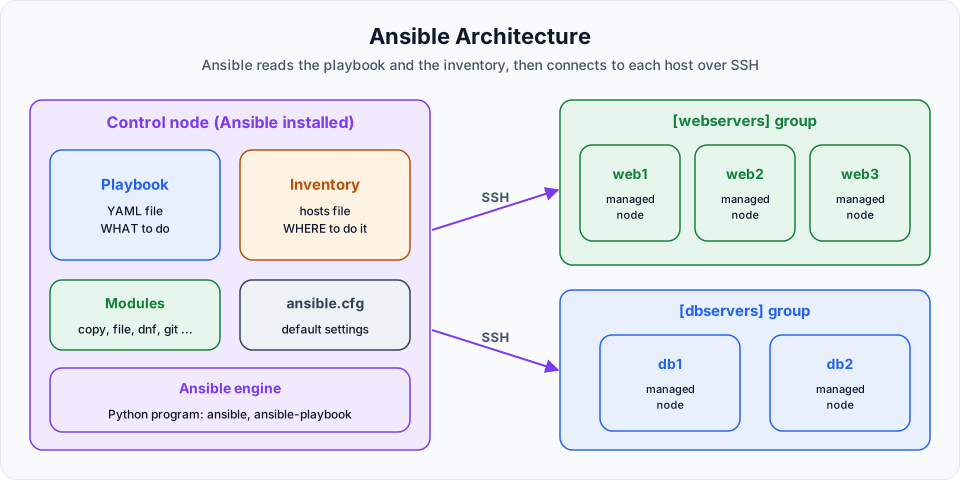
The playbook: what to do
A playbook is a file where you write the configuration you want, as code. It is written in YAML (the name stands for "YAML Ain't Markup Language", although many people still say "Yet Another Markup Language"). Files end in .yml or .yaml, and Ansible treats both the same.
Inside a playbook you list the work in plain, readable steps: install Python on these machines, copy this file to that path, start this service. You will write your first one in Ansible First Playbook. For now, just look at the shape:
- name: Prepare web servers
  hosts: webservers
  become: true
  tasks:
    - name: Install Java 17
      ansible.builtin.package:
        name: java-17-amazon-corretto
        state: present
Even without knowing YAML, you can read it: on the webservers machines, install Java 17. That readability is a big reason teams pick Ansible.
The host inventory: where to do it
The inventory (often called the host inventory file) lists the machines Ansible manages. Its most useful feature is groups.
Suppose you have five servers. Three of them run the web application and need Java. Two of them run the database. You put them into two groups:
[webservers]
172.31.10.11
172.31.10.12
172.31.10.13

[dbservers]
172.31.20.21
172.31.20.22
Now the playbook can say hosts: webservers and only the three web machines get Java. Another play can say hosts: dbservers and install a database only on the other two. The group name in square brackets is your choice. webservers and dbservers are just common conventions.
| If the playbook says | Ansible runs on |
|---|---|
hosts: webservers | The three hosts in the [webservers] group |
hosts: dbservers | The two hosts in the [dbservers] group |
hosts: all | Every host in the inventory (all is a built-in group) |
The exact inventory you will use on AWS, with users and SSH keys, is built in Ansible Config.
How the pieces work together
- You run Ansible and point it at a playbook.
- Ansible reads the
hosts:line of each play and looks up those hosts in the inventory. - It connects to each matching host over SSH.
- It carries out the tasks in the playbook, in order, on every host.
- It prints a result for each task on each host.
Two more pieces appear in the diagram. Modules are the small programs that do the actual work (package installs software, copy copies files, and so on). ansible.cfg holds default settings such as where the inventory file lives. Both get their own lessons later.
Summary so far
| Point | What to remember |
|---|---|
| What Ansible is | An open source IT configuration management, deployment and orchestration tool, owned by Red Hat |
| Built with | Python. You do not need to learn Python to use it |
| Main idea | Define configuration as code |
| Where the code lives | Playbooks, written in YAML |
| Where the host list lives | The inventory file, with hosts organised into groups |
Playbook and inventory are separate on purpose
The same playbook can run against a test inventory today and a production inventory tomorrow, without changing a single line of the playbook. Keeping "what" and "where" apart is what makes that possible.
Official references
Written By: Shramik Masti
How is this guide?
Last updated on
Ansible Introduction
Understand why configuring many servers by hand breaks down, what configuration management means, and where Ansible fits as an open source automation tool.
More on Ansible Architecture
Learn the difference between the control node and managed nodes, what each one needs installed, and how Ansible pushes work to servers over SSH without an agent.