
Ansible Adhoc commands
Run one-off Ansible commands from the control node without writing a playbook, target all hosts or a single group, and read the SUCCESS and CHANGED output.
Normally you write a playbook for anything you want Ansible to do. But sometimes you just want a quick answer: are all my servers reachable? What time is it on each of them? How long have they been running? Writing a whole YAML file for that would be overkill.
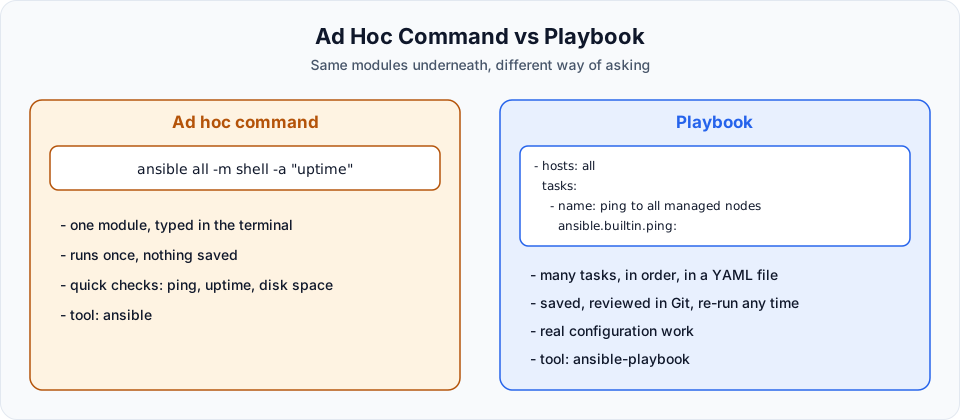
An ad hoc command is a single Ansible command typed straight into the terminal on the control node, without a playbook. You already ran one at the end of the last lesson: ansible all -m ping.
The shape of an ad hoc command
ansible <pattern> -m <module> -a "<module arguments>"| Part | Meaning | Example |
|---|---|---|
ansible | The ad hoc command line tool (playbooks use ansible-playbook) | |
<pattern> | Which hosts from the inventory to target: a group, a host, or all | all, webservers, 172.31.9.250 |
-m | The module to run | ping, shell, command |
-a | Arguments for that module | "date", "uptime" |
Run as the right user
Everything we set up lives under the ansible user: the SSH key, the PATH to the Ansible binaries. If you log in as ec2-user and type ansible, you get command not found. Switch first:
sudo su - ansiblePing every managed node
ansible all -m pingall is a built-in group that contains every host in the inventory. Both managed nodes answer SUCCESS with "ping": "pong".
Ping only one group
Our inventory has two groups, [webservers] and [dbservers]. Put the group name where all was:
ansible webservers -m ping172.31.9.250 | SUCCESS => {
"changed": false,
"ping": "pong"
}Only the web server answers. This is the same group targeting you will use in playbooks with hosts: webservers.
Run a Linux command on every node
The shell module runs any shell command on the managed nodes. Pass the command with -a:
ansible all -m shell -a "date"172.31.9.250 | CHANGED | rc=0 >>
Fri Jun 13 06:31:02 UTC 2025
172.31.12.18 | CHANGED | rc=0 >>
Fri Jun 13 06:31:05 UTC 2025And how long have they been running?
ansible all -m shell -a "uptime"172.31.12.18 | CHANGED | rc=0 >>
06:31:29 up 59 min, 1 user, load average: 0.00, 0.00, 0.00
172.31.9.250 | CHANGED | rc=0 >>
06:31:29 up 59 min, 1 user, load average: 0.00, 0.00, 0.00Notice that the hosts do not always answer in the same order. Ansible talks to several hosts in parallel (5 at a time by default) and prints each result as soon as it arrives.
Reading the output
| Word | Colour | Meaning |
|---|---|---|
SUCCESS | Green | The module ran and changed nothing |
CHANGED | Yellow | The module ran and reports that it changed something |
FAILED | Red | The module ran but returned an error |
UNREACHABLE | Red | Ansible could not even connect (SSH, network, key problem) |
rc=0 | Return code of the command. 0 means success in Linux |
Why does date say CHANGED when it obviously changed nothing? Because shell and command just run whatever you give them. Ansible cannot know what your command does, so it assumes something changed. Modules built for a specific job, like ping, know exactly whether they changed anything. This difference becomes important when we talk about idempotence in Ansible First Playbook.
shell vs command
If you leave out -m, Ansible uses the command module by default:
ansible all -a "uptime"| Module | Runs through a shell? | Pipes, >, &&, $HOME work? | When to use |
|---|---|---|---|
ansible.builtin.command (default) | No | No | Simple commands. Safer, because nothing is interpreted by a shell |
ansible.builtin.shell | Yes, /bin/sh | Yes | When you really need shell features |
ansible all -m shell -a "df -h / | tail -1"The lecture uses the short names ping and shell. Their full names (FQCN, fully qualified collection name) are ansible.builtin.ping and ansible.builtin.shell. Both forms work. The full name avoids clashes when you install other collections, and it is what the official docs use.
A few more useful ad hoc commands
These are the commands you will actually type in day-to-day work:
# Gather all facts about the web servers (OS, IPs, memory, disks...)
ansible webservers -m ansible.builtin.setup

# Only the OS name and version
ansible all -m ansible.builtin.setup -a "filter=ansible_distribution*"

# Check free memory on every node
ansible all -a "free -m"

# Run a command that needs root, with privilege escalation
ansible all -b -a "whoami"| Flag | Meaning |
|---|---|
-b / --become | Run the module as root using sudo. Works without a password because of our NOPASSWD sudoers rule |
-i <file> | Use a different inventory instead of /etc/ansible/hosts |
-u <user> | Log in as a different remote user |
-f <n> | How many hosts to work on in parallel (default 5) |
-C / --check | Dry run: report what would change, but change nothing (for modules that support it) |
-v, -vvv | More output, very useful when debugging connection problems |
Ad hoc or playbook?
Use ad hoc commands for quick checks and one-time actions: "restart this service now", "how much disk is free?". Anything you will do more than once, or want to review and keep in Git, belongs in a playbook.
Try It Yourself
- Run
ansible dbservers -m pingand confirm only the database node answers. - Find the kernel version of every node with
ansible all -a "uname -r". - Run
ansible all -a "whoami"and thenansible all -b -a "whoami". Explain the difference in the output. - Use the
setupmodule withfilter=ansible_memtotal_mbto see how much memory each node has. - Run
ansible all -a 'echo hello > /tmp/x'and then the same with-m shell. Check withansible all -a "cat /tmp/x". Which one actually created the file, and why?
Official references
Written By: Shramik Masti
How is this guide?
Last updated on
Ansible Config
Build a three-server Ansible lab on AWS EC2, install Ansible on the control node, set up passwordless SSH to the managed nodes, write the inventory and run your first ping.
Ansible Playbook YAML Basics
Learn the YAML you need for Ansible playbooks, including key-value pairs, lists, nested mappings and indentation, with the common mistakes that break a playbook.