
More on Ansible Architecture
Learn the difference between the control node and managed nodes, what each one needs installed, and how Ansible pushes work to servers over SSH without an agent.
So far we have a playbook (what to do) and an inventory (where to do it). Two more terms complete the picture, and you will hear them in every Ansible conversation: control node and managed node.
Managed nodes
A managed node is any machine that Ansible manages. If you use Ansible to install Java on three EC2 instances, those three instances are managed nodes. Other names you may see for the same thing are "target hosts", "remote hosts" or simply "hosts".
The control node
The control node is the machine where Ansible itself is installed and from where you run the ansible and ansible-playbook commands. Your playbooks and inventory file live here. In this course the control node is also an EC2 instance, but it could be your Linux laptop or a CI server like Jenkins.
| Control node | Managed node | |
|---|---|---|
| Role | Runs Ansible and sends the work | Receives the work and gets configured |
| Ansible installed? | Yes | No |
| Needs | Python, Ansible, the playbooks, the inventory, an SSH private key | An SSH server, a user Ansible can log in as, Python |
| How many | Usually one (or a few) | As many as you like |
| Operating system | Linux or macOS (Windows only through WSL) | Linux, plus Windows through WinRM or SSH |
Windows as a control node
Ansible does not run natively on Windows. If your laptop runs Windows, either use WSL (Windows Subsystem for Linux) or do what this course does: launch a Linux EC2 instance and use it as the control node.
Agentless: how the work actually reaches the server
Tools like Puppet and Chef install an agent (a background program) on every server. The agent regularly asks a central server "is there anything new for me?" That is a pull model.
Ansible works the other way round. It is agentless and uses a push model. When you run a playbook, the control node opens an SSH connection to each managed node and pushes the work to it.
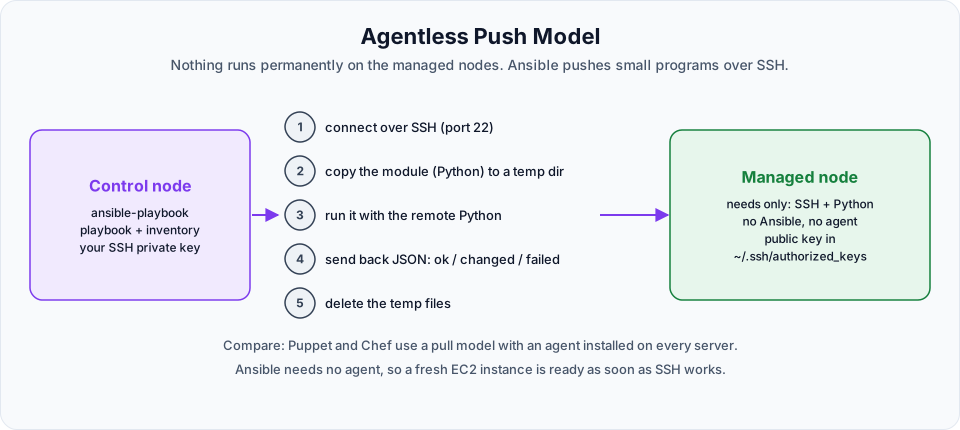
For each task, roughly this happens:
- The control node connects to the managed node over SSH (port 22).
- It copies a small Python program, the module for that task, into a temporary folder.
- The managed node runs the module with its own Python.
- The module reports back as JSON: did it succeed, and did it change anything?
- The temporary files are removed.
Nothing is left running on the server afterwards. This is why a brand new EC2 instance can be managed by Ansible the moment you can SSH into it. Most Linux images, including Amazon Linux and Ubuntu, already ship with Python.
Putting all four terms together
| Term | One line definition |
|---|---|
| Control node | The machine with Ansible installed, where you run commands |
| Managed node | A machine that Ansible configures |
| Host inventory file | The list of managed nodes, organised into groups |
| Playbook | The YAML file with the tasks to carry out on those nodes |
So the control node reads the inventory to find out which managed nodes to work on, and reads the playbook to find out what to do on them.
What this means for the lab setup
Because everything goes over SSH, the control node must be able to log in to every managed node without typing a password. On AWS that means:
- The control node has a private SSH key, and each managed node has the matching public key in
~/.ssh/authorized_keys - The managed nodes' security group allows inbound SSH (port 22) from the control node
- You know the login user of each image:
ec2-useron Amazon Linux,ubuntuon Ubuntu
You will set all of this up, step by step, in Ansible Config.
Official references
- Ansible concepts: control node, managed nodes, inventory
- Installing Ansible: control node and managed node requirements
- Red Hat: How Ansible works
Written By: Shramik Masti
How is this guide?
Last updated on
Ansible Architecture
See how Ansible replaces the manual admin with a playbook and a host inventory, and how inventory groups decide which servers get which configuration.
Ansible Config
Build a three-server Ansible lab on AWS EC2, install Ansible on the control node, set up passwordless SSH to the managed nodes, write the inventory and run your first ping.