
Ansible First Playbook
Write and run your first Ansible playbook that pings every managed node, understand the hosts, variables and tasks sections, check syntax and read the PLAY RECAP.
In the ad hoc lesson you pinged every managed node with one command: ansible all -m ping. Now we do exactly the same thing with a playbook. The result is identical, but the work is now written in a file you can save, reuse, review and grow.
The three sections of a playbook
A playbook is a YAML file that contains one or more plays. Each play has three parts:
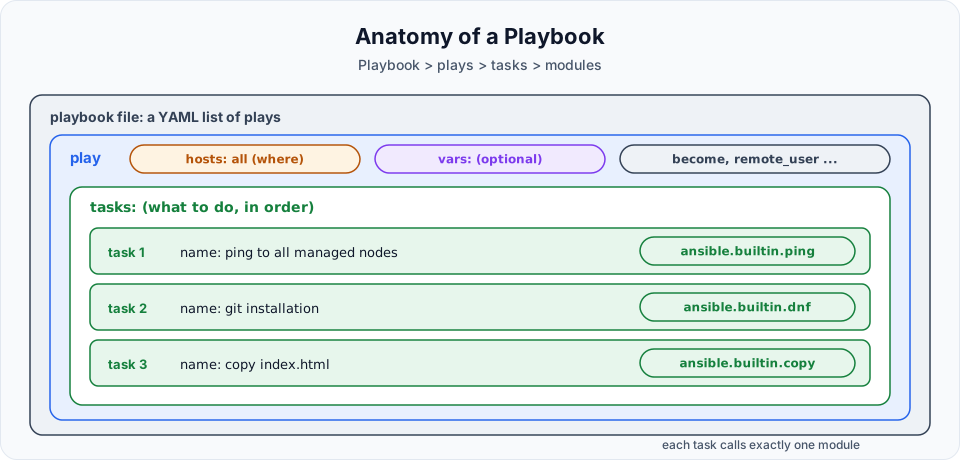
| Section | Keyword | What it holds | Required? |
|---|---|---|---|
| Hosts | hosts: | Which managed nodes (from the inventory) this play targets. Ten web servers and twenty DB servers? You choose which ones | Yes |
| Variables | vars: | Values you want to reuse in the tasks | No. We use it in the variables lesson |
| Tasks | tasks: | The list of things to do, in order. Each task calls one module | Yes, for anything useful |
Write the playbook
Log in to the control node and switch to the ansible user. Its home directory, /home/ansible, is where we keep our playbooks:
sudo su - ansible
pwd/home/ansibleCreate the file:
vi first-playbook.ymlPress i and type:
---
- hosts: all
  tasks:
    - name: ping to all managed nodes
      ping:
      remote_user: ansible
...
Save with Esc, :wq. Here is what each line does:
| Line | Meaning |
|---|---|
--- / ... | Start and end of the YAML document |
- hosts: all | A play that targets every host in the inventory |
tasks: | The list of tasks for this play |
- name: ping to all managed nodes | A human readable label, printed when the task runs |
ping: | The module this task runs. It takes no arguments, so the value is empty |
remote_user: ansible | Log in to the managed nodes as the ansible user for this task |
The same playbook, in the style used from now on
The lecture's version is correct and runs fine. In real projects you will usually see a name on the play, remote_user set once at play level (or in ansible.cfg), and the module written with its full name:
---
- name: Check connectivity to all managed nodes
  hosts: all
  remote_user: ansible
  tasks:
    - name: ping to all managed nodes
      ansible.builtin.ping:
ping and ansible.builtin.ping are the same module. The full name (FQCN) is what the official documentation recommends, and it prevents mix-ups when other collections are installed.
Check the syntax first
Before running a playbook, let Ansible parse it:
ansible-playbook first-playbook.yml --syntax-checkplaybook: first-playbook.ymlIf the YAML or the playbook structure is wrong, you get an error with the line number instead. No error means the syntax is valid. It does not mean the tasks will succeed: a wrong package name, for example, only shows up at run time.
Run it
ansible-playbook first-playbook.ymlPLAY [all] *********************************************************************
TASK [Gathering Facts] *********************************************************
ok: [172.31.12.18]
ok: [172.31.9.250]
TASK [ping to all managed nodes] ***********************************************
ok: [172.31.9.250]
ok: [172.31.12.18]
PLAY RECAP *********************************************************************
172.31.12.18 : ok=2 changed=0 unreachable=0 failed=0 skipped=0 rescued=0 ignored=0
172.31.9.250 : ok=2 changed=0 unreachable=0 failed=0 skipped=0 rescued=0 ignored=0Both managed nodes answered. The ad hoc command and the playbook did the same work.
Reading the output
PLAY [all] is printed when a play starts, with its name (or its hosts, if it has no name).
TASK [Gathering Facts] is a task you did not write. Before running your tasks, Ansible runs the setup module on every host to collect facts: OS, IP addresses, memory, and so on. That is why each host shows ok=2 and not ok=1. If a play does not need facts, you can skip this step and save time:
- hosts: all
  gather_facts: false
TASK [ping to all managed nodes] is your task, labelled with the name you gave it. Good task names make the output readable, so always name your tasks.
PLAY RECAP is the summary per host:
| Counter | Meaning |
|---|---|
ok | Tasks that ran successfully, including the ones that changed something |
changed | Tasks that actually modified the managed node |
unreachable | Ansible could not connect to the host |
failed | Tasks that returned an error. The host stops running further tasks |
skipped | Tasks skipped because a condition was false |
rescued, ignored | Errors that were handled by rescue blocks or ignore_errors |
ok vs changed: your first look at idempotence
ping only checks a connection, so it never changes anything: changed=0. Most modules work differently. A module that installs a package first checks whether the package is already there, and only acts if it is missing. Run it twice and the second run reports ok instead of changed.
That property is called idempotence: running the same playbook again does not do the work again or break anything. It only fixes what is different from the desired state. You will see it in action in the very next lesson.
Useful flags for ansible-playbook
| Flag | What it does |
|---|---|
--syntax-check | Parse the playbook and stop |
--list-hosts | Show which hosts the playbook would run on |
--list-tasks | Show the tasks without running them |
-C / --check | Dry run: report what would change without changing it |
-v to -vvvv | More detail, from task results up to full SSH debugging |
-i <inventory> | Use a different inventory file |
-l <pattern> / --limit | Run only on some of the play's hosts, for example -l webservers |
Try It Yourself
- Change
hosts: alltohosts: webserversand run the playbook again. How many hosts appear in the recap? - Add
gather_facts: falseto the play and compare the output and theokcount. - Add a second task that uses
ansible.builtin.debugwithmsg: "Hello from {{ inventory_hostname }}". Run it and find the message in the output. - Break the indentation of
tasks:on purpose and run--syntax-check. Read the error and fix it.
Official references
Written By: Shramik Masti
How is this guide?
Last updated on
Ansible Playbook YAML Basics
Learn the YAML you need for Ansible playbooks, including key-value pairs, lists, nested mappings and indentation, with the common mistakes that break a playbook.
Ansible File creation playbook
Write a playbook that creates a file on every managed node with the file module, then target only the webservers group and learn why state touch is not idempotent.